Tapo S110E smart switch setup

Tapo S110E smart switch setup

Tapo S110E smart switch setup
2025-11-24 12:05:38 - last edited 2025-11-28 09:57:15
Model: Tapo S110E  
Hardware Version:
Firmware Version:

How can I set the close time of S110e dry contact? I have a divice what can be controlled with-e 1-2s dry contact close, but not with a longwer one what I could set up with switch and delayed cut off setting (5s or more..)..


What I would like to set up in S110E:

1)Triger push button

2)Dry contact close 2s


Thanks in advance


Gabor

  0      
  0      
#1
Options
1 Accepted Solution
Re:Tapo S110E smart switch setup-Solution
2025-11-27 07:32:11 - last edited 2025-11-28 09:57:15

  @BGabor 


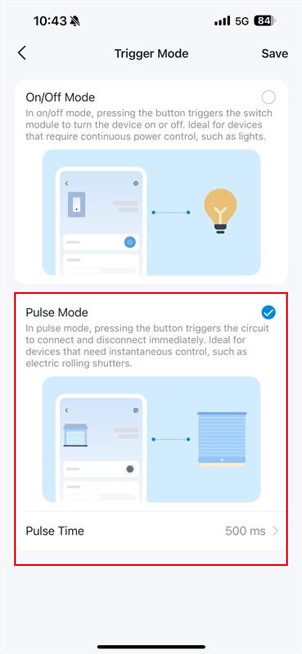
When the Tapo S110E is wired in dry contact, there is a trigger mode, 'Pulse Mode', in which pressing the button immediately connects and disconnects the circuit. The pulse time is configurable.


Is that what you're looking for?


CES 2026 Meet TP-Link AI Assistant and More New Products!
Recommended Solution
  0  
  0  
#2
Options
3 Reply
Re:Tapo S110E smart switch setup-Solution
2025-11-27 07:32:11 - last edited 2025-11-28 09:57:15

  @BGabor 


When the Tapo S110E is wired in dry contact, there is a trigger mode, 'Pulse Mode', in which pressing the button immediately connects and disconnects the circuit. The pulse time is configurable.


Is that what you're looking for?


CES 2026 Meet TP-Link AI Assistant and More New Products!
Recommended Solution
  0  
  0  
#2
Options
Re:Tapo S110E smart switch setup
2025-11-27 09:02:29

  @Wayne-TP


Exatly, this is what I meant.. somehow I have not recognised it..


Thank you very much! 


Gabor

  0  
  0  
#3
Options
Re:Tapo S110E smart switch setup
2025-11-28 09:57:10

  @BGabor  That's nice, i'm glad to help!

CES 2026 Meet TP-Link AI Assistant and More New Products!
  0  
  0  
#4
Options