
Reboot Schedule Issue OC300 1.31.10 Build 20251118 Rel.38820
 This thread has been locked for further replies. You can start a new thread to share your ideas or ask questions.
Hi @Vincent-TP
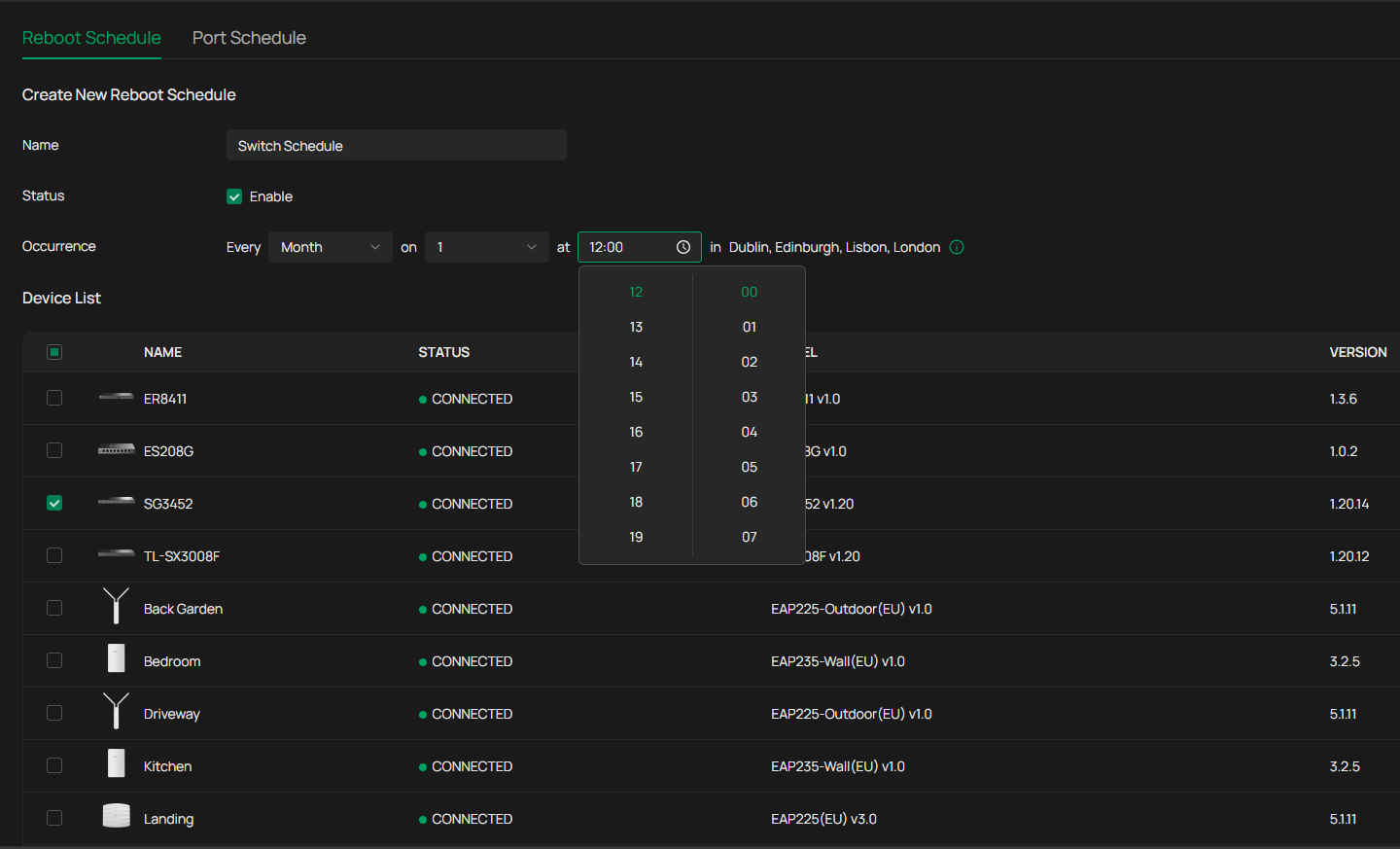
Since upgrading to the latest firmware on my Oc300 I can no longer set a scheduled device reboot before 12:00 midday, i cant scroll backwards, only forwards and when I reach 23:00 I then cant go backwards, the same happens with the minutes, I can only go forward but not backwards, although the minutes do start at 00 so i have access to the full range but not with the hours.
Many Thanks
Lee...
- Copy Link
- Subscribe
- Bookmark
- Report Inappropriate Content
@Vincent-TP Hi Vincent
Do you enable cloud access? What if login via the cloud platform?
Its the same if I use a local login or use the cloud platform.
1. Try with a different web browser, such as Firefox or Google Chrome.
Tried with Edge, firefox and google chrome, still same issue with all 3 browsers
2. Clear the cache of the browsers
Done and made no difference
.
3. Try private mode;
Done and made no difference
4. Try with a different PC.
Using a different PC and Edge it now works although the 2 existing schedules I have setup previously, I did with my laptop which is the device that doesnt work.
I'm at a loss to know what the difference is between my laptop and my desktop and everything else using my laptop is working fine both with Omada and other apps....
Many Thanks for all your help
Lee...
- Copy Link
- Report Inappropriate Content

- Copy Link
- Report Inappropriate Content
- Copy Link
- Report Inappropriate Content


Hi @MantonL
Thanks for posting here.
We don't have this situation. Please try the following and see if it helps:
1. Try with a different web browser, such as Firefox or Google Chrome.
2. Clear the cache of the browsers.
3. Try private mode;
4. Try with a different PC.
Do you enable cloud access? What if login via the cloud platform?
- Copy Link
- Report Inappropriate Content

Hi @MantonL, are you able to type 00:00 into the field?
- Copy Link
- Report Inappropriate Content
- Copy Link
- Report Inappropriate Content
@Vincent-TP Hi Vincent
Do you enable cloud access? What if login via the cloud platform?
Its the same if I use a local login or use the cloud platform.
1. Try with a different web browser, such as Firefox or Google Chrome.
Tried with Edge, firefox and google chrome, still same issue with all 3 browsers
2. Clear the cache of the browsers
Done and made no difference
.
3. Try private mode;
Done and made no difference
4. Try with a different PC.
Using a different PC and Edge it now works although the 2 existing schedules I have setup previously, I did with my laptop which is the device that doesnt work.
I'm at a loss to know what the difference is between my laptop and my desktop and everything else using my laptop is working fine both with Omada and other apps....
Many Thanks for all your help
Lee...
- Copy Link
- Report Inappropriate Content
Hi @MantonL
Thanks for the info.
Please give us more details about the involved PC, such as the brand, system info. etc.
BTW, did you reboot it? did it help?
- Copy Link
- Report Inappropriate Content
Information
Helpful: 0
Views: 745
Replies: 7
Voters 0
No one has voted for it yet.