
Can't connect to Wi-Fi 7 with TBE400E
Can't connect to Wi-Fi 7 with TBE400E

So, this is basically my question. Not long ago I bought Wi-Fi 7 router Cudy WR3600H. It can run 2.4GHz and 5Ghz (no idea if hardware can 6GHz, but probably not at least until it will be allowed in my country).
As adapter I bought TP-LINK TBE400E. It's also Wi-Fi 7, supports MLO.
To confirm at least something, I used moblie app WiFiman that highlighted, that my network indeed is Wi-Fi 7 and using MLO. The issue is that for some reason my Windows still uses protocol 802.11ax (Wi-Fi 6) instead of 802.11be (Wi-Fi 7) when I connect to my network. I updated windows from 22h2 to 25h2. I installed the latest driver. I set network to use WPA3-Personal. But windows still for some reason uses Wi-Fi 6 protocol. I'm out of ideas why. I want to use MLO. Why can't I?
Just to clarify, netsh wlan show drivers shows that it supports 802.11be
P.S. Just now I noticed that there are different driver versions for different regions, but I have no clue right now which one I need. At the very least I see no warnings in the Device Manager.
- Copy Link
- Subscribe
- Bookmark
- Report Inappropriate Content


Hello @xwolkx ,
Welcome to our community.
According to my research, the Cudy WR3600H is a dual-band WiFi 7 router. But it does support MLO network.
Could you share your PC's motherboard model number and other relevant details?
Are you unable to find the MLO Network on your PC? Or are you able to see it but couldn't connect?
Please confirm that the built-in Wi-Fi adapter is disabled on the PC.
Please forget the wireless network on the PC, then try searching for it and reconnecting.
On the router, please try to change the channel and channel width.
The latest version driver is Archer TBE400E(UN)_V1_20251011_Win11. Did you install it?
Please confirm the old driver is removed correctly. How to remove old and useless drivers in Windows
- Copy Link
- Report Inappropriate Content

Hi,
Don't worry about regions. The drivers for all modern Wi-Fi cards that I know of are universal. (i.e. they are meant for use in all regions)
Does Windows also show "Wi-Fi 6" when you connect to the non-MLO SSIDs of the Cudy router?
If you'd like to try, there are drivers available that are still slightly newer (version 5.7.0.4755) than the ones available on the TP-Link website.
https://www.elevenforum.com/t/drivers-amd-mediatek-wifi-bluetooth.11384/
- Copy Link
- Report Inappropriate Content
@woozle Hello. So far I tried on 5GHZ and on MLO networks. In both cases windows tells me Wi-Fi 6, yeah.
UPD: Updating with the driver you suggested sadly didn't help out
- Copy Link
- Report Inappropriate Content
@Joseph-TP Hello
My motherboard is ASUS PRIME B450M-A
It lacks any Wi-Fi. So, basically, to fix this issue I bought TBE400E, yeah...
I can see all the networks from my Cudy WR3600H device. One 2.4GHz, one 5GHz and one MLO.
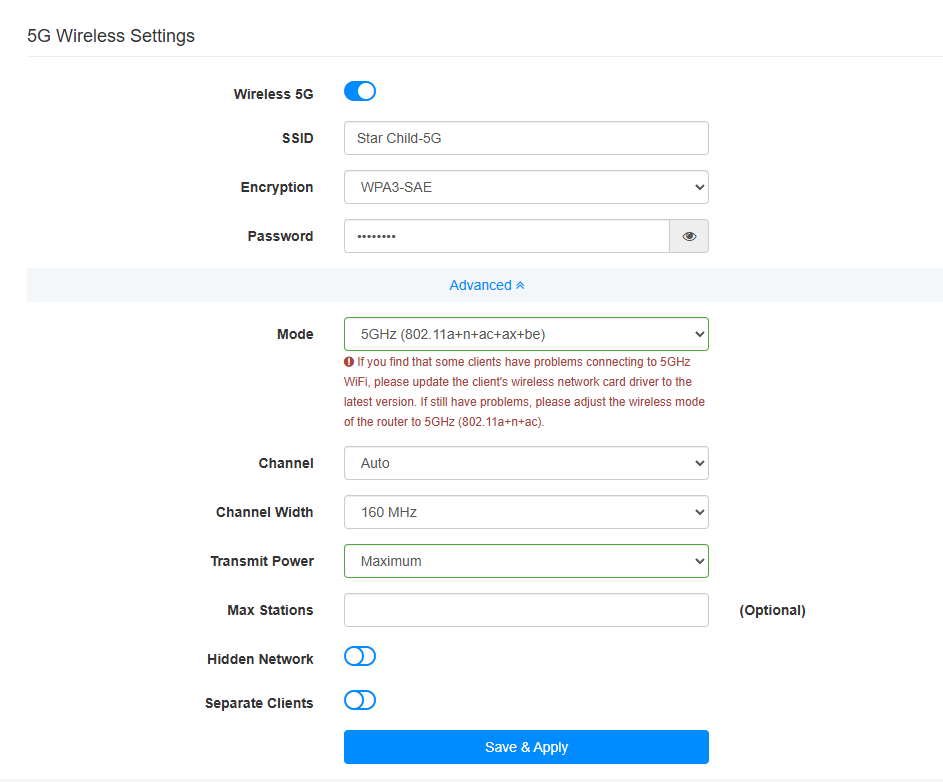
I tried enabling Smart Connect. Then disabled it. I switched to WPA2/WPA3. Then to just WPA3. I changed 5GHz channel width to 160 MHz. Still the same result.
I installed the latest driver as I wrote in first post and installation program removes previous driver by itself (I checked because I reinstalled it several times and the program itself tells that).
I tried to attach netsh returns, but for some reason forums doesn't allow me to :/
- Copy Link
- Report Inappropriate Content
Hi @xwolkx ,
Are there any other Wi-Fi 7 clients that can connect and show as connected to Wi-Fi 7?
Please try the following steps:
1. Check Network Adapter Advacned Settings (Adapter Side):
Please go to your network adapter's 'Advanced' settings and verify if the 'Wireless Mode' has 802.11be (Wi-Fi 7) support enabled.
2. Check Router Settings:
Similarly, please log in to your router settings and check if the wireless mode is configured to support 11be (Wi-Fi 7).
3. Run Diagnostics Command:
Please run the following command in Command Prompt (CMD). Check the Radio type line. If it reads 802.11be, then you are successfully connected to Wi-Fi 7; you can simply ignore the Wi-Fi 6 icon displayed in the Windows system tray (status bar).
netsh wlan show interfaces
- Copy Link
- Report Inappropriate Content
@Joseph-TP Hello. So far I don't have any device besides TBE400E with Wi-Fi 7, but android app tells me that my network is indeed Wi-Fi 7. This is what I can get from netsh:
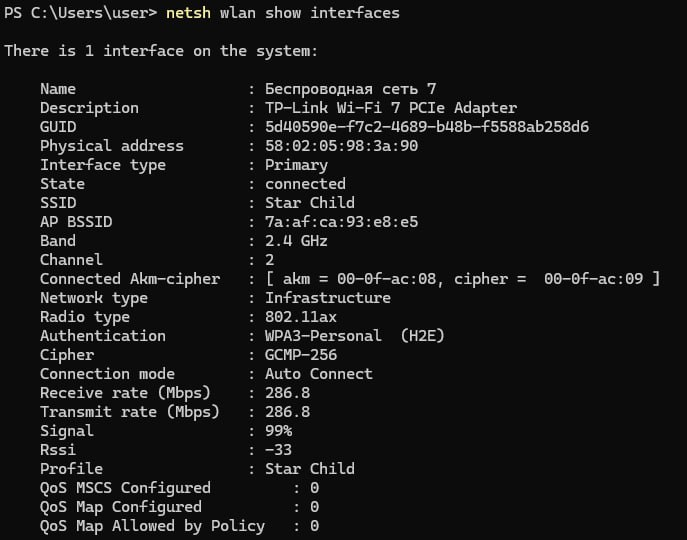
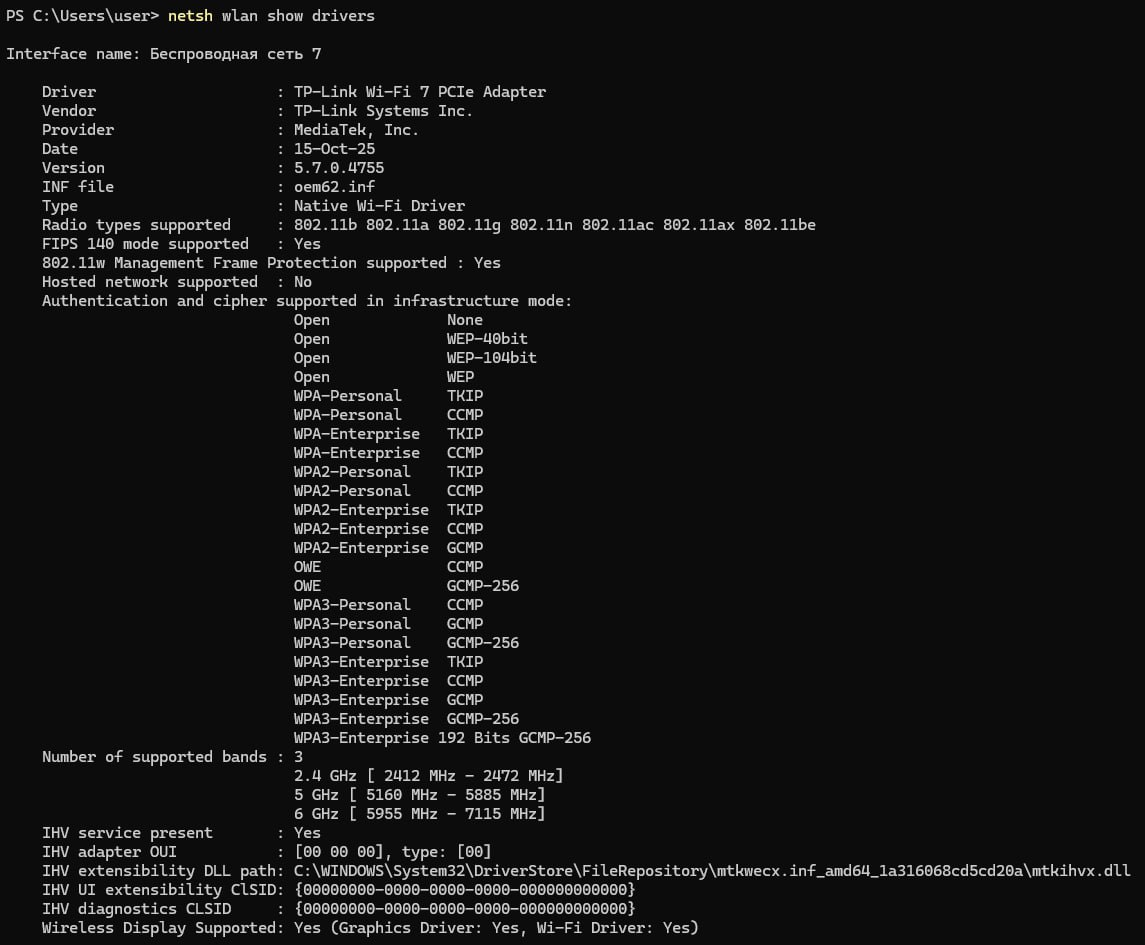
Router settings:
This is what my phone tells me about router
- Copy Link
- Report Inappropriate Content
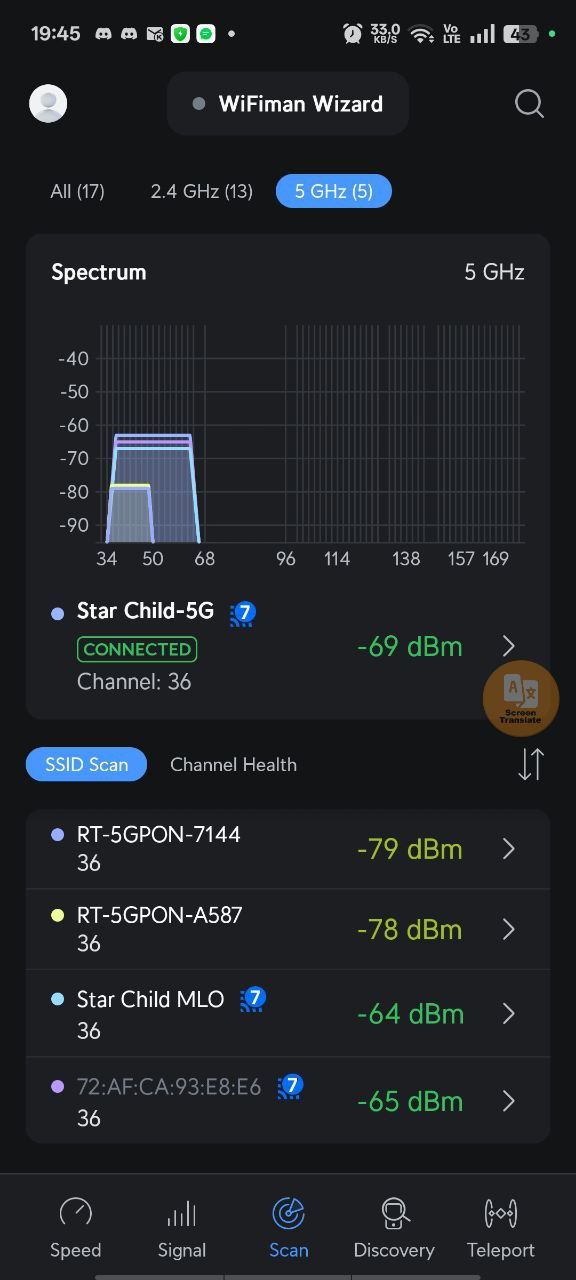
- Copy Link
- Report Inappropriate Content
Does Windows already report the "Star Child..." networks as "802.11ax" before you actually connect to them?
If you haven't tested that yet, then please disconnect the Wi-Fi completely, run "netsh wlan show networks mode=Bssid" and look up the output for the "Star Child..." SSIDs. (even if the Wi-Fi card of the computer does not support Wi-Fi 7 that command should show "Radio type: 802.11be" if the Wi-Fi router supports it, just like your smartphone does)
- Copy Link
- Report Inappropriate Content
@woozle Sorry for late reply. I hope that I don't have to re-create topic... My PC broke and it took a while to repair it. So, I re-installed windows and drivers and still do see Wi-Fi 6
I did what you said and got the following output:
SSID 15 : Star Child MLO
Network type : Infrastructure
Authentication : WPA3-Personal
Encryption : GCMP-256
BSSID 1 : 72:af:ca:93:e8:e7
Signal : 90%
Radio type : 802.11be
Band : 5 GHz
Channel : 36
Details : (H2E supported) (MLD)
Bss Load:
Connected Stations: 0
Channel Utilization: 33 (12 %)
Medium Available Capacity: 0 (0 us/s)
QoS MSCS Supported : 1
QoS Map Supported : 1
MLD Address : 72:af:ca:93:e8:e7
Colocated APs: : 1
MldID : 0, LinkID: 1, BSSID: 7a:af:ca:93:e8:e8, Band: 2.4 GHz, Channel: 3
Basic rates (Mbps) : 6 12 24
Other rates (Mbps) : 9 18 36 48 54
BSSID 2 : 7a:af:ca:93:e8:e8
Signal : 89%
Radio type : 802.11be
Band : 2.4 GHz
Channel : 3
Details : (H2E supported) (MLD)
Bss Load:
Connected Stations: 1
Channel Utilization: 34 (13 %)
Medium Available Capacity: 0 (0 us/s)
QoS MSCS Supported : 1
QoS Map Supported : 1
MLD Address : 72:af:ca:93:e8:e7
Colocated APs: : 1
MldID : 0, LinkID: 0, BSSID: 72:af:ca:93:e8:e7, Band: 5 GHz, Channel: 36
Basic rates (Mbps) : 1 2 5.5 11
Other rates (Mbps) : 6 9 12 18 24 36 48 54
- Copy Link
- Report Inappropriate Content
So, Windows properly identifies from the Wi-Fi beacon that the Cudy's Wi-Fi network supports 802.11be.
However, the Archer TBE400E is only able to negotiate a 802.11ax connection with the Cudy router.
Since you have already re-installed Windows (which would have been my next suggestion), I don't know what else could be tried.
Perhaps you can contact Cudy and ask if they are aware of any known incompatibility between the WR3600H and Wi-Fi cards using the MediaTek MT7925 chip?
- Copy Link
- Report Inappropriate Content
Information
Helpful: 0
Views: 1947
Replies: 12
Voters 0
No one has voted for it yet.