Wireguard Client fails while Win11 Wireguard Client (with same config) works fine...

Wireguard Client fails while Win11 Wireguard Client (with same config) works fine...

Wireguard Client fails while Win11 Wireguard Client (with same config) works fine...
2 weeks ago
Model: M8550  
Hardware Version: V1
Firmware Version: 1.1.0 3.0.0 v60ab.0 Build 250711 Rel.65534n

I've been looking for a decent 5G hotspot with a built in VPN client and I had high hopes for the M8550.  I've been fighting with this for a couple of days now...


Basic Problem:  Can not get the Wireguard client to pass traffic properly to/from my router (OPNsense 25.7.10-amd64 = latest)


- The M8550 seems to work fine as a hotspot for my test PC to/from the Internet.  So that is good.  To simplify things, my Test PC is connected directly to the ethernet port on my M8550.


- I have tested my configuration using the generic Wireguard client on my Test PC.  It works just fine.  This confirms that my router and my test configuration is appropriate and functional.  I am even using the M8550 in this configuration as my hotspot (obviously with the M8550's Wireguard client disabled).


- Trying to import the simple Wireguard Configuration file is all but impossible on the M8550.  I don't think I have ever seen it succeed so I always have to enter the corresponding client configuration data by hand (copy/pasting the all-important public/private keys to be sure they are correct).


- Even when entering the data by hand, the M8550 always seems to want more data then is available in the config file (like MTU and PersistentKeepalive).  The M8550 never reports a meaningful error (just "9007 invalid data" - even when a field is left blank).  Anyway, I finally know which fields arte required and I can get a proper config entered by hand.


- In comparing the manually entered configuration data with the data in the client configuration file everything seems consistent and accurate.


- The M8550 shows that the connection is established once the client is activated but this is pretty useless data.  I have seen the "connected" message on the M8550 when even a knowingly incorrect config parameter was provided.  The client "connected" indication is essentially useless for troubleshooting.


- The M8550 also provides no useful VPN data in the system log files even at "debug" level.


- However, I can see on my router when a Wireguard Client (any client) successfully negotiates a tunnel.  The router will indicate when a tunnel has been established and also when it collapses.  I can see from my router that it looks like the M8550 is successfully opening a Wireguard tunnel.


- After the M8550 appears to successfully open the wireguard tunnel, it looks like something is broken with respect to the routing tables on the device.  If I try to ping an internal IP address in my network (from my test PC), I will get a "192.168.1.1: Destination host unrerachable".  To me, this looks like the M8550 (192.168.1.1) does not understand what it needs to do to reach the internal network on the other side of the Wireguard tunnel.  "AllowedIPs = 0.0.0.0/0" is set in my cleint config so all traffic should be passed via the tunnel.  Again, this exact same configuration works just fine when imported into the generic Wireguard client on my Test PC.


- I have also tried "AllowedIPs = 0.0.0.0/1" as I have seen that used as an example in various TP-Link documentation - but it also does not work.


- I have tried "AllowedIPs = 172.20.0.0/16" in the M8550 (and reconfiguring the OpnSense router accordingly) as that is the RFC1918 Class B address of my internal/private network - but it also does not work.


I don't think there is anything else I can do here.  I've been at this literally for days.  The fact that the generic Wireguard client on my Test PC works just fine and the M8550 client does not is a pretty good indication where the problem is.  It would be helpful if the Client Config import actually worked properly (not hanging) and also if it would give meaningful information if it thought it had a configurastion issue.  This is pretty lazy programming I think...


Anyone have any ideas?


  1      
  1      
#1
Options
27 Reply
Re:Wireguard Client fails while Win11 Wireguard Client (with same config) works fine...
2 weeks ago

  @evanevery 

Hi, thank you very much for your feedback.

Can you send an email to support.forum@tp-link.com with the following details:

Subject:[Forum ID]852464 M8550 Wireguard Client fails while Win11 Wireguard Client (with same config) works fine

  • A copy of the web UI system log.
  • A copy of the WireGuard VPN Config file.


Thanks a lot.

Best regards.

  0  
  0  
#2
Options
Re:Wireguard Client fails while Win11 Wireguard Client (with same config) works fine...
2 weeks ago

  @David-TP 


I already sent a screen shot of my wireguard config to Glenn under ticket "TKID251253558".  You may want to refer to that ticket so we are not doing this twice.


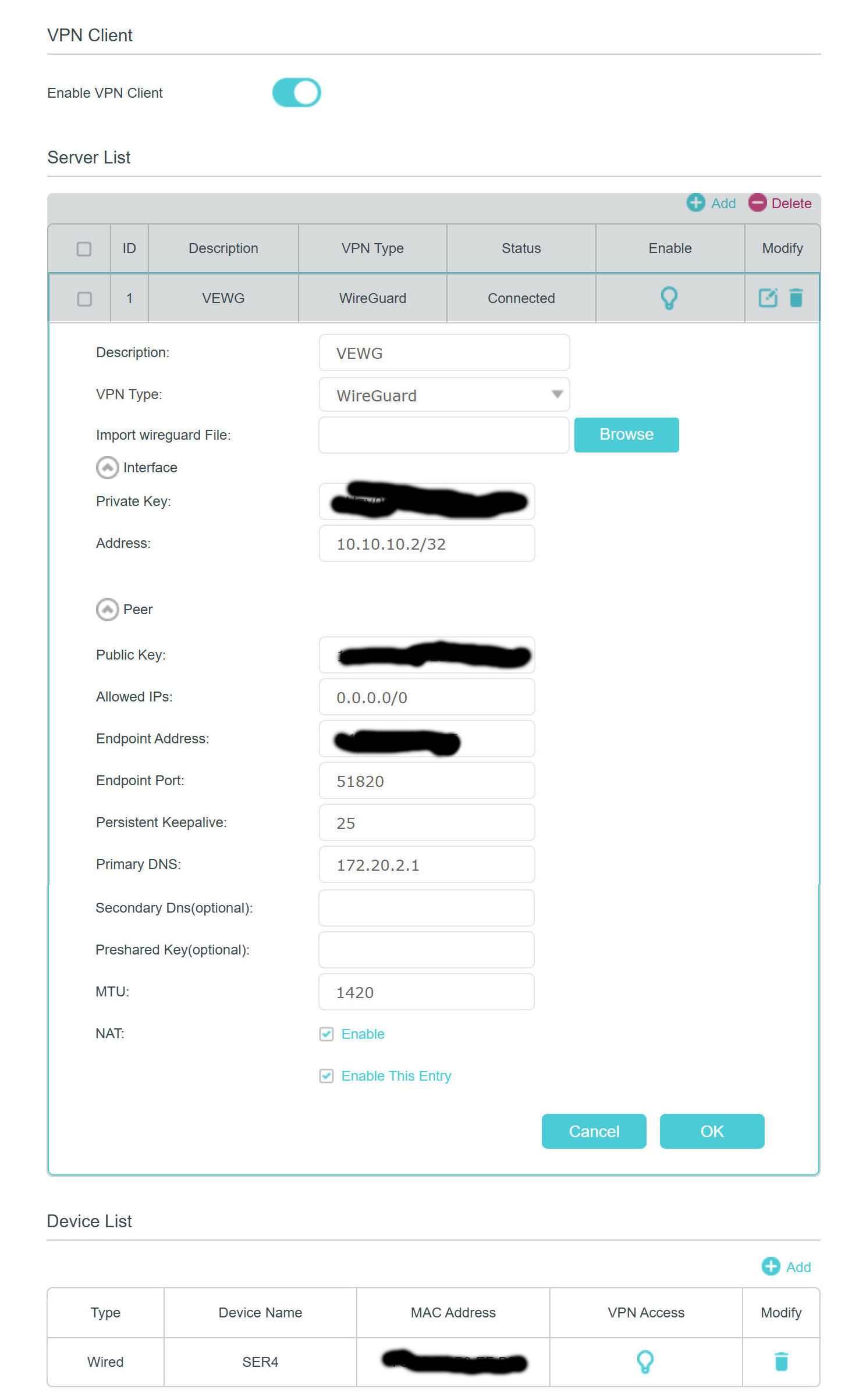
Obviously there is only a few fields in the config and my keys have been obfuscated.  (I'm not going to send a working file with real keys.  I am also attaching that screen shot here (with external router IP also obfuscated).


Glenn sent me some firmware to try [M8550(EU)v1_1.3.0_3.0.0_Build_251204_Rel.63905n_UP_BOOT_beta_2025-12-04_20.51.22.bin] but the installation failed partway through giving "Error Code 4503 - The uploaded file was not accepted".  I have a "US" device running on hardware "1.0" if that matters.  I have responded with that info. 


I have tried a few variations of what should be a very simple config file (which loads and functions just fine by the Windows Wireguard Client) and NONE oif them will load without hanging the "config import" process at 100%.  I have to hit F5 and then refresh the screen to begin again.  This import should be such a simple thing.  Did no one test it?  Here is a simple text of what was in the config file (which worked with Win Wireguard).  (I have obfuscated both keys and also my endpoint IP address):


[Interface]
PrivateKey = xxxxxxxxxxxxxxxxxxxxxxxxxxxxxxxxxxxxxxxxxx=
Address = 10.10.10.2/32
DNS = 172.20.2.1

[Peer]
PublicKey = yyyyyyyyyyyyyyyyyyyyyyyyyyyyyyyyyyyyyyyyyyy=
Endpoint = 12.34.56.78:51820
AllowedIPs = 172.20.0.0/16


I tried moving the "DNS" entry under the "Peer" section but that did not help.  Nothing I tried would allow the known-good config file to be accepted by the M8550.  The only way I could get the M8550 to create a configuration was to enter each field by hand in the interface.  So that is what you see in the screen shot above.


Again, I'm pretty sure the M8550 is negotiating the tunnel OK as I can see it open from the routers perspective when I click on "activate" on the M8550.  This indicates (to me) that this is likely not a negotiation (key) issue.  However, based on my ping and tracert tests, it appears that the M8550 simply has not created the proper routing tables for the tunnel once it is open...


  2  
  2  
#3
Options
Re:Wireguard Client fails while Win11 Wireguard Client (with same config) works fine...
Sunday

  @evanevery 


I too experience the same issue after purchasing one of these.  


After downloading the file from my Draytek, and trying to apply the client configuration, on the latest version of firmware it just continuously tries to connect.  I too have a V1 and have fettled with the settings to get it in this state.  


I can install and connect an apple device without no real problems at all, just some verified typos and away she went.  


Is there another beta firmware that could be tested as of yet that will install successfuly?  


Thanks


Pete

  0  
  0  
#4
Options
Re:Wireguard Client fails while Win11 Wireguard Client (with same config) works fine...
Tuesday

  @Pete_8550 


Hi Pete,


TP-Link has been sending me BETA firmware to try and address these issues.


So far, they have saent me three different BETA firmware versions to try.  After loading the third copy, it seems they may finally have conquered the massive challenge of loading configuration data from a text file!  (The first firmware they sent me wouldn't even load...)


Even though the current BETA is loading the config information, the VPN Tunnel still isn't working.  For one thing, it appears they are not loading default values properly if something isn't explicitely specified in the conf file (MTU, PersistentKeepalive).  (Most Wireguard config exports likely won't provide this info if using default values - 1420 and 25 respectively)


Given its taken them this long just to ALMOST achieve the ability to import half a dozen text fields, I'm not particularly optimistic about how long its gonna take to implement the finer details of actually open a functioning VPN tunnel.


That being said, they do appear to be pretty responsive.  Its just too bad nobody appears to have tested any of this.  How hard is it to import a text file?


I'm guessing somebody got hold of some open source router code and rushed this out the door without much testing.


In any case the Wireguard VPN stuff is STILL not working (even if we completely disregard the "configuartion import failure" and I enter all my values by hand)


I'm not going to post any Beta Firmware to this forum.  That's not my place.  My suggestion is to open a tech support ticket and get on board.  Feel free to reference this thread or my original support ticket.

  1  
  1  
#5
Options
Re:Wireguard Client fails while Win11 Wireguard Client (with same config) works fine...
Tuesday

  @evanevery


I should also note that while the shipping firmware ***DID*** appear to properly negotiate a tunnel (as indicated on my router), none of the BETA firmwares they sent me would even achieve that.


When trying to activate the tunnel using the shipping firmware (with hand entered config data), my router would show that the tunnel has been opened and the M8550 would show "connected".  It just appeared the M8550 didn't have the proper routing tables implemented to move data accordingly.  (That my guess based on ICMP traces)


With the Beta firmware, my router has NEVER shown any tunnels to be properly opened and my M8550 has ALWAYS sat at the "Connecting" status.


While we might be making some progress importing text files (woohoo!), it appears we may be losing ground on actually establishing a VPN Tunnel.


All-in-all, I*'ld rather be able to actually open a tunnel if it only required entering configuration data by hand (once!).

  1  
  1  
#6
Options
Re:Wireguard Client fails while Win11 Wireguard Client (with same config) works fine...
Wednesday

  @evanevery 


Thanks for coming back to me, and sorry for the delay.  I was expecting email notifications and didn't realise that I had to log in.  I have been talking to David on another thread, and he has sent me some beta firmware to try (not seen that yet, but going through everything).  


I'm hoping they do sort this becuase it is a nice unit and would like to use this in the work place and dial into home.  I have noticed that somebody mentioned about getting connected but couldn't use the "devices" listing which i believe select which client / MAC to tunnel through the configuration.  


I've not used TP-link in years and does remind me of some of the early Archer stuff that I used to "mess about with" some 15 - 20 years ago, and not a lot has changed.  Your theories in your last two post do add up, and I'm still in two minds about sending the unit back, especially not having this very long.  


The marketing lists the tri-WiFI setup, but no 5 and 6 GHz bands, I'd rather do away with the 2.4 GHz, but guessing the 5 and 6 porbably use the same radio setup?  

The annoying feature with the LAN port on the battery only setup, but we should have some control over this, and if it consumes the battery quicker, then so be it.  

This WireGuard VPN client (not had a chance to check server yet due to CG-NAT) headache scenario concuring!!  


all in all playing on a Vodafone Sim before I commit to something has proven to be fairly reasonable taking into account the three caveats listed in the last paragraph, it would be nice to get what is promised working.  


Thanks


Pete

  0  
  0  
#7
Options
Re:Wireguard Client fails while Win11 Wireguard Client (with same config) works fine...
Wednesday

  @evanevery 


The version I have is filename M8550(EU)v1_1.3.0_3.0.0_Build_260105_Rel.57595n_UP_BOOT_beta_2026-01-05_20.12.46.bin, can I assume that this is the version you have too?  


Thanks


Pete

  0  
  0  
#8
Options
Re:Wireguard Client fails while Win11 Wireguard Client (with same config) works fine...
Yesterday

  @Pete_8550 


No, I'm in the states.  They did send me beta "EU" firmware to test initially but it wouldn't load (surprise, surprise).


Here are the versions I have been provided:


M8550(EU)v1_1.3.0_3.0.0_Build_251204_Rel.63905n_UP_BOOT_beta_2025-12-04_20.51.22.bin  (Wouldn't Load)


M8550(US)v1_1.1.0_3.0.0_Build_251027_Rel.46184n_UP_BOOT_beta_2025-12-30_09.39.29.bin


M8550(US)v1_1.2.0_3.0.0_Build_251230_Rel.57415n_UP_BOOT_beta_2025-12-30_16.19.50.bin


M8550(US)v1_1.2.0_3.0.0_Build_260104_Rel.55665n_UP_BOOT_beta_2026-01-04_16.11.45.bin


They seem focused on trying to get a simple text file to load configuration data.  I have told them multiple times that even if I load the proper configuration by hand, the tunnel still does not work.  In fact, I think we are moving backwards with respect to functionality.  While the most recent public firmware does seem to open a tunnel, NONE of the BETA firwares are completing the handshake.  (I've been writing network software since the 1980's and, based on what I was seeing, it appeared to me that the routing tables were not properly updated to accommodate the tunnel)


But now, even the tunnel is not getting properly established...  My router used to indicate (public firmware) that a tunnel was opened by the M8550.  Its not doing that anymore with any of the BETA firmwares.


So while TP-Link focuses on trying to load half a dozen config parameters from a text file the VPN functionality actually seems to be getting worse (if thats possible).


I find it kind of insulting that they are asking me (us?) to test to see if the data from a text file is being properly imported.  It should be pretty obvious to them if they would actually care to test it for themself.  Surely, the developers have an M8550 of their own they can test...


I'm happy to test the VPN tunnel functionality as I can appreciate that some routers may behave differently as VPN peers.  But asking me to test if a text file can be imported?  Thats simply a waste of everyone's time...  (...but I will do it in any case)

  1  
  1  
#9
Options
Re:Wireguard Client fails while Win11 Wireguard Client (with same config) works fine...
Yesterday

  @evanevery 


Hi Evan


Yes, the import never functions as expected, and to think they have this option on other routers. You can see the format with the commas (i.e. the DNS settings), and it still give the invalid format error.  I've yet to try this firmware as of yet, but maybe tomorrow when I have the time.  


I'm wondering if it is worth testing an M8550 to M8550 to see how that goes?  I'm wondering if I was to DMZ my Draytek to the WAN port if you could connect a WireGuard link striaght through, I doubt it somehow.  


I also done what you done and decide to quickly setup a Windows Client last night like I did with the Apple client, and it worked straight away.  


I'm quite new in commparison to you, and certainly not or have never been into compiling code, but do have an engineering background, and used to trialing methods to ge tthings to work, hence when you see a couple of other solutions function as expected, makes me wonder how they are struggling to get this to work in the first place.  


I'll update you tomorrow when I have had a chance to load this firmware on, as you know it is not a five minute process.  


Note I'm in the UK


Thanks


Pete

  0  
  0  
#10
Options
Re:Wireguard Client fails while Win11 Wireguard Client (with same config) works fine...
Yesterday - last edited Yesterday

I seem to be running into the same issues:
- crashes of the router's web server when trying to upload VPN config files

- unusable config entries that can neither be edited nor deleted

- "format" errors when trying to create VPN configs manually

(I also got a beta firmware version that the device didn't accept.)


Also, I don't seem to be able to rename a network client via the web app (works fine in Tether app).

Finally, the "feature" of the LAN port being switched off after being 3 mins disconnected with no option to disable this behaviour is deal breaker for me.


I am quite disappointed that this device is in such a buggy state, and I guess I will have to return it. Does anyone have recommendations for a good replacement? Doesn't necessarily have to be as mobile as this one...


Cheers,

- Julian

  0  
  0  
#11
Options