
Deco BE25 WireGuard - VPN connected, but no access to other LAN devices

Deco BE25 WireGuard - VPN connected, but no access to other LAN devices

Deco BE25 WireGuard - VPN connected, but no access to other LAN devices
a week ago - last edited Wednesday
Model: Deco BE25  
Hardware Version:
Firmware Version: 1.1.7

Hi everyone,


I’m having a routing issue with the WireGuard VPN server running directly on my Deco BE25.


The Setup:

  • VPN Server: Deco BE25 (Firmware: Latest)

  • Local Network: 192.168.21.0/24 (Deco is at 192.168.21.1)

  • Client Connection: Connecting from a remote location via a DS-Lite internet connection.

  • VPN Tunnel: Connects successfully.

The Problem: Once connected, I can access the internet through the tunnel and I can successfully ping/access the Deco itself at 192.168.21.1. However, I cannot reach any other devices in my home network (e.g., a NAS at 192.168.21.100 or any other Deco f.e. at 192.168.21.245).


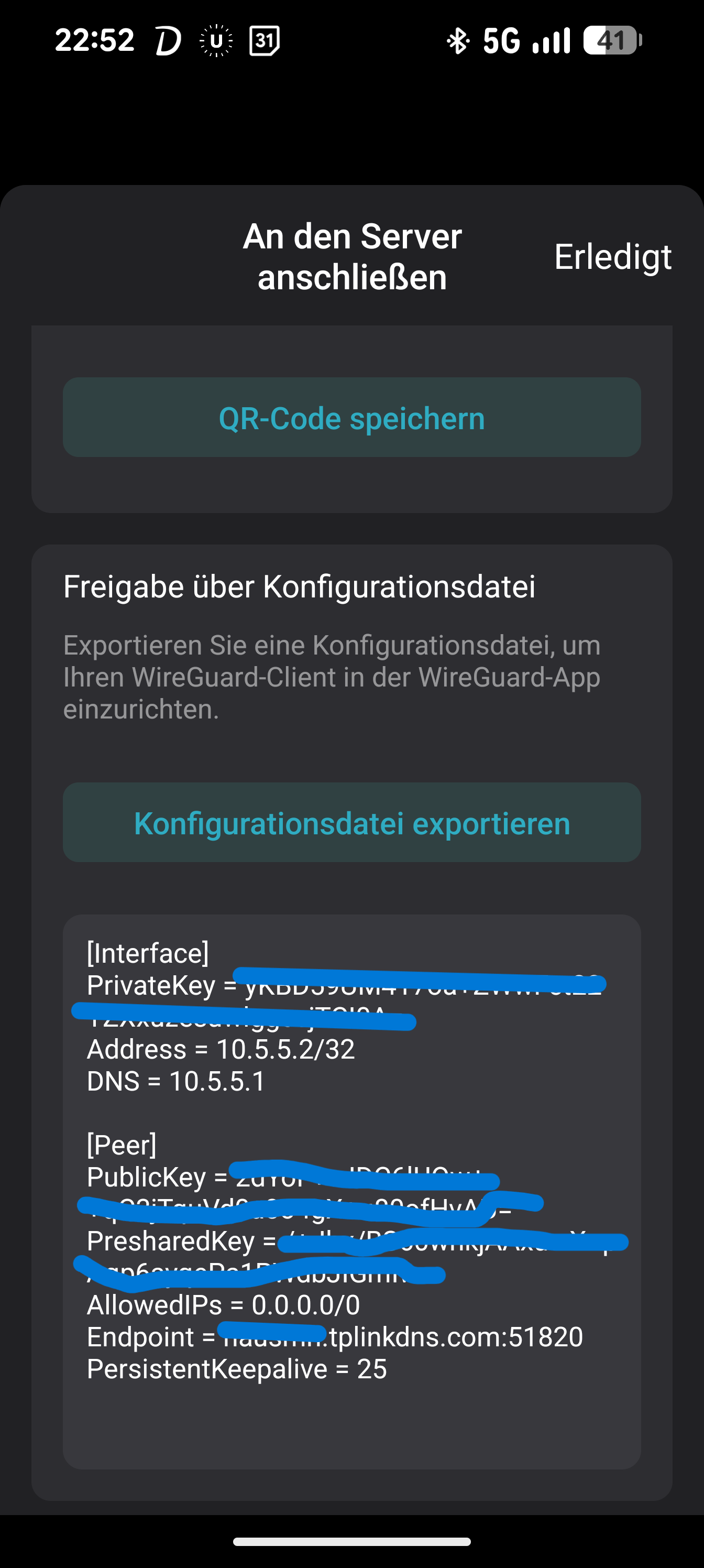
My Client Config:

What I've checked so far:

  1. "Access Home Network" Toggle: I have checked the VPN settings in the Deco app, but I'm still restricted to the router's IP only.

  2. Firewalls: The local devices (like the NAS) don't seem to be the issue, as they are reachable when I'm physically at home.

  3. Routing: It feels like the Deco isn't correctly routing/forwarding traffic from the 10.5.5.x subnet to the rest of the 192.168.21.x LAN.


I've tried in Allowed Ips 0.0.0.0/0 AND 

0.0.0.0/0, 192.168.21.0/24 AND

0.0.0.0/0, ::0 AND

0.0.0.0/0, ::0, 192.168.21.0/24


Is there a specific setting in the BE25 or the Deco App that I might be missing to allow "Internal-to-Internal" routing? Could the DS-Lite connection at my remote location be causing issues even though the tunnel itself is up? Or a Firmware Bug?


Any help or suggestions would be greatly appreciated!
 

Caption


  0      
  0      
#1
Options
1 Accepted Solution
Re:Deco BE25 WireGuard - VPN connected, but no access to other LAN devices-Solution
Sunday - last edited Wednesday


Update / Issue Resolved

I’ve identified the root cause of the problem.

A family member had configured a VPN client on the Deco, routing all connected devices through NordVPN. Because of this, all LAN traffic was being tunneled through the VPN. When I connected to the Deco via WireGuard, I could reach the Deco itself, but I had no access to any local network devices, since they were no longer considered “local” from the system’s perspective.

Solution:

There are two ways to restore access:

  1. Disable the VPN client on the Deco → After turning it off, LAN access via WireGuard works normally again.

  2. Adjust the VPN client access permissions: Change the setting from “All available clients” to “Client List”, and then add only the devices that should actually use NordVPN. All other devices remain in the local network and are reachable when connecting through WireGuard.

This fully resolves the routing issue.

ItsMe999 wrote

Hi everyone,


I’m having a routing issue with the WireGuard VPN server running directly on my Deco BE25.


The Setup:

  • VPN Server: Deco BE25 (Firmware: Latest)

  • Local Network: 192.168.21.0/24 (Deco is at 192.168.21.1)

  • Client Connection: Connecting from a remote location via a DS-Lite internet connection.

  • VPN Tunnel: Connects successfully.

The Problem: Once connected, I can access the internet through the tunnel and I can successfully ping/access the Deco itself at 192.168.21.1. However, I cannot reach any other devices in my home network (e.g., a NAS at 192.168.21.100 or any other Deco f.e. at 192.168.21.245).


My Client Config:

What I've checked so far:

  1. "Access Home Network" Toggle: I have checked the VPN settings in the Deco app, but I'm still restricted to the router's IP only.

  2. Firewalls: The local devices (like the NAS) don't seem to be the issue, as they are reachable when I'm physically at home.

  3. Routing: It feels like the Deco isn't correctly routing/forwarding traffic from the 10.5.5.x subnet to the rest of the 192.168.21.x LAN.


I've tried in Allowed Ips 0.0.0.0/0 AND 

0.0.0.0/0, 192.168.21.0/24 AND

0.0.0.0/0, ::0 AND

0.0.0.0/0, ::0, 192.168.21.0/24


Is there a specific setting in the BE25 or the Deco App that I might be missing to allow "Internal-to-Internal" routing? Could the DS-Lite connection at my remote location be causing issues even though the tunnel itself is up? Or a Firmware Bug?


Any help or suggestions would be greatly appreciated!


Caption


Recommended Solution
  1  
  1  
#3
Options
2 Reply
Re:Deco BE25 WireGuard - VPN connected, but no access to other LAN devices
a week ago

Hi  @ItsMe999 


Welcome to the Community!


Given the steps you've already tried, I'd recommend contacting our technical support team for further assistance with the unexpected WireGuard behavior you're experiencing. You can get in touch with support using the resources Here.


Thanks!

  1  
  1  
#2
Options
Re:Deco BE25 WireGuard - VPN connected, but no access to other LAN devices-Solution
Sunday - last edited Wednesday


Update / Issue Resolved

I’ve identified the root cause of the problem.

A family member had configured a VPN client on the Deco, routing all connected devices through NordVPN. Because of this, all LAN traffic was being tunneled through the VPN. When I connected to the Deco via WireGuard, I could reach the Deco itself, but I had no access to any local network devices, since they were no longer considered “local” from the system’s perspective.

Solution:

There are two ways to restore access:

  1. Disable the VPN client on the Deco → After turning it off, LAN access via WireGuard works normally again.

  2. Adjust the VPN client access permissions: Change the setting from “All available clients” to “Client List”, and then add only the devices that should actually use NordVPN. All other devices remain in the local network and are reachable when connecting through WireGuard.

This fully resolves the routing issue.

ItsMe999 wrote

Hi everyone,


I’m having a routing issue with the WireGuard VPN server running directly on my Deco BE25.


The Setup:

  • VPN Server: Deco BE25 (Firmware: Latest)

  • Local Network: 192.168.21.0/24 (Deco is at 192.168.21.1)

  • Client Connection: Connecting from a remote location via a DS-Lite internet connection.

  • VPN Tunnel: Connects successfully.

The Problem: Once connected, I can access the internet through the tunnel and I can successfully ping/access the Deco itself at 192.168.21.1. However, I cannot reach any other devices in my home network (e.g., a NAS at 192.168.21.100 or any other Deco f.e. at 192.168.21.245).


My Client Config:

What I've checked so far:

  1. "Access Home Network" Toggle: I have checked the VPN settings in the Deco app, but I'm still restricted to the router's IP only.

  2. Firewalls: The local devices (like the NAS) don't seem to be the issue, as they are reachable when I'm physically at home.

  3. Routing: It feels like the Deco isn't correctly routing/forwarding traffic from the 10.5.5.x subnet to the rest of the 192.168.21.x LAN.


I've tried in Allowed Ips 0.0.0.0/0 AND 

0.0.0.0/0, 192.168.21.0/24 AND

0.0.0.0/0, ::0 AND

0.0.0.0/0, ::0, 192.168.21.0/24


Is there a specific setting in the BE25 or the Deco App that I might be missing to allow "Internal-to-Internal" routing? Could the DS-Lite connection at my remote location be causing issues even though the tunnel itself is up? Or a Firmware Bug?


Any help or suggestions would be greatly appreciated!


Caption


Recommended Solution
  1  
  1  
#3
Options