
RE705X and RE605X bugs

Hi there. I just want to report some bugs.
For RE705X:
After enabling ofdma and mu-mimo with twt, the wifi connection speed drops significantly and all the devices conected to the extender report that the connection is wifi 5 not 6 anymore. A reboot fixes the issue until it randomly reappears. Disabling ofdma and mu-mimo fixes it.
For RE605X:
After updating to the latest firmware 1.3.17 Build 20260113 Rel. 37666 for V3 hardware, if i reset the extender and reconfigure it, at initial wifi discovery and connection phase with easymesh, the extender will try to copy the settings from the main router be230 which has easymesh active. It normally reboots but it gets stuck, so i have to unplug it then plug it back in to the power socket to continue it's process.
Please fix. Thank you!
- Copy Link
- Subscribe
- Bookmark
- Report Inappropriate Content
Just a heads up, I have received a beta firmware for both of my access points and everything is fixed now. I'm pretty sure this fix will come in the stable release sometime. Thank you for the fix!
- Copy Link
- Report Inappropriate Content


Hello @qlfsa ,
Welcome to our community.
May I know if your network topology diagram is as follows:
ISP modem—BE230—RE605X)))((( client devices
└──RE705X
(Note: — stands for wired connection,)))((( stands for wireless connection )
Did you set both Range Extenders to Satellite nodes? How did you configure the RE605X when you reconfigured it? Web scan?
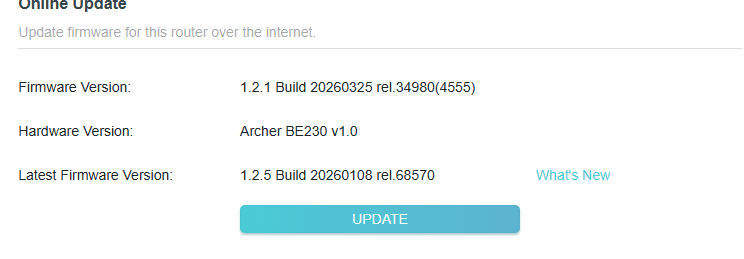
What are the hardware and firmware versions of the BE230?
- Copy Link
- Report Inappropriate Content
Hello,
I have my ISP ONT/ROUTER, then BE230 in Access point mode with easymesh active and then what you see here:
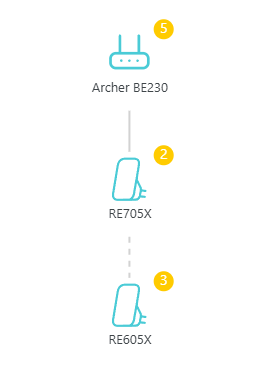
I am using the beta firmware to correct wifi issues on my BE230:
Yes, I configured my RE605X like I always do, by using the web interface, then web scan. I never used the tether app. I configure like this all of my internet equipment.
- Copy Link
- Report Inappropriate Content
Hello @qlfsa ,
Thanks for getting back to us.
Based on this, your complete network topology should be: ISP Ont/Router — BE230 (AP mode) — RE705X)))(((RE605X
(Note: — stands for wired connection,)))((( stands for wireless connection )
Please help us confirm the following information:
1. Does the connection speed reduction issue exist on the RE605X, or only on the RE705X?
2. If you switch the RE705X to wireless networking, will the speed reduction issue persist?
3. If the RE605X is configured using different methods, such as WPS or wired networking, will it also experience lag during the configuration process?
To help you efficiently, I've forwarded your case to the TP-Link support engineers, who will reach out to you using your registered email address later. Please keep an eye on your email inbox for follow-up.
- Copy Link
- Report Inappropriate Content
Hello,
1. Yes, RE605X has lower speed since enabling ofdma and mumimo on RE705X, also it frequently drops the 2.4ghz band from RE705X, remaining connected only to the 5ghz band, which is weird.
2. I have no idea, I do not use RE705X with a wireless connection to my BE230.
3. I do not know, never did WPS configuration.
- Copy Link
- Report Inappropriate Content
Hello @qlfsa ,
Thanks for sharing the results.
I will sync this info with the engineer. Please pay attention to your email communication with the engineer. 
- Copy Link
- Report Inappropriate Content
Just a heads up, I have received a beta firmware for both of my access points and everything is fixed now. I'm pretty sure this fix will come in the stable release sometime. Thank you for the fix!
- Copy Link
- Report Inappropriate Content
Information
Helpful: 0
Views: 458
Replies: 6
Voters 0
No one has voted for it yet.