Archer BE700 has no port forwarding settings in the advanced menu

Archer BE700 has no port forwarding settings in the advanced menu

Archer BE700 has no port forwarding settings in the advanced menu
Yesterday
Model: Archer BE700  
Hardware Version: V1
Firmware Version: 1.2.2 Build 20251027

All the tutorials and documentation I read says there should be some sort of port forwarding menu in the advanced settings but it doesn't exist. The router is not in access point mode or anything either. I am pulling my hair out with this. 

  0      
  0      
#1
Options
2 Reply
Re:Archer BE700 has no port forwarding settings in the advanced menu
Yesterday

  @monolithical 


Hi,


Can you please post a screenshot of the Advanced menu you are presented with?


Normally, in "Wireless Router Mode" the NAT Forwarding menu should exist. I think the only exception would be if some IPv6-only Internet connection was configured, like DS-Lite or V6Plus.

  1  
  1  
#2
Options
Re:Archer BE700 has no port forwarding settings in the advanced menu
6 hours ago - last edited 6 hours ago

  @monolithical 


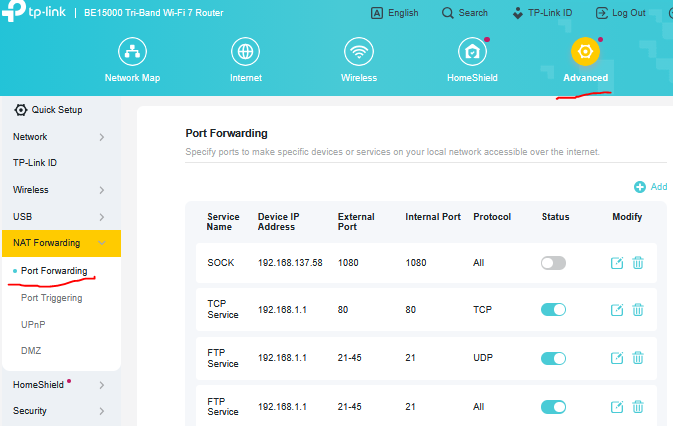
Normally what you're looking for is here:


In some router models WebGUI Port Forwarding is called Virtual Servers.

If this was helpful click on the arrow pointing upward to make it blue. If this solves your issue, click the star to make it blue as a "Recommended Solution". Tips:149wubkkfoLmNDjDbiTxx4ZU8mpcMA5CJt
  1  
  1  
#3
Options