2
Votes

Feature Request: Disable IR and Spotlight in Night Mode

 
2
Votes

Feature Request: Disable IR and Spotlight in Night Mode

Feature Request: Disable IR and Spotlight in Night Mode
2026-05-01 09:40:26 - last edited 2026-05-08 01:59:31
Model: Tapo C51A  
Hardware Version:
Firmware Version: 1.2.3

Dear TP-Link / Tapo Team,

I am using a Tapo C51A camera and I would like to suggest a feature improvement regarding night mode behavior.

Currently, the camera offers:

  • Infrared mode (black & white with IR LEDs)
  • Full-color mode (with white spotlight)
  • Smart mode (automatic switching)

However, there is no option to operate the camera at night without activating either infrared LEDs or the white spotlight.

This creates an issue when the camera is placed behind a window (which is a common use case):

  • Infrared causes strong reflections on the glass, making the image unusable
  • The white spotlight is too visible from outside and prevents discreet usage

Feature request:
Please add a mode allowing the camera to operate in low-light conditions without IR and without spotlight (i.e., a “passive night mode” using only ambient light and sensor gain).

This would:

  • Eliminate reflections when used behind glass
  • Allow discreet indoor placement facing outside
  • Improve flexibility for many real-world scenarios

Thank you for considering this suggestion. I believe this feature would be very valuable for many users.

Best regards,

#1
Options
8 Reply
Re:Feature Request: Disable IR and Spotlight in Night Mode
2026-05-01 23:30:17 - last edited 2026-05-03 05:17:54

  @ato53 100% we need this asap, I have an external IR source as my camera get covered in cobwebs otherwise 

#2
Options
RE:Feature Request: Disable IR and Spotlight in Night Mode
2026-05-04 07:43:01
much needed
#3
Options
Re:Feature Request: Disable IR and Spotlight in Night Mode
2026-05-04 07:43:48
Please vote to support that request
#4
Options
Re:Feature Request: Disable IR and Spotlight in Night Mode
2026-05-06 06:21:53

  @ato53 

Hello,
Thank you very much for sharing your detailed suggestion—we truly appreciate the thought you’ve put into this use case.


At the moment, the camera does not support disabling the infrared LEDs in Night Mode while remaining in night operation. If you confirm that there is sufficient ambient light at night, you may set the camera to Day Mode, which will prevent the camera from switching to night mode and keep the infrared lights turned off.


That said, we would also like to note that we do not recommend placing the camera facing glass, windows, or other reflective surfaces, as this can cause image quality issues—especially when infrared lighting is involved.


We’ve recorded your feature request regarding a passive night mode (without IR or spotlight) and will forward your feedback to the relevant team for consideration. Suggestions like yours are very valuable and help us better understand real‑world usage scenarios.


Best Regards.
 

#5
Options
Re:Feature Request: Disable IR and Spotlight in Night Mode
2026-05-06 07:32:43

  @Hilbert-TP 


Hello,


Thank you for your response and for considering my suggestion.


Regarding your suggestion to put the camera in Day mode, it's a feature I would have liked to find in the settings, but unfortunately, it's not there.

The only setting is the one I described, which defines the three Night Mode options.


My camera is a C51A model, hardware version 2.0 with firmware 1.2.3.


Thank you for your follow-up.

#6
Options
Re:Feature Request: Disable IR and Spotlight in Night Mode
2026-05-07 00:10:33 - last edited 2026-05-08 01:59:31

  @ato53 

Hello,

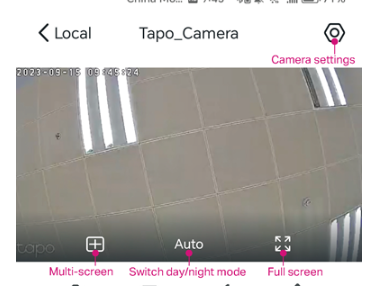
Please open the live view page of your camera, upon clicking the live view screen, you will see options for day/night mode appear at the bottom. If there is a button labeled “Auto”, please tap it. You should then see three options: Day Mode, Night Mode, and Auto. Select “Day Mode”, and the camera will no longer switch to night vision mode after dark. Please refer to the pictures below.

Best Regards,

#7
Options
Re:Feature Request: Disable IR and Spotlight in Night Mode
2026-05-07 09:03:14

  @Hilbert-TP 


thanks for your answer

I did not realize that the "Auto" button was the requested option
I will check the results tomorrow morning, but I am pretty sure it will be ok

Thanks for your help

#8
Options
Re:Feature Request: Disable IR and Spotlight in Night Mode
3 weeks ago
It works perfectly, thank you.
#9
Options