
ER8411 drunk?

Who is actually assigning the IP address here?
A duplicate assignment?

Completely different addresses have been assigned.
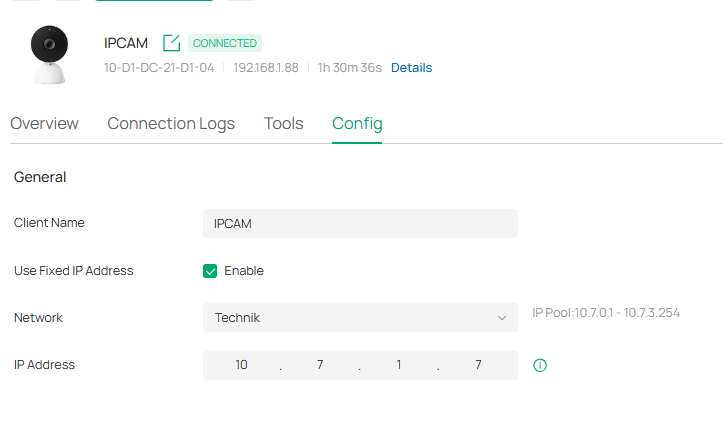
and
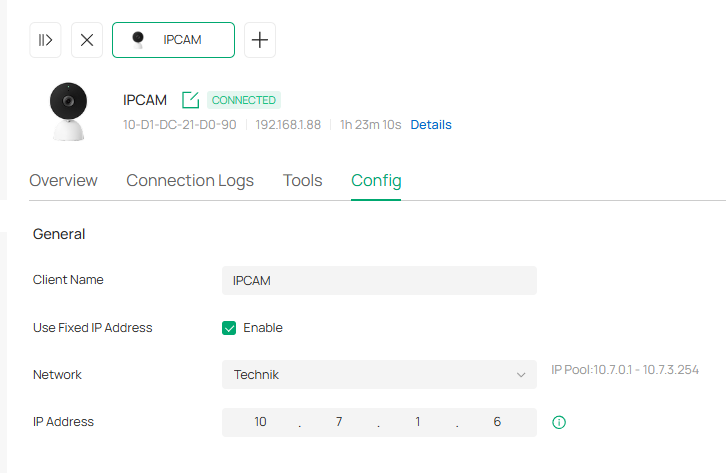
Regardless of this, it is no longer checked whether the assigned IP address matches the specified VLAN.
Programmed chaos!
The AI says that it would have been better if I had spent more money to acquire better equipment.
- Copy Link
- Subscribe
- Bookmark
- Report Inappropriate Content
Thanks for the ticket.
Fortunately, I found the error.
I switched from the OC200 to the OC300.
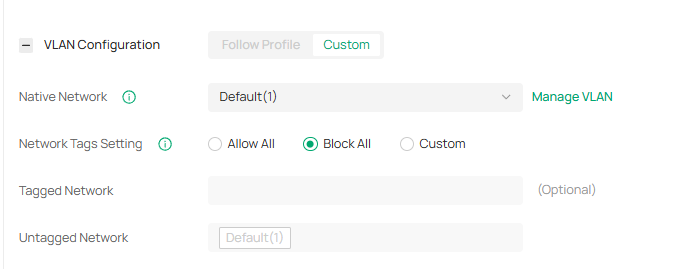
It was due to a faulty adoption of the switches.
I have corrected the port configuration.
While that doesn't explain the router's behavior, it has solved my problem.
Before Adopting
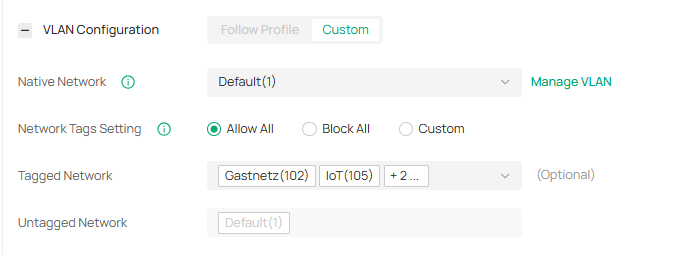
After the adoption
- Copy Link
- Report Inappropriate Content

DHCP reserved addresses can only be assigned if the device is on the correct vlan and there are no other DHCP servers serving conflicting addresses within the scope of that vlan
- you may have the incorrect native vlan assigned to the switch ports
- you may have another DHCP server running somewhere that responds first
I have 2 ER8411s and neither behaves in this way over hundreds of devices on 9 vlans.
- Copy Link
- Report Inappropriate Content


Hi @VolkerS
Thanks for reaching out to TP-Link Business Forums.
Would it be helpful if you try to reboot the two cameras? It might be previously assigned by the previous DHCP server and the IP has not been released yet.
Alternatively, you may navigate to Site View > Network Config > Transmission > DHCP Reservation and manually setup a reservation IP for the two IPCs. How to set up DHCP Reservation for clients on Omada Gateway in Controller mode | Omada Network Support
- Copy Link
- Report Inappropriate Content
You lucky Man
- Copy Link
- Report Inappropriate Content
Hello, the system's behavior is completely irregular.
I reviewed the system today with a support representative. No configuration errors are apparent.
Even after restarting all system components, the duplicate IP assignment persists as long as both cameras are located within the same VLAN.
The router simply ignores the instructions from the OC300 and assigns the cameras an IP address from VLAN 1—despite the switch ports being configured for VLAN 107 and a specific static IP address from VLAN 107 having been assigned.
The DHCP reservation was created automatically, but is being ignored just the same.



To me, as a layperson, it appears that the management software is clearly experiencing issues.
Furthermore, the "Lock to Wireless Device" feature remains unusable.
- Copy Link
- Report Inappropriate Content
Hi @VolkerS
To better assist you, I've created a support ticket via your registered email address. The ticket ID is TKID260548006, please check your email box and ensure the support email is well received. Thanks!
- Copy Link
- Report Inappropriate Content
Thanks for the ticket.
Fortunately, I found the error.
I switched from the OC200 to the OC300.
It was due to a faulty adoption of the switches.
I have corrected the port configuration.
While that doesn't explain the router's behavior, it has solved my problem.
Before Adopting
After the adoption
- Copy Link
- Report Inappropriate Content
Information
Helpful: 0
Views: 359
Replies: 6
Voters 0
No one has voted for it yet.