
Confused by Kasa widget for ios 26 - iPhone and CarPlay

Confused by Kasa widget for ios 26 - iPhone and CarPlay

Confused by Kasa widget for ios 26 - iPhone and CarPlay
Friday
Model: Kasa EP40M  
Hardware Version:
Firmware Version:

I'm trying to use a Widget on CarPlay so that I can turn on my porch lights, connected to a Kasa Outdoor Smart Plug, from my car.  I don't understand how the widget works.


I created a widget from the CarPlay settings adding 2 devices.  Both are SmartPlugs.  I just want to be able to turn the sockets on & off from my car.  (I created a similar widget on my iPhone just to see it that worked any beeter, but it is equally confusing)


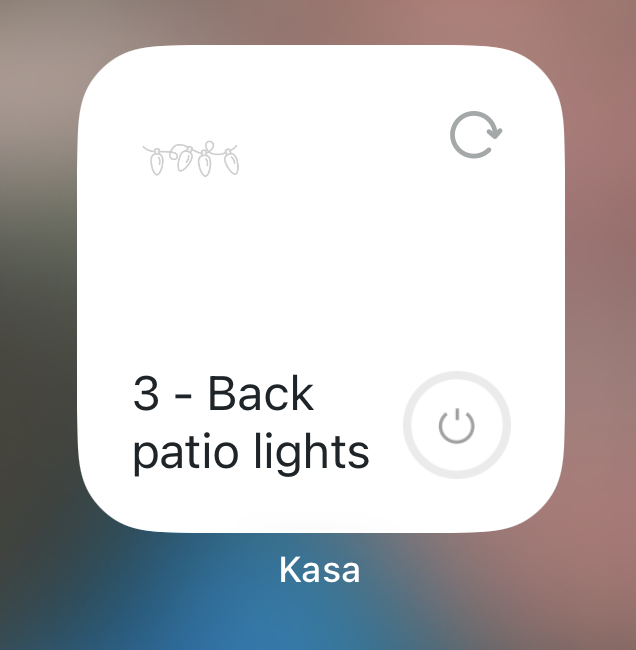
Here's what I see:
500cf29b2cf743f5b2f83df0bcf33fc0


My questions:

  1. How does this work?
  • What does the circular arrow do?  When I click on it, it changes to a checkmark, but doesn't seem to do anything.
  • If I click on the power icon in the lower right, it does seem to turn on the plug (and the lights attached), but not sure it's consistent.
  1. Why do I only see one of my devices?  How to I access the 2nd device?  I can't figure out how to control the other plug.

  0      
  0      
#1
Options
1 Reply
Re:Confused by Kasa widget for ios 26 - iPhone and CarPlay
Yesterday

  @rjf17ca 


The circular arrow is a refresh button, it helps to update the status of the smart device on the widget.


You can pick from three styles of the Device Control widget, depending on how many devices you want to show. Right now you have the one for just one device. If you need to manage more, delete this widget and add a different one from the widget menu.

Tapo P110M Matter 1.3 Release Energy Monitoring through Matter ▶ Smart HomeBase Tapo H500 - Even More Powerful Smart Hub ▶ First Smart Switch Module! Tapo S112 Smart Switch Module with Roller and Switch Dual ModesTapo Camera Image Style & Image Brightness Try out a different image style for your camera!
  0  
  0  
#2
Options