
How turn voice off on c120 or c121 ?
 This thread has been locked for further replies. You can start a new thread to share your ideas or ask questions.
I have 5 cameras c121 and 5 of the c120 , and i wanted to know how to disable the voice on the cameras that say "wifi disconnected" or other stuff, it needs to have a option to turn that vioce off. My wifi cuts of once in while and just starts talking at midnight or late that the wifi signal is lost of whatever and scares the heck of all in the house.
How to disable that ? I think the c121 does that from what i heard and in the cam menu i am not finding nothing about it to turn it off.
- Copy Link
- Subscribe
- Bookmark
- Report Inappropriate Content
Tp-link, Care to reply here?
- Copy Link
- Report Inappropriate Content
@patrocle Hello. Did you get a reply? I have the same question. How do I mute the camera's voice for intermittent wifi connection? It is quite disruptive especially at night. I don't know if the new updates within the last two months are causing this issue. Thank you for asking this question.
- Copy Link
- Report Inappropriate Content
@sfoto Nope never got any reply back. Looks that no one is listing around TP-Link team, but i will send a link directly to support soon you can do the same and let me know the outcome
- Copy Link
- Report Inappropriate Content
found this here:
Hi,
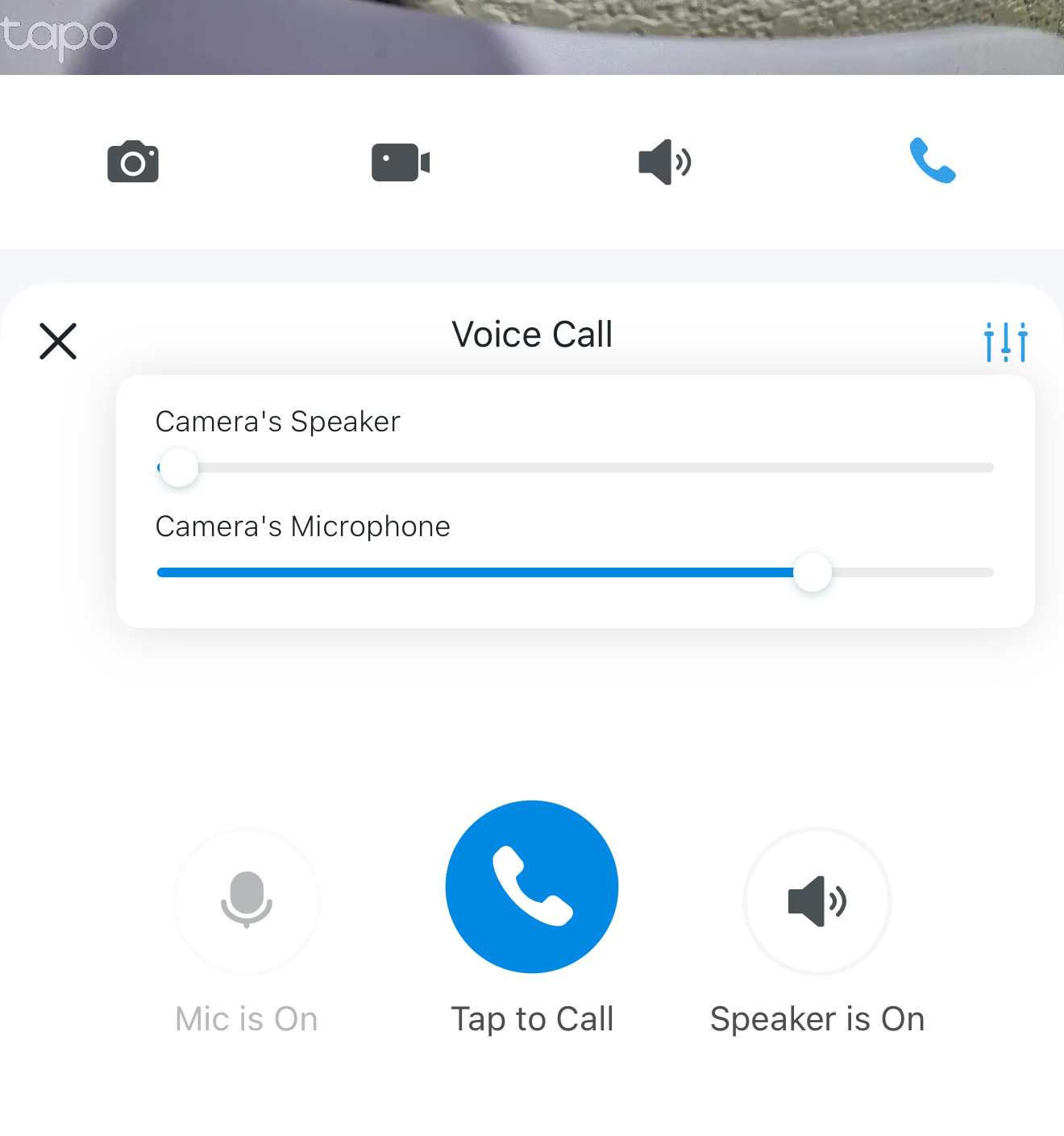
On the Tapo app > camera's Live View page, please tap the Call icon to go to the Voice Call page, then tap the icon at the top right corner of the Voice Call page, try to reduce the speaker volume, and check if it helps.
Best Regards
https://community.tp-link.com/en/home/forum/topic/811538
Will have to try it
- Copy Link
- Report Inappropriate Content
Thank you very much! There is also an option to completely turn off the speaker (like pressing a mute button) by pressing the "Speaker is On" icon at the lower right per your screen shot. It should then read "Speaker is Off" with an "x" next to the speaker. I guess one could toggle this setting back and forth to turn it off and on in addition to lowering the volume like you suggested. I currently do not use my cameras to relay my voice over the C120, but it is a good feature to have. Therefore, I will keep my speakers on off or mute on all of my cameras. I greatly appreciate your help and will update if this does not work. Lately, I don't know if there were software updates, but fortunately, the voice notification has lessen significantly. Thanks again!
- Copy Link
- Report Inappropriate Content
Update. I think the method you mentioned to minimize the volume is the best. The "Speaker is On" might only be used for the phone itself whether to speak directly to the mic on the phone or via speaker. Your method can completely lower/minimize the "Camera's Speaker" directly on the C120. Thank you again! :)
- Copy Link
- Report Inappropriate Content
Information
Helpful: 2
Views: 761
Replies: 6
Voters 1
