
Multiple Alexa devices created for Tapo motion and temperature sensors

I recently purchased a Tapo temperature sensor and the required hub. It works well with Alexa routines to turn on and off my electric wall heater. I noticed that Alexa created three devices for this sensor. I didn't think much of it at the time, but then I ordered a motion sensor and Alexa also created three devices for it as well. I order a 2nd motion sensor and the same thing happened. If I delete any of the three devices, Alexa just recreates them. The sensors all work just fine with Alexa routines, but there is obviously some issue with the Hub/Sensors involving the skill. I have 6 Tapo C120 cameras, a wall switch, a plug, and an outdoor dual plug. None of them have this issue.
- Copy Link
- Subscribe
- Bookmark
- Report Inappropriate Content
@Wayne-TP After a lot of deleting/changing/researching I finally resolved this. When I initially installed the hub, I installed it first, then bound it to Matter through the Alexa App which for some reason caused the Alexa app to create multiple devices for the hub and each sensor. I fixed the multiple device issue by unbinding the hub from Matter Alexa services using settings in the Tapo app, deleting all the hub and sensor devices in the Alexa app, rebinding the hub to Alexa in the Tapo app, then letting the Alexa app recreate them. This worked and I now have only one device for the sensors and hub. This needs documentation clarification as to the exact procedure to follow and in what order with regard to Matter binding procedure. You must do that in order to use the sensors in Alexa routines. They work great, by the way.
- Copy Link
- Report Inappropriate Content

Please share more details of your Tapo devices here. Which Tapo hub do you use? What are the hardware and firmware versions of your Tapo sensors? Please ensure their firmware is updated. How to update the firmware of the Tapo devices on the Tapo App
Try to relink Tapo and Alexa (disable Tapo skill in the Alexa app, then re-enable), see if that helps.
Can you share some screenshots here?
- Copy Link
- Report Inappropriate Content
@Wayne-TP After a lot of deleting/changing/researching I finally resolved this. When I initially installed the hub, I installed it first, then bound it to Matter through the Alexa App which for some reason caused the Alexa app to create multiple devices for the hub and each sensor. I fixed the multiple device issue by unbinding the hub from Matter Alexa services using settings in the Tapo app, deleting all the hub and sensor devices in the Alexa app, rebinding the hub to Alexa in the Tapo app, then letting the Alexa app recreate them. This worked and I now have only one device for the sensors and hub. This needs documentation clarification as to the exact procedure to follow and in what order with regard to Matter binding procedure. You must do that in order to use the sensors in Alexa routines. They work great, by the way.
- Copy Link
- Report Inappropriate Content

I’m curious, did you previously connect your Tapo hub and its sub‑devices to Alexa using both Matter and the Tapo integration simultaneously? Normally, this situation won't occur when you use any of the connection methods.
- Copy Link
- Report Inappropriate Content
@Wayne-TP I'm not sure. I MAY have done that. I have a lot of Tapo devices...DECO router, plugs, cameras, switches, etc.....but had never used the sensors, so this is my first experience with the Tapo hub. Amazon reviews indicated that it worked with Alexa routines, but after installing it, I found out that it didn't. Then I found the article on it being Matter compatible which WOULD allow it to work with routines. I don't remember how I added Matter, but I didn't know you could do that within the Tapo app (there was no mention of that in the instructions) so I think I installed it as a Matter device under Alexa. Installation/Matter needs some better instructions in this area.
Routines have been a little hokey here lately since Amazon installed Alexa+ on my phone. One of my C120 cameras in the shop would turn ON the lights with motion, but wouldn't turn them off with "no motion" after a specific time. An identical setup in the garage worked just fine. Finally just power cycled the camera and it seems to work now. Strange that if I look at routine activity in the Alexa app for the two cams, it shows me activity for the "turn on" routine for both cams, but gives me a "Routine Activity Not Available" for the "turn off" routines, although they both work.
The temperature sensor worked perfectly to trigger routines to turn my Dreo heater on and off, then it wouldn't....still haven't figured out why. Still working on it. May try deleting the routines and recreating them.
I am waiting patiently (well, mostly) for the Tapo T150 Presence Sensor. I am using a motion sensor in the bedroom/bath to turn on the lights and turn them off after 20 minutes. My wife is unhappy when the lights suddenly go out while she is putting on her makeup! LOL! There are other sensors available, but I try to minimize the number of apps I have to deal with. Don't suppose you would want to send me one to try?
- Copy Link
- Report Inappropriate Content
@Crosscut Spent all day trying to get the temp/humidity sensor to work with a routine. Been through all the hub/sensor installationns several times. The motion sensors work and trigger my routines just fine, but not the temp/humidity sensor. It works just fine if I test the routine in the Alexa app, but apparently the temp sensor will not trigger a routine on temperature change.
I finally gave up on that and created a smart automation to send me a notification when the temp drops below 71 degrees and when it rises above 73 degrees. It sends a notification to messages in the Tapo app and gives me a popup, but no push to system notifications. If that had worked, I could use Macrodroid and VirtualHome to trigger on the notification text. All notification parameters are set to on in the Tapo app and system settings.
I need a way to turn my heater off and on with an external sensor. May have to look elsewhere.
- Copy Link
- Report Inappropriate Content
A way to test whether the smart device is functioning normally, is to create an automation in the Tapo app using the same trigger. If the automation runs as expected, it confirms that the relevant data is being transmitted correctly. This suggests the device should also work properly when used on a third‑party platform.
This article might help, FYI. What can I do if the Smart Action/Automation doesn’t take effect as expected?
If you need further assistance, feel free to Contact TP-Link Technical Support.
- Copy Link
- Report Inappropriate Content
@Wayne-TP I gave up on using the temp sensor in a routine. It's just too unreliable. As you know, unlike a thermostat, a sensor will trigger on change, so if you are shutting down a heater when a specific temperature is reached and it doesn't trigger, it will continue to heat until you shut it down manually. Personally I think EVERY heating cooling device should support an external thermostat.
I finally got the temp sensor to push notifications after trying every setting I could think of. Setting the Tapo app to have unrestricted power usage in background seemed to be the fix. I tried that for a while and it consistently pushed notifications when a temp setting was reached. I set up an automation to include the temp value in the notification. I used VirtualHome to set up two "doorbells" for Alexa to turn on my heater on and off in a routine. I then setup Macrodroid to trigger a macro on notifications from the Tapo app with the temp limit values in the notifications. That has been very reliable for the last couple of days.
Then....
I had purchased a door sensor to tell me when my shop door was open. Yesterday I tried installing that. Since it was in the shop, I had to move the sensor hub because it was too far away. After I plugged the sensor hub back in, I now have multiple sensor devices in the Alexa app again. There are a number of posts on Reddit and other forums about other users having this problem. Fortunately, summer is not far away. Hopefully by next year, Tapo will fix this hub/sensor problem. I'm tired of working on it. If not, will dump the whole sensor setup and try something else.
I hate hubs and try to avoid them at all costs. They vastly complicate smart home setups.
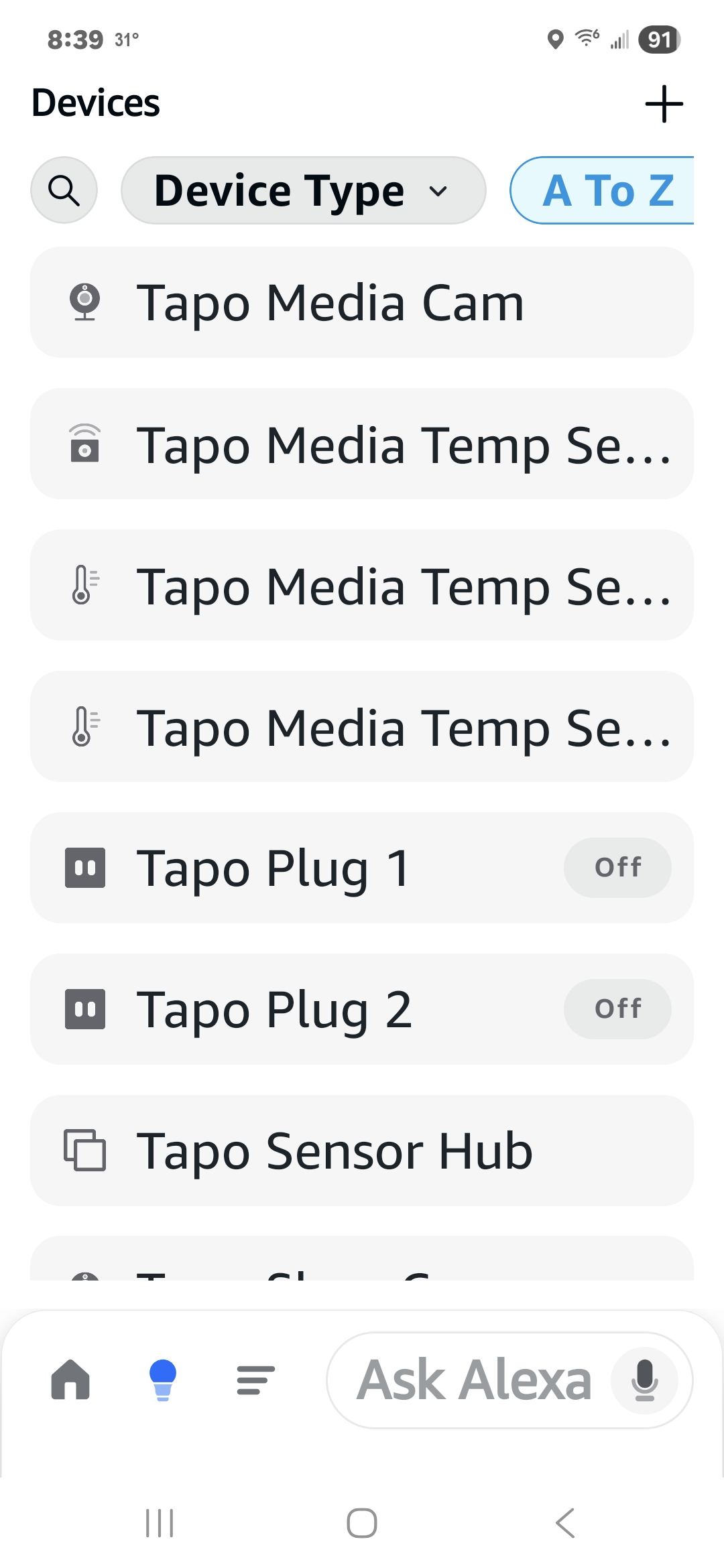
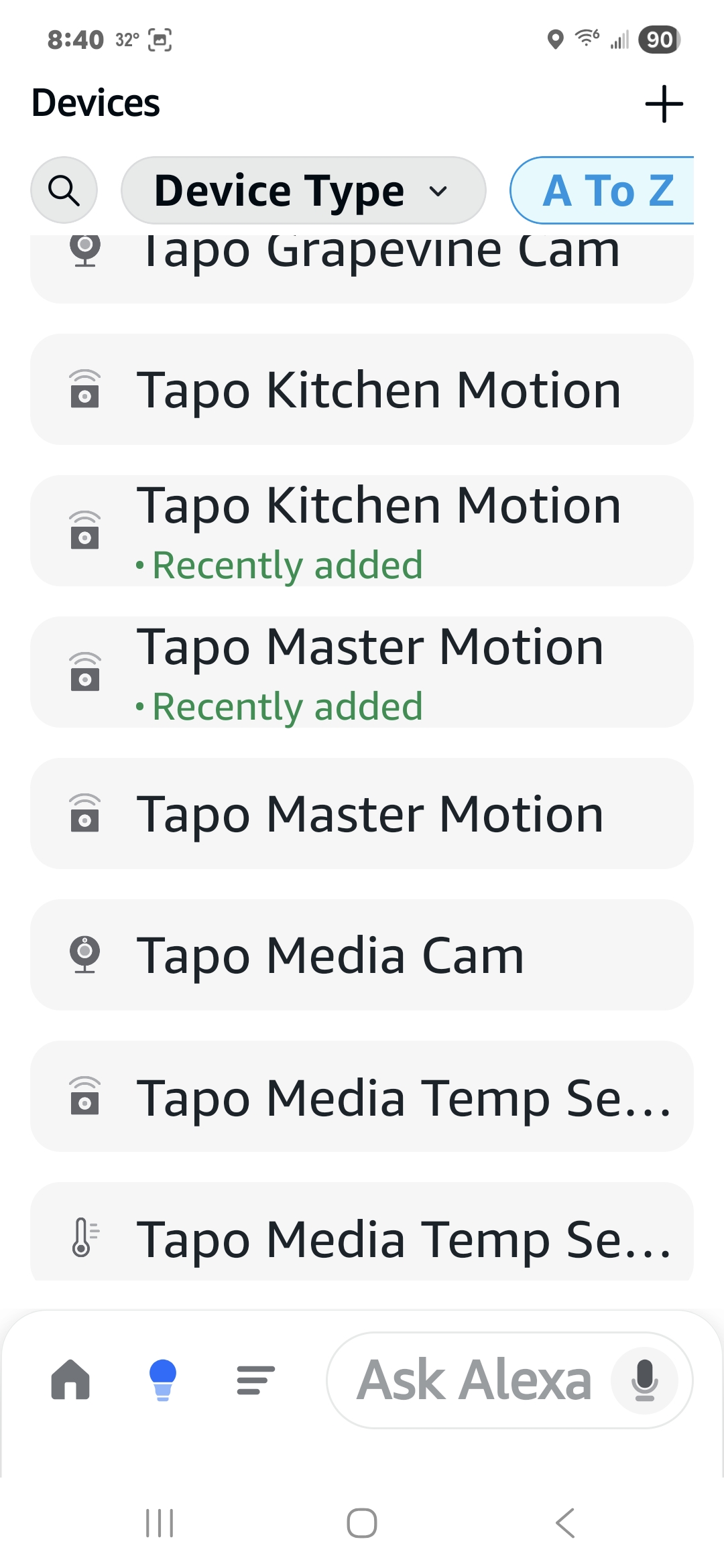 less because I now to to have a hub close enough to the devices it supports.
- Copy Link
- Report Inappropriate Content
@Crosscut For this duplicate devices issue, i recommend contacting the support team directly for further investigation. Contact Technical Support
- Copy Link
- Report Inappropriate Content
I have been through Tapo Support a several times in the past. Working with them is like mating elephants. It's accomplished with a lot of roaring and screaming and takes two years to produce results. You have to fight your way through multiple levels and the levels don't communicate with each other which means every time you get a different technician, you have to describe the issue several times, send screenshots, pictures, etc. all over again until you finally get to someone who will actually look at the problem.
I will contact them, but only in a minimal basis. I'm sure they are aware of the problem. If not, they should be. It's an easy to find thread in a number of forums and in a Google search. Search "Alexa creates multiple devices for Tapo sensors".
- Copy Link
- Report Inappropriate Content
Information
Helpful: 0
Views: 784
Replies: 9
Voters 0
No one has voted for it yet.