RV20 — Reports main brush is stuck, but it is not

RV20 — Reports main brush is stuck, but it is not

RV20 — Reports main brush is stuck, but it is not
2026-02-13 00:00:19

I had just completed a cleaning job on hardwood floors and the vacuum was on its charger. At the beginning of a new cleaning job on carpeting, the RV20 is reporting, "Main brush is stuck."


It is actually not stuck.


  • Brush and vicinity is 95% clear of pet fur and hair. Yes, I have a dog.
  • The area is clean of any general grime which tends to build-up every few months. I cleaned it two days ago.
  • With the brush installed, spinning the brush while it's engaged with the internal gearing and/or motor has what I subjectively say is the appropriate amount of resistance. The mechanism is not actually jammed nor seized; it turns.


Any ideas, before I disassemble it? I have nothing to lose, though a two-year life is awfully short of expectations.
 

Thanks!


There is never a wrong time to do the right thing

  0      
  0      
#1
Options
2 Reply
Re:RV20 — Reports main brush is stuck, but it is not
2 weeks ago

  @Dacker 


Try to run the vacuum without the main brush. If there are no changes, it is time to involve the support team. Contact Technical Support

CES 2026 Meet TP-Link AI Assistant and More New Products!
  0  
  0  
#2
Options
Re:RV20 — Reports main brush is stuck, but it is not
a week ago

933258

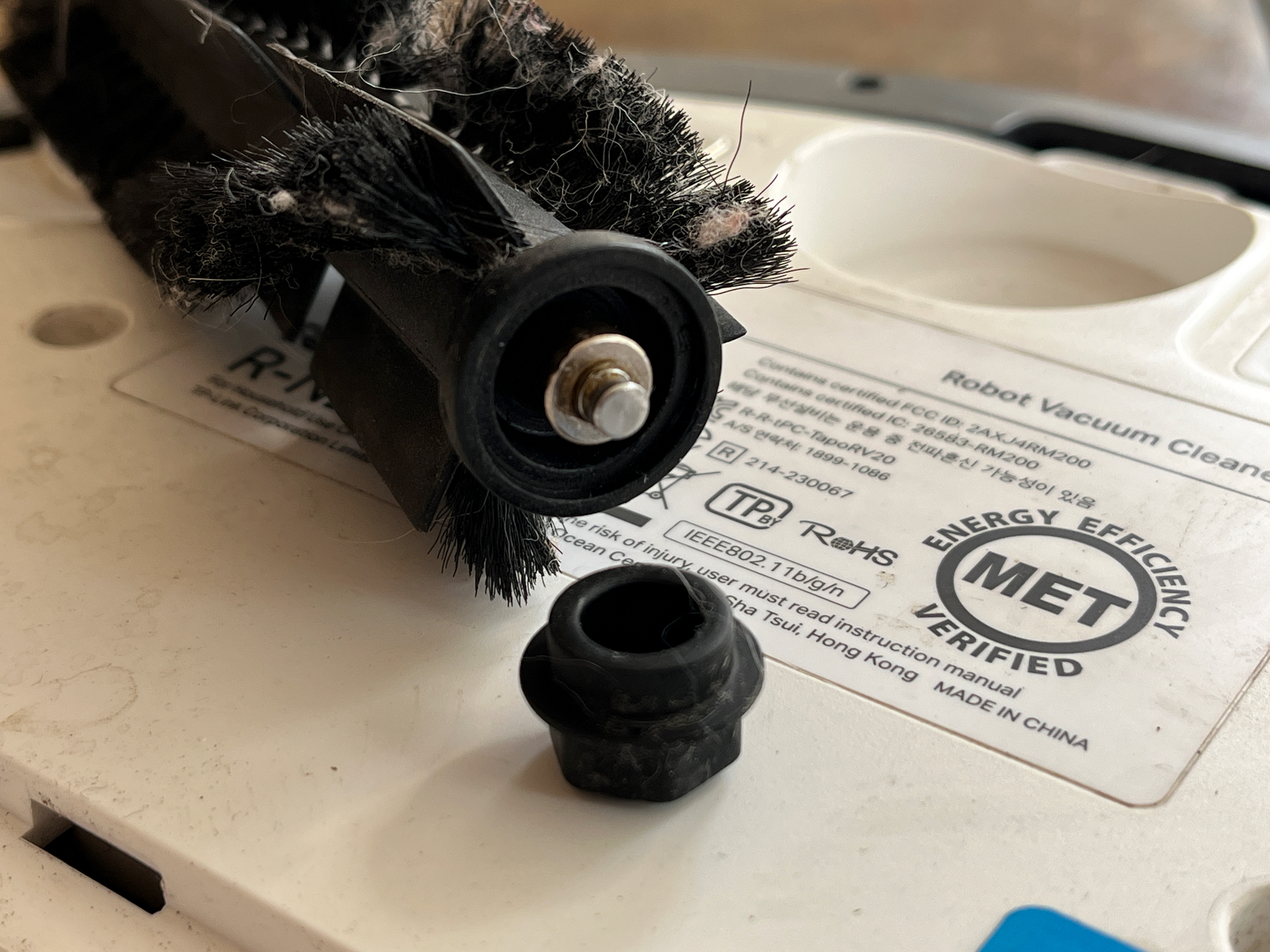
Main brush end Caption

Wayne-TP wrote

  @Dacker 


Try to run the vacuum without the main brush. If there are no changes, it is time to involve the support team. Contact Technical Support

  @Wayne-TP 


I gave that a try and didn’t get any errors.


After I reinstalled the main brush, the errors were gone as well. I’d previously removed and reinstalled the main brush and still had it error out, so… go figure.


I ran a 30‑minute cleaning job with no errors, although it was noticeably a little noisy.


Long story short: on the non‑drive end of the main brush there’s a hexagonal rubber cap that turns out to be removable. With the cap off, you can see a shaft running through the center of the brush to the drive side. On that shaft is a small metal bushing (which really should have been a bearing). The bushing wasn’t freely rotating on the shaft; instead, it was sticking to the shaft and spinning inside the rubber cap. There was some rubber residue as well.


I removed the bushing, cleaned everything, applied a tiny bit of silicone grease to the shaft and the inside of the bushing, and reassembled it. I then ran a 45‑minute cleaning job and the noise was gone.


The easy solution would be to replace the entire main brush assembly, which includes the shaft and bushing. That’s probably the right approach for most consumers, though it would take several days to get the part.


I opted for the cheap and very quick fix. 😉


---


Before I tracked down the bushing issue, I had started taking the vacuum apart. It’s definitely not designed for serviceability. I removed the eight screws from the bottom, but the top and bottom shells wouldn’t separate, and I wasn’t about to force it.
 

I suppose I could invoke my state’s Right to Repair law and request service documentation; that would be essential if/when the battery needs to be replaced. Batteries should always be under covers, not built in.
 

There is never a wrong time to do the right thing
  0  
  0  
#3
Options