Try the New Device Sharing 2.0 Feature Today!

Try the New Device Sharing 2.0 Feature Today!

Try the New Device Sharing 2.0 Feature Today!
2026-08-25 16:08:59 - last edited a week ago

4ac5346da80e42ab8b9754d224aa7253What Do You Think of Device Sharing 2.0?

With Device Sharing 2.0’s official release approaching, the team wants to give everyone a chance to test the features and share feedback before launch.

After testing the feature, please provide your feedback in the in-app form or leave a comment on this post with your thoughts.
 

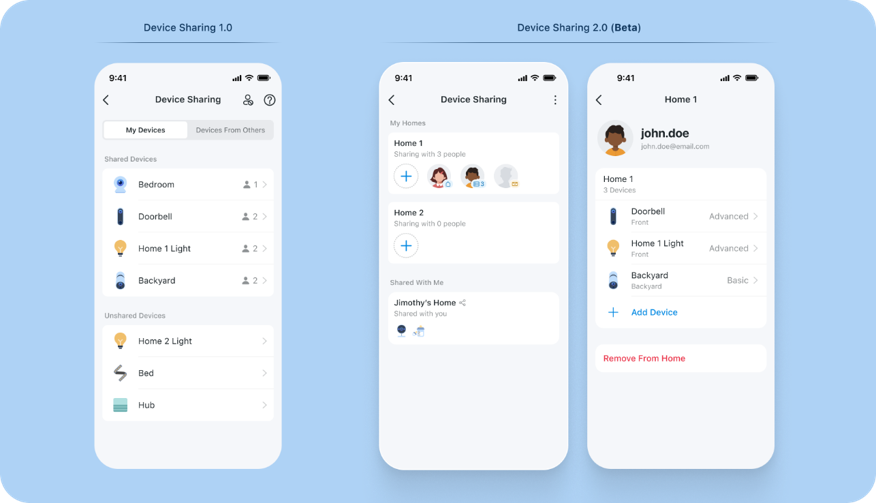
What You Can Expect in This Update to Device Sharing?

  • New ThreeTier Permission Model: Advanced, Basic, Live View Only
  • HomeLevel and Device-Level Sharing
  • Brand New Member Profiles for Easily Managing Access
  • New Device Sharing Invitation Process and App Flow
     

Note: BOTH the Account you are sharing devices from AND the account you are sharing devices to, must be using the beta application to use the latest device sharing features.


Missed the First Beta?

Join the Beta Below and Provide Your Feedback to Help Guide the Future of Device Sharing 2.0

Apple/iOS: Join the Official Device Sharing 2.0 TestFlight [Updated 10/28]

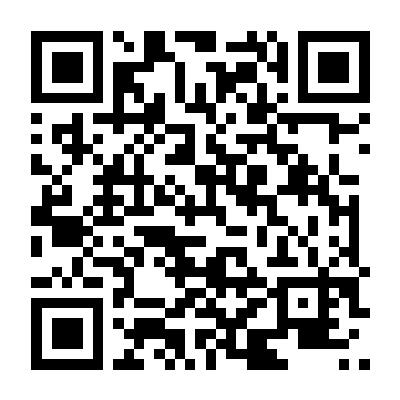
Android: Scan the QR Code Below or Download the Device Sharing 2.0 Beta App for Android 
4df212acb47c43578d4946099ead3aa2

Provide Your Feedback to Help Guide the Feature's Development

After testing the feature, please provide your feedback in the comments below, through the in-app feedback form, or through a new post on our official apps forum.

Our teams are currently looking for any feedback about the new interface, its ease of use, improvements you would like to see in the device sharing feature, and any other recommendations you may have for our development team.
 

  • What Improvements or Additions to Device Sharing Are the Most Useful to You?
  • Where Does Device Sharing 1.0 (or 2.0 for that matter) fall short of your expectations?


Device Sharing will continue to receive updates, so any feedback, whether significant or minor, is more than appreciated – if not for this update, definitely the next.
It’s never too late to request changes or improvements.


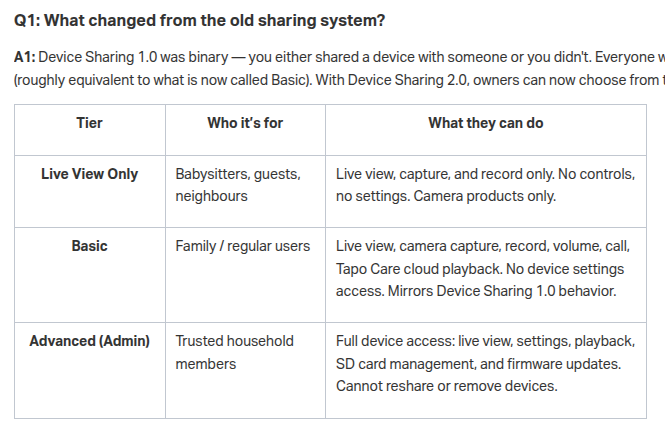
Check out the Current Permission Levels Planned for Device Sharing 2.0 Below (Subject to Change)

Tier

Who it’s for

What they can do

Live View Only

Babysitters, guests, neighbours

Live view, capture, and record only. No controls, no settings. Camera products only.

Basic

Family / regular users

Live view, camera capture, record, volume, call, Tapo Care cloud playback. No device settings access. Mirrors Device Sharing 1.0 behavior.

Advanced (Admin)

Trusted household members

Full device access: live view, settings, playback, SD card management, and firmware updates. Cannot reshare or remove devices.


Learn More About What's Coming in Device Sharing 2.0, Permission Levels, and More in our FAQ

Introduction to Tapo Device Sharing 2.0
 

e5fdbb78202b4560a80ec876fe3b0e2b

1. You may return to the official app version by removing your account from TestFlight (iOS) and reinstalling the official Tapo App from the Google Play Store or Apple App Store.

2. Device and Feature functionality is expected to be limited during the beta trial. If you find any bugs or unexpected limitations, please leave a comment or forward your feedback through the app.

3. This beta has not yet been localized for various regions/languages and is currently only available in English during this beta.

Tapo DL130 – Palm Access Smart Lock - Now Available! Check out Our Community Newsletter and Monthly Firmware Updates in our Knowledge Base
Contact Support or Join our Official Subreddits: r/tapo, r/tplink, r/omada_networks
  1      
1
#1
Options
9 Reply
Re:Try the New Device Sharing 2.0 Feature Today!
2026-08-26 23:53:12

 @Riley_S Appreciate the new permission tiers! As device sharing evolves, please consider these additions for AI and Facial Recognition features:


1. Pass Recognized Face Tags in Shared Push Notifications: Ensure that named facial recognition alerts (e.g., "Known Person: [Name] Detected") are passed directly to shared accounts, rather than downgrading the notification to generic "Motion Detected."


2. Allow Shared Admins to Create Face-Based Smart Actions: Advanced/Admin shared users should be able to create Smart Actions/Automations using the camera's AI tags (such as specific recognized faces) as the trigger for alerts or smart device actions.


3. Per-User AI Notification Filtering: Allow shared users to customize which AI events ping their phone (e.g., letting one family member receive alerts only when an "Unknown Face" is seen, while another gets alerts for specific "Known Faces").

  4  
4
#2
Options
Re:Try the New Device Sharing 2.0 Feature Today!
2026-08-29 13:38:36

This looks like a useful update. I haven't tried it yet because I'm an Android user and not particularly keen on installing apps outside the Play Store (why not offer beta via the Play store?). But I do have some comments in response to "Where Does Device Sharing 1.0 fall short of your expectations? Some of these comments are based on knowledge I have gained from reading about Tapo cameras, rather than first hand knowledge from using the devices, so please correct me if I am wrong about any of it.


  • As far as I understand, it is not possible for multiple users to simultaneously access recordings from a camera or hub. This is a big drawback. 
  • As far as I understand, it is not possible for a Share 1.0 recipients to turn off receipt of motion notifications from a doorbell camera whilst retaining doorbell button press notifications. Share 1.0 recipient seems to just get a single notification toggle for the device. For most devices that is probably adequate but video doorbell should have separate toggles for motion and button press and these toggles should be available to Basic share recipients.   
  • Your product documentation is a bit weak in clarifying what is and isn't available to share recipients for specific devices. For example, to inform purchase decisions I'm interested in knowing if Share 1.0/Basic share recipients will be able to manually turn on/off the lights on floodlight cameras. I can't find that information when I look in the following places
    • https://www.tp-link.com/us/support/faq/2613/https://www.tp-link.com/us/support/faq/2613/
    • https://www.tapo.com/uk/product/smart-camera/tapo-c720/https://www.tapo.com/uk/product/smart-camera/tapo-c720/  


  0  
0
#3
Options
Re:Try the New Device Sharing 2.0 Feature Today!
2026-09-18 03:32:35

  @Riley_S Is there an ETA for this feature to go to production? Trying to decide if I want to side load.


(Also, as someone mentioned, Google Play Store has a lovely beta track feature that would avoid all that)

  1  
1
#4
Options
Re:Try the New Device Sharing 2.0 Feature Today!
2026-09-23 20:52:02

  @dclaar,


I believe that it is coming relatively soon, but I have not asked for any updates on its exact progress. Last I had heard was that the feature is needed later this year for a few device's planned features. The team will use the beta branch for select features and programs, but typically the branch is not used as a result of an extra factor such as inter-account compatibility, program headcounts, etc.

Tapo DL130 – Palm Access Smart Lock - Now Available! Check out Our Community Newsletter and Monthly Firmware Updates in our Knowledge Base
Contact Support or Join our Official Subreddits: r/tapo, r/tplink, r/omada_networks
  0  
0
#5
Options
Re:Try the New Device Sharing 2.0 Feature Today!
2026-10-03 20:07:03 - last edited 2026-10-03 20:09:09

  @Riley_S   Inability for shared users to access cloud recordings and the single viewer restriction for SD card playback are terrible and surprising functionality mistakes   Hopefully these will be fixed in Device Sharing 2.0.  Along these lines, I'm here to point out documentation inconsistencies with Device Sharing 1.0.   The Intro To Device Sharing 2.0 page  states supported functionality in the Basic tier includes "Live view, camera capture, record, volume, call, Tapo Care cloud playback. No device settings access. Mirrors Device Sharing 1.0 behavior."  However, under Device Sharing 1.0(Key Takeaways) stated in the Tapo app, 'Shared users....cannnot access the Tapo Care cloud storage or change other settings on the camera'.  These are conflicting items but the app documentation seems accurate as currently my family member and I have Device Sharing 1.0 and sharing Tapo Care cloud storage for my C425 does not work.  


Will shared users definitively be able to access Tapo Care Cloud Storage in Device Share 2.0? 


2d9f2fb0157840999ec82ca97ecd9371


  1  
1
#6
Options
Re:Try the New Device Sharing 2.0 Feature Today!
3 weeks ago
  0  
0
#7
Options
Re:Try the New Device Sharing 2.0 Feature Today!
a week ago

  @Riley_S will we get notification if they put this officially on TAPO app playstore?

I just reinstalled and installed on everyones phone.

device sharing also have no pictures? 

  0  
0
#8
Options
Re:Try the New Device Sharing 2.0 Feature Today!
a week ago

  @Riley_S 


I appreciate the update to this feature.  I have a specific use case that may or may not be helped by this.  I need to grant access to my google home speakers (Google Home) to my light switches but not my cameras or my H500.  I cannot grant access currently to Tapo as it gives access to all or nothing.  Would like to have an ID that is just paired with my switches.


I tried to use the Matter approach on the Google side, but it seemed to disconnect that plug from my Tapo app.  I like telling the devices to turn on and off my lights, but no one should see my cameras, unlock my doors or anything like that.

  0  
0
#9
Options
Re:Try the New Device Sharing 2.0 Feature Today!
Monday - last edited Monday

  @KhanKong hi. not even 7 days. 

notice all my phone accounts device sharing was removed? i downloaded all the beta version . (removed the official. then installed this one)

i did all admins etc. but now. every account and phone have sharing 2.0 gone? thank you. is this limited test only?

edit:

ok. i reinstalled it again. all the admin on emails still the same. will automatically update it self to official version? (i did install new c52ws and hub200 earlier)

  0  
0
#10
Options