Disconected issues

This thread has been locked for further replies. You can start a new thread to share your ideas or ask questions.

Disconected issues

This thread has been locked for further replies. You can start a new thread to share your ideas or ask questions.
Disconected issues
Disconected issues
2024-03-16 16:07:08
Model: Archer VR600  
Hardware Version: V3
Firmware Version: 1.6.0 0.9.1 v009e.0 Build 230809 Rel.6944n

I have this router about 3 months and its was work perfect, connection type is: optic fiber connected to optic transmitter and with RJ-45 CAT6 cable into the roruter VR 600, 

The issue starts about one week ago, every 2-5 min all connection are terminated (cable and wifi) for 1 min or less and then everything continues to work.


The steps i was taken:


Update the router version via admin tool to:  1.6.0 0.9.1 v009e.0 Build 230809 Rel.6944n

its shown that is the last version - same problem


reset the router completely then set configuration again with user name and password (provider) - same problem


reset the router and upload the file backup with all the settings - same problem


configure the optic fiber transmitter with user name and password from provider and connect with cable to PC - works perfect !


so i understand the issue is in my router. what can i do more ?


Thanks

Best Regards Eve.


  0      
  0      
#1
Options
3 Reply
Re:Disconected issues
2024-03-18 19:15:05

  @easyJet 


From your description It sounds like your VR600 is rebooting every 2-5 min.

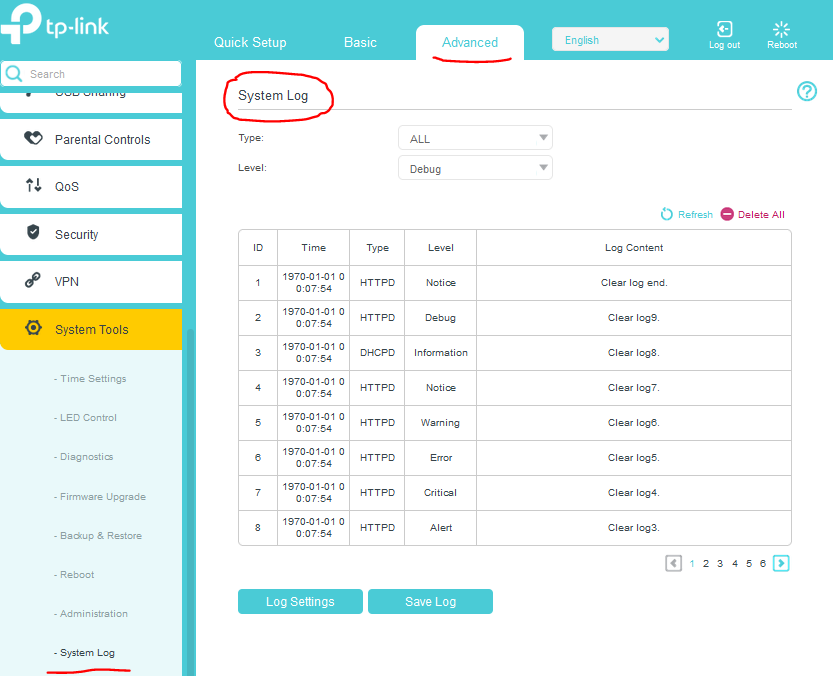
I would suspect its power supply. Did you see the logs on the VR600 ?

Every time the VR600 restarts its log records will be lost.

If this was helpful click on the arrow pointing upward to make it blue. If this solves your issue, click the star to make it blue and mark the post as a "Recommended Solution".
  0  
  0  
#2
Options
Re:Disconected issues
2024-03-19 09:47:20

  @terziyski Thank you for replay !


The device is not rebooting, the internet connection is down or disconected every 2-5 m in, How can i see the logs ?


Thanks again

  0  
  0  
#3
Options
Re:Disconected issues
2024-03-19 10:56:39

  @easyJet 


You can see the system logs here:


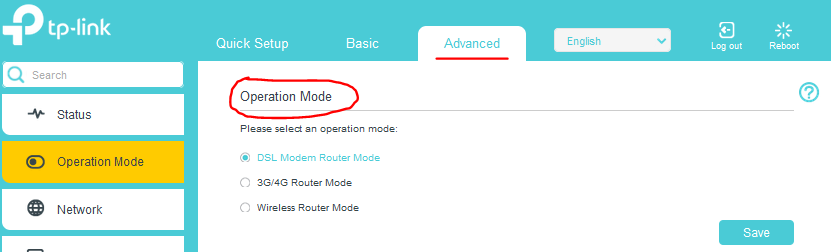
The operation mode of the device can be seen here:


If this was helpful click on the arrow pointing upward to make it blue. If this solves your issue, click the star to make it blue and mark the post as a "Recommended Solution".
  0  
  0  
#4
Options