
Online Firmware Update Issue

This thread has been locked for further replies. You can start a new thread to share your ideas or ask questions.

Online Firmware Update Issue

This thread has been locked for further replies. You can start a new thread to share your ideas or ask questions.

Online Firmware Update Issue
2025-06-06 08:29:32 - last edited 2025-06-11 08:40:15
Model: Archer AX53  
Hardware Version: V1
Firmware Version: 1.1.1 Build 20221107 rel.50044(5553)

I recently purchased the TP-Link Archer AX53 (US Version).
I’m located in Bangladesh, and I’m currently facing issues with online firmware updates.

I have manually updated the router to the latest firmware available on the TP-Link USA Download Center:

Current Firmware Version:
1.1.1 Build 20221107 rel.50044(5553) ( US )
(This is the latest version listed on the official US Download Center page.)

However, the router keeps prompting for an update to the following version:

Available Update Shown:
1.4.3 Build 20250314 rel.78903 (US)

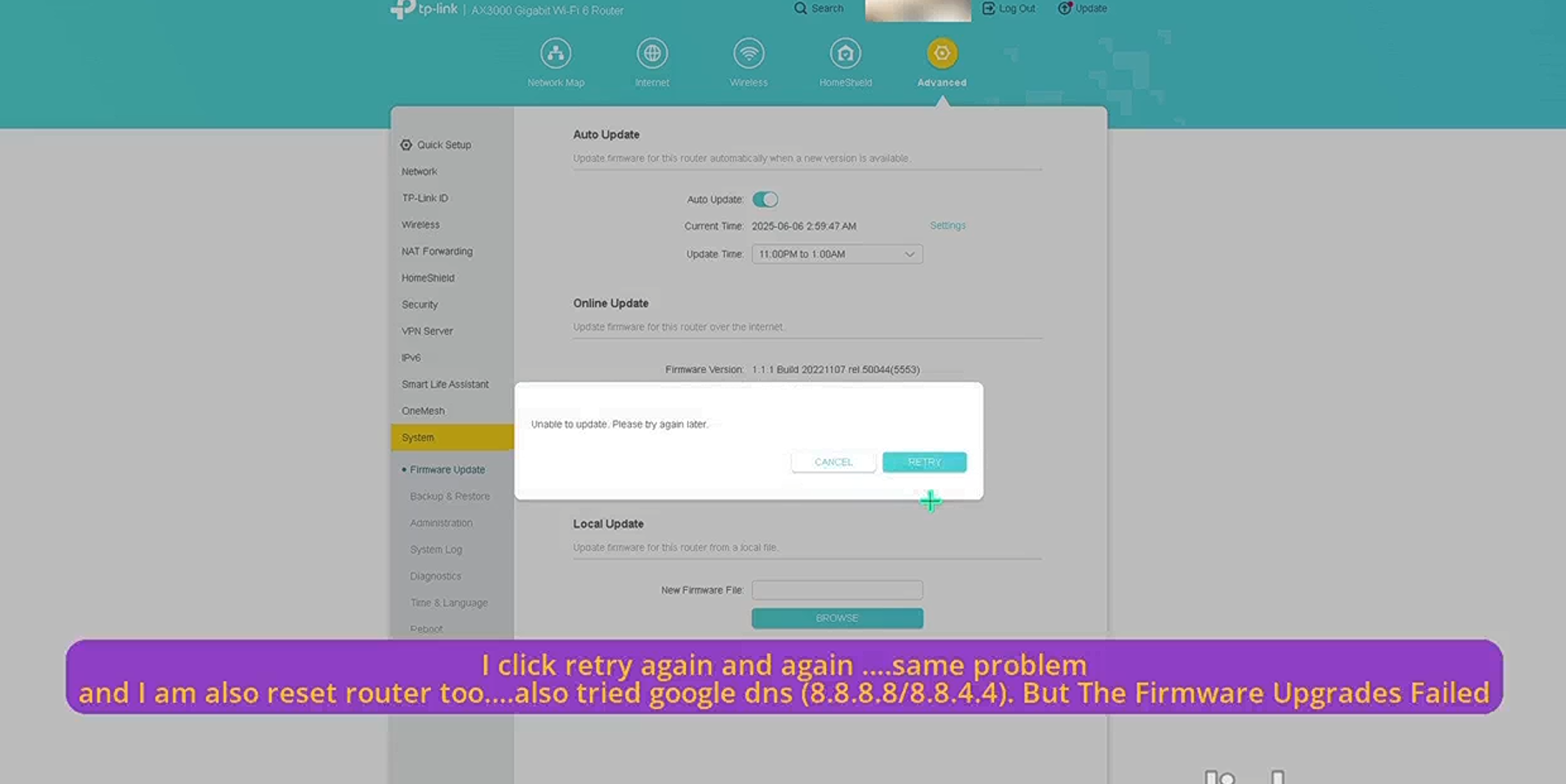
Each time I attempt the update via the router’s web interface, the download begins and the update process starts, but after a few seconds, it fails repeatedly.

I have already tried the following troubleshooting steps:

  • Changed DNS settings to 8.8.8.8 and 1.1.1.1

  • Rebooted the router after changing DNS

Unfortunately, the issue persists.

Additionally, the manual firmware file for version 1.4.3 Build 20250314 rel.78903 (US) is not yet available on the TP-Link USA support/download center, so I’m unable to apply the update manually.

Please advise on how to resolve this issue or when the updated firmware will be made available for manual download.

 

  1      
  1      
#1
Options
1 Accepted Solution
Re:Online Firmware Update Issue -Solution
2025-06-11 03:41:21 - last edited 2025-06-11 08:40:15

Hi@SONICVERSE,

Thank you for your reply with test results.


It is strange that you cannot update to the latest version. 

Would you mind trying to update firmware via the Tether APP?

Or you can install the firmware here. It is also a US version on one local official website.


If it still doesn't work, please contact local support for further help.

Recommended Solution
  3  
  3  
#8
Options
8 Reply
Re:Online Firmware Update Issue
2025-06-09 07:54:42

Hi@SONICVERSE,

Thank you for contacting our community.


Please check if you can login the TP-Link ID? 

It is recommended that you can install the firmware manually here: Pre-release Firmware for Archer AX53/AX58 Supports EasyMesh in AP Mode, Ethernet Backhaul, ECO Mode

If it doesn't work, please hard reset the router and try again.


Best Regards~

  0  
  0  
#2
Options
Re:Online Firmware Update Issue
2025-06-09 10:30:04
Is this the official version? Will it work on my US version of the Archer AX53 V1.0
  0  
  0  
#3
Options
Re:Online Firmware Update Issue
2025-06-09 10:40:28

Hi@SONICVERSE,

Yes,this pre-release firmware for Archer AX53/AX58 V1 can be applied to all versions (EU/US/AU/KR/etc.).

  0  
  0  
#4
Options
Re:Online Firmware Update Issue
2025-06-10 06:34:32
Bro Showing Upload Error and also I do hard reset ...but same
  0  
  0  
#7
Options
Re:Online Firmware Update Issue -Solution
2025-06-11 03:41:21 - last edited 2025-06-11 08:40:15

Hi@SONICVERSE,

Thank you for your reply with test results.


It is strange that you cannot update to the latest version. 

Would you mind trying to update firmware via the Tether APP?

Or you can install the firmware here. It is also a US version on one local official website.


If it still doesn't work, please contact local support for further help.

Recommended Solution
  3  
  3  
#8
Options
Re:Online Firmware Update Issue
2025-06-11 08:38:14
After Install 1.4.2 Build 20250305 rel.56105(5553) From Your Sending Website ......Now Online Updates Fixed ....Thank You
  1  
  1  
#9
Options
Re:Online Firmware Update Issue
2025-06-11 08:40:01
Also I am now upgrading to 1.4.3 Build 20250314 rel.78903(5553) Update firmware for this router over the internet.
  0  
  0  
#10
Options
Re:Online Firmware Update Issue
2025-06-11 08:48:43

@SONICVERSE,

Thank you for your update.

I am glad to hear that your issue can be resolved.

Please feel free to contact us if you have further questions~

  0  
  0  
#11
Options