Website unreacheable through PowerLink LAN

This thread has been locked for further replies. You can start a new thread to share your ideas or ask questions.

Website unreacheable through PowerLink LAN

This thread has been locked for further replies. You can start a new thread to share your ideas or ask questions.

Website unreacheable through PowerLink LAN
2025-06-21 08:33:42 - last edited 2025-07-07 01:54:26
Model: PG2400P KIT  
Hardware Version:
Firmware Version:

Country: Italy

ISP: Fastweb


I am having this weird issue where if I connect via a PowerLine LAN some websites are unreacheable (error unreacheable or quic protocol error) while if I connect via wi-fi everything works perfectly.


What should I do?


0
0
#1
1 Accepted Solution
Re:Website unreacheable through PowerLink LAN-Solution
2025-06-23 07:37:06 - last edited 2025-07-07 01:54:26

Hi@kaeros85,

Welcome to our community.


Do you know if there is any error message? Please take screenshots with the error message.


Please try different LAN ports for PG2400P KIT.

Please try accessing these websites through different clients to verify compatibility with the PG2400P KIT network.


If it doesn't work, please try a reset PG2400P KIT hard:

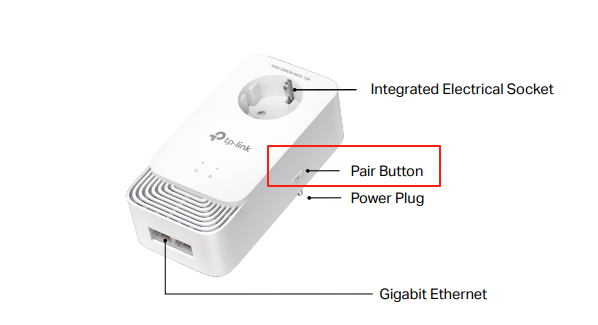
How to reset: Press and hold for more than 6 seconds to reset the powerline adapter.

How to pair: Press and hold the button for 1 second to join a powerline network.


Welcome to Community! Get the latest posts: △New Firmware for Archer GE550/GE650 V1 Introduces AI-QoS, EasyMesh IoT Expansion, and More! △New Firmware Releases for Archer BE805 V1/BE450 V1 to Support VPN Merge, New ECO Mode, and More! More posts, please see: △ Get the Ongoing Pre-release Firmware for Wi-Fi Routers Here— Subscribe for Updates! Urgent problems with your Wi-Fi Router, Range Extender, or DSL Modem? Please reach out via private Messages or @Joesph-TP in your new thread directly. Click Or ☆Recommended Solution if the post/answer helps.
Recommended Solution
0
0
#2
1 Reply
Re:Website unreacheable through PowerLink LAN-Solution
2025-06-23 07:37:06 - last edited 2025-07-07 01:54:26

Hi@kaeros85,

Welcome to our community.


Do you know if there is any error message? Please take screenshots with the error message.


Please try different LAN ports for PG2400P KIT.

Please try accessing these websites through different clients to verify compatibility with the PG2400P KIT network.


If it doesn't work, please try a reset PG2400P KIT hard:

How to reset: Press and hold for more than 6 seconds to reset the powerline adapter.

How to pair: Press and hold the button for 1 second to join a powerline network.


Welcome to Community! Get the latest posts: △New Firmware for Archer GE550/GE650 V1 Introduces AI-QoS, EasyMesh IoT Expansion, and More! △New Firmware Releases for Archer BE805 V1/BE450 V1 to Support VPN Merge, New ECO Mode, and More! More posts, please see: △ Get the Ongoing Pre-release Firmware for Wi-Fi Routers Here— Subscribe for Updates! Urgent problems with your Wi-Fi Router, Range Extender, or DSL Modem? Please reach out via private Messages or @Joesph-TP in your new thread directly. Click Or ☆Recommended Solution if the post/answer helps.
Recommended Solution
0
0
#2