
Tapo C411 – Repeating Audio Interference Noise (Spectrogram Attached)

Tapo C411 – Repeating Audio Interference Noise (Spectrogram Attached)

Tapo C411 – Repeating Audio Interference Noise (Spectrogram Attached)
2025-10-25 13:55:32 - last edited 2025-11-03 09:45:13
Model: Tapo C410 KIT  
Hardware Version: V2
Firmware Version: 1.3.1 Build 250916

Hi,
I recently purchased a Tapo C411 battery camera and I’m experiencing a constant repeating noise in both live view and recorded video/audio.

  • The issue occurs in a completely quiet room
  • It happens in every location I tested
  • Firmware is up to date
  • Audio settings reset do not help
  • Other Tapo cameras I own (Tapo C100 and other wired models) have clean audio


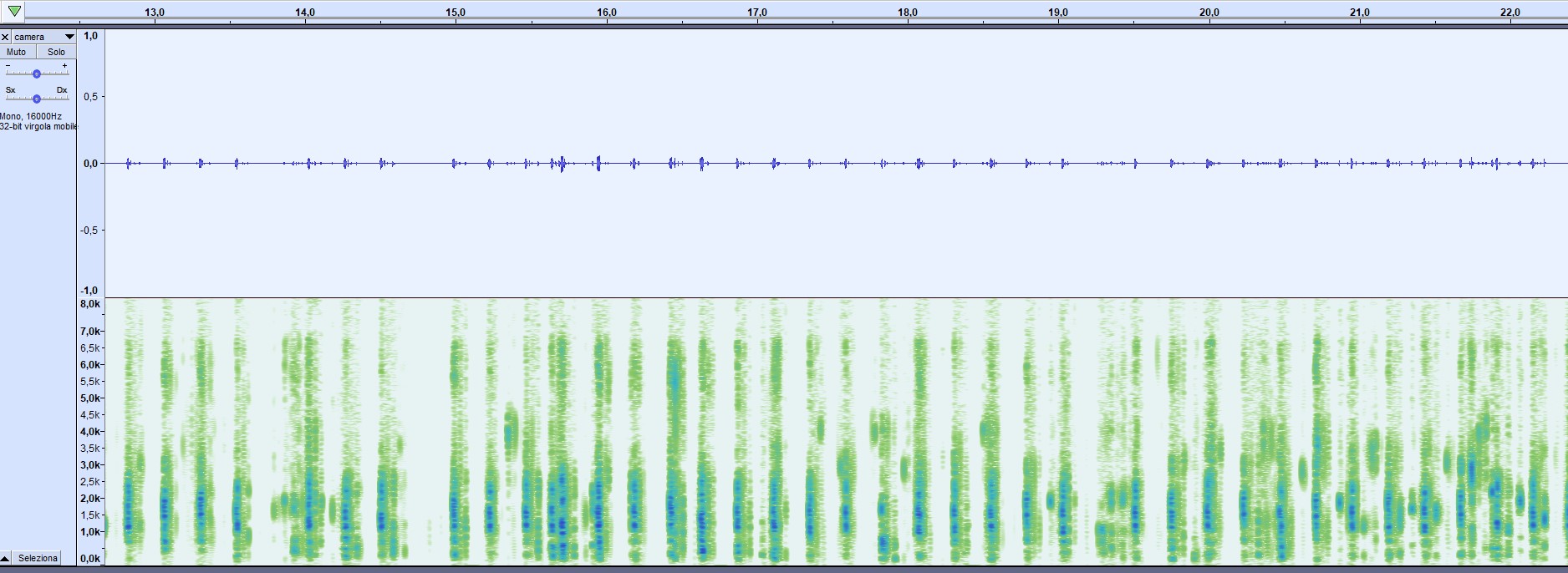
I recorded the sound and analyzed it in Audacity. The spectrogram shows narrow-band, periodic interference around 1.15–1.25 kHz and 1.55–1.56 kHz, repeating continuously. This may suggests internal switching noise leaking into the microphone circuit (likely DC-DC converter or Wi-Fi bursts).

This appears to be a hardware interference issue, not environmental noise.


I would like to know:

  1. Is this a known issue with the Tapo C411 and/or C410 battery version?

  2. Are there different hardware revisions with improved audio shielding?

  3. Should I request a replacement, or is this expected behavior for this model?

  4. Is there any planned firmware fix for this internal noise?


I’m attaching:

  • An audio sample (.flac)

  • A spectrogram screenshot showing the interference pattern


Any support or clarification would be greatly appreciated.
Thank you!


File:
camera.zipDownload
  0      
  0      
#1
Options
1 Accepted Solution
Re:Tapo C411 – Repeating Audio Interference Noise (Spectrogram Attached)-Solution
2025-11-02 12:45:56 - last edited 2025-11-03 09:45:13

  @Wayne-TP 


Tanks for the answer, but I am unable to change wifi mode on the router. 

Meanwhile I asked replace of the camera with a same mode, and the new one is working fine.

So probably was just an hardware issue of that item.

Recommended Solution
  1  
  1  
#3
Options
5 Reply
Re:Tapo C411 – Repeating Audio Interference Noise (Spectrogram Attached)
2025-10-29 07:29:18

  @tapotiger 


Please check if this helps: adjust the router's 2.4 GHz Wi-Fi mode to 802.11b only or 802.11n only.

CES 2026 Meet TP-Link AI Assistant and More New Products!
  0  
  0  
#2
Options
Re:Tapo C411 – Repeating Audio Interference Noise (Spectrogram Attached)-Solution
2025-11-02 12:45:56 - last edited 2025-11-03 09:45:13

  @Wayne-TP 


Tanks for the answer, but I am unable to change wifi mode on the router. 

Meanwhile I asked replace of the camera with a same mode, and the new one is working fine.

So probably was just an hardware issue of that item.

Recommended Solution
  1  
  1  
#3
Options
Re:Tapo C411 – Repeating Audio Interference Noise (Spectrogram Attached)
2025-11-03 09:45:47

  @tapotiger Thank you for your update, i'm glad to hear that the problem is solved!

CES 2026 Meet TP-Link AI Assistant and More New Products!
  0  
  0  
#4
Options
Re:Tapo C411 – Repeating Audio Interference Noise (Spectrogram Attached)
Wednesday - last edited Wednesday

  @Wayne-TP 

I recently installed the same camera and I'm experiencing the same issue. It’s connected directly to the router, and it also connects to the H500 as a backup with strong connectivity. I would appreciate your support.

The problem is that the audio is very hard to hear—conversation-level sounds are barely picked up. I’ve attached a link demonstrating the audio (the video has been cropped).

Model: C411

Hardware Version: 2.0

Firmware Version: 1.3.2

https://youtu.be/lI-GkNmkoG4?si=6LjXq0q10iOVymsA

  0  
  0  
#5
Options
Re:Tapo C411 – Repeating Audio Interference Noise (Spectrogram Attached)
Yesterday

Evergreen48 wrote

  @Wayne-TP 

I recently installed the same camera and I'm experiencing the same issue. It’s connected directly to the router, and it also connects to the H500 as a backup with strong connectivity. I would appreciate your support.

The problem is that the audio is very hard to hear—conversation-level sounds are barely picked up. I’ve attached a link demonstrating the audio (the video has been cropped).

Model: C411

Hardware Version: 2.0

Firmware Version: 1.3.2

https://youtu.be/lI-GkNmkoG4?si=6LjXq0q10iOVymsA

  @Evergreen48 


For your case, we recommend reaching out to the local support team directly for assistance. Contact Technical Support 


Make sure to include some original video clips downloaded directly from the camera in the email, as well as the device's Mac address. How to save and download videos from Tapo devices

CES 2026 Meet TP-Link AI Assistant and More New Products!
  0  
  0  
#6
Options

