
< Deco
Firmware upgrade missing button
Firmware upgrade missing button
Posts: 1
Helpful: 0
Solutions: 0
Stories: 0
Registered: 2025-11-13

2025-11-13 07:43:12 - last edited 2025-12-03 11:02:03
Posts: 1
Helpful: 0
Solutions: 0
Stories: 0
Registered: 2025-11-13
Firmware upgrade missing button
2025-11-13 07:43:12 - last edited 2025-12-03 11:02:03
Tags:
#Firmware Update
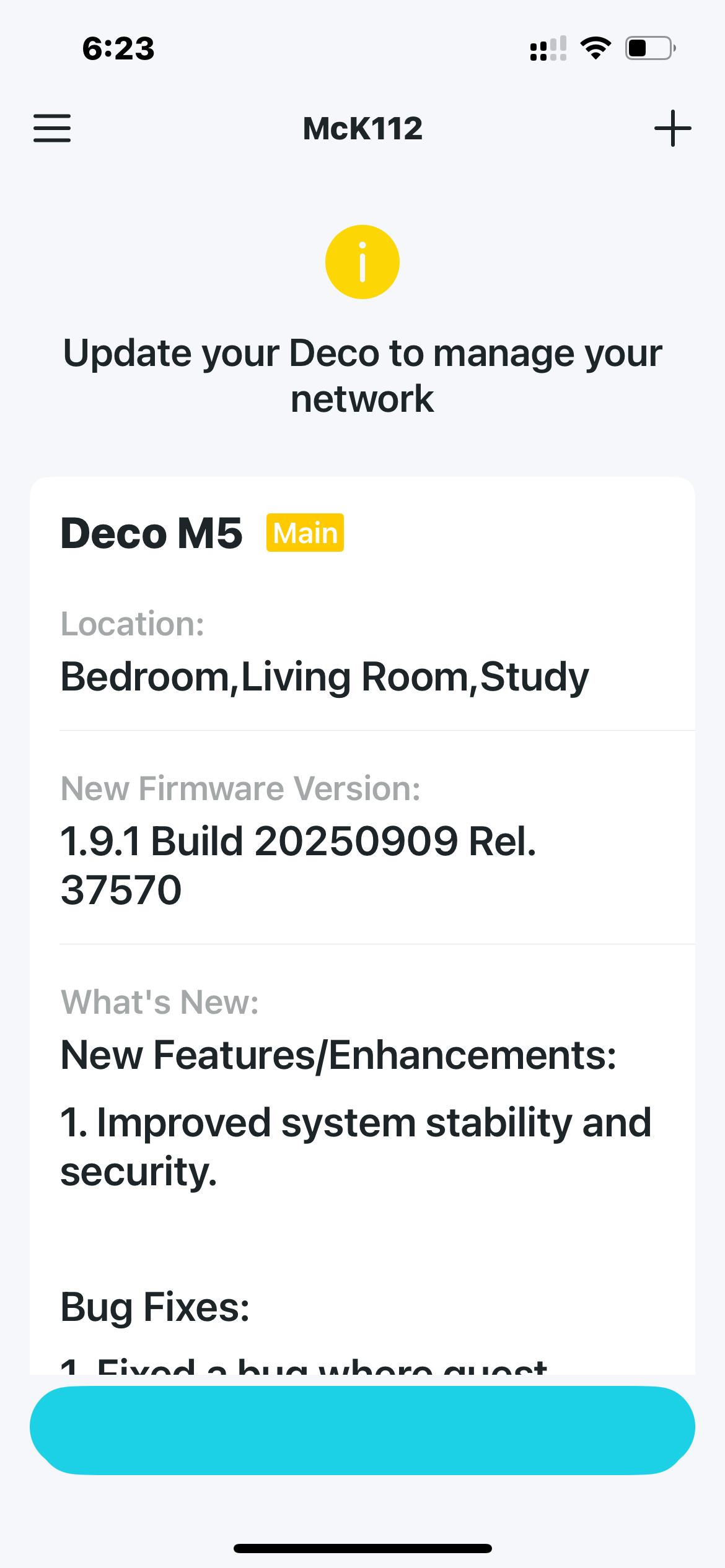 The button to download the latest firmware is not there and goes nowhere. Won't let me use the app unless I update. Please fix
#1
Options
- Copy Link
- Subscribe
- Bookmark
- Report Inappropriate Content
Thread Manage
Module Manage
Announcement Manage
1 Accepted Solution
Posts: 18232
Helpful: 2699
Solutions: 3271
Stories: 9
Registered: 2020-04-14


2025-11-14 03:37:00 - last edited 2025-12-03 11:02:03
Posts: 18232
Helpful: 2699
Solutions: 3271
Stories: 9
Registered: 2020-04-14
Re:Firmware upgrade missing button-Solution
2025-11-14 03:37:00 - last edited 2025-12-03 11:02:03
Hi, it is also suggested to power restart the Deco units and kill the Deco app, then log in again to see whether it helps.
Best regards.
Recommended Solution
2
We appreciate your feedback. Feel free to let us know more. Log in to submit feedback.
2
We appreciate your feedback. Feel free to let us know more. Log in to submit feedback.
#3
Options
- Copy Link
- Report Inappropriate Content
Thread Manage
Module Manage
Announcement Manage
2 Reply

Posts: 1279
Helpful: 524
Solutions: 72
Stories: 0
Registered: 2023-12-03
Re:Firmware upgrade missing button
2025-11-13 16:40:23
@Territowelling You can update the firmware from the Web UI (192.168.68.1)
Please & Thank You !! ❤️
1
We appreciate your feedback. Feel free to let us know more. Log in to submit feedback.
1
We appreciate your feedback. Feel free to let us know more. Log in to submit feedback.
#2
Options
- Copy Link
- Report Inappropriate Content
Thread Manage
Module Manage
Announcement Manage
Posts: 18232
Helpful: 2699
Solutions: 3271
Stories: 9
Registered: 2020-04-14
2025-11-14 03:37:00 - last edited 2025-12-03 11:02:03
Posts: 18232
Helpful: 2699
Solutions: 3271
Stories: 9
Registered: 2020-04-14
Re:Firmware upgrade missing button-Solution
2025-11-14 03:37:00 - last edited 2025-12-03 11:02:03
Hi, it is also suggested to power restart the Deco units and kill the Deco app, then log in again to see whether it helps.
Best regards.
Recommended Solution
2
We appreciate your feedback. Feel free to let us know more. Log in to submit feedback.
2
We appreciate your feedback. Feel free to let us know more. Log in to submit feedback.
#3
Options
- Copy Link
- Report Inappropriate Content
Thread Manage
Module Manage
Announcement Manage
Posts: 1
Helpful: 0
Solutions: 0
Stories: 0
Registered: 2025-11-13
2025-11-13 07:43:12 - last edited 2025-12-03 11:02:03
Posts: 1
Helpful: 0
Solutions: 0
Stories: 0
Registered: 2025-11-13
Information
Helpful: 0
Views: 216
Replies: 2
Voters 0
No one has voted for it yet.
Tags
Report Inappropriate Content
Transfer Module
New message