Sky Q and Sky Go - wired vs wireless...

Sky Q and Sky Go - wired vs wireless...

Sky Q and Sky Go - wired vs wireless...
Monday
Model: Deco BE65  
Hardware Version:
Firmware Version: 1.2.0 Build 20250718 Rel. 43949

Now this *was* working, but I'm jiggered if I can work out how I broke it! Three BE65 units operating in Access point mode.

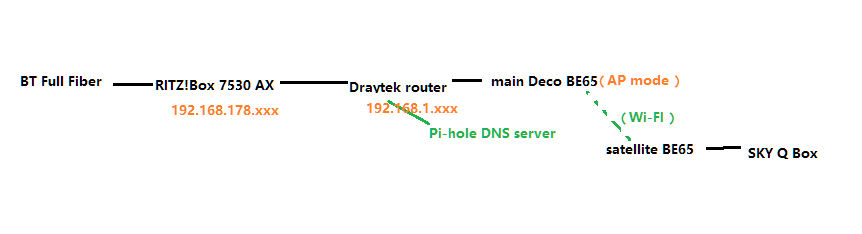
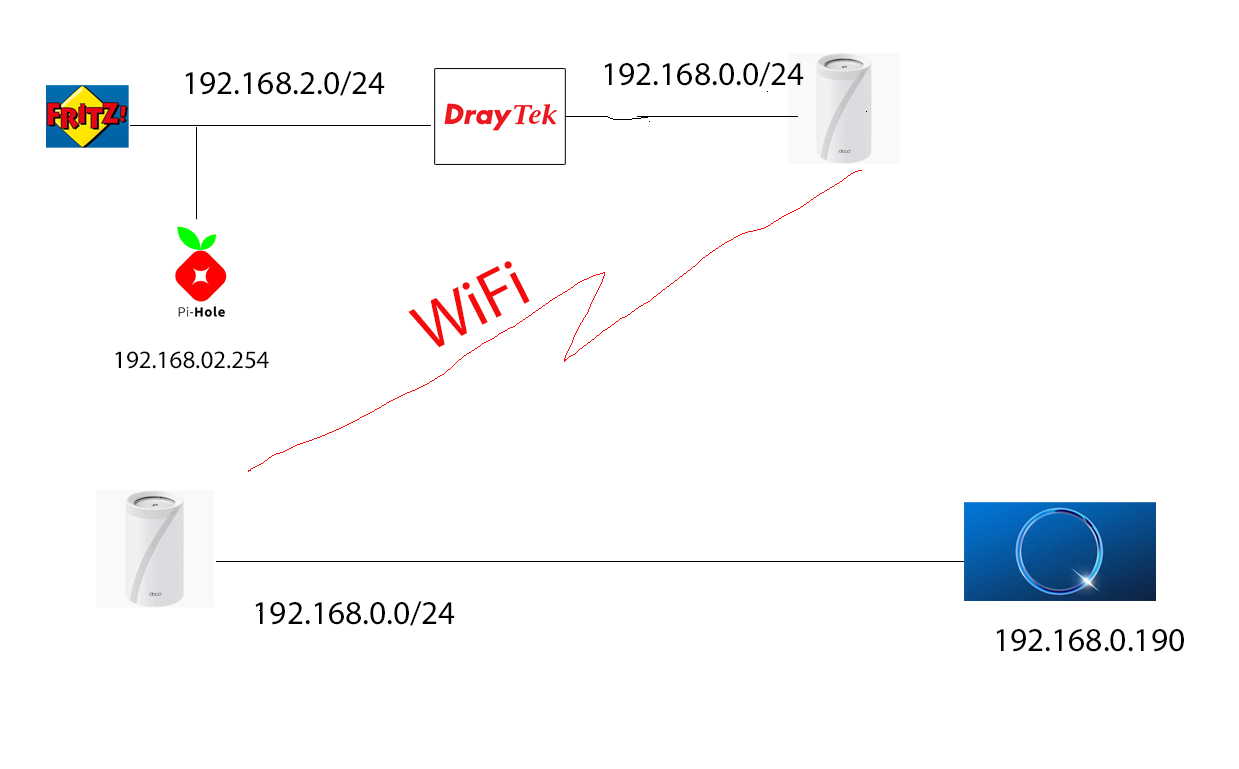
Sky Q 2TB (both wifi frequencies disabled), ethernet cable to BE65 which is connected via wifi to... another BE65 (well, duh) which is connected via cable to a Draytek router. Draytek routes to another IP segment which has a raspberry PI running Pi-hole as my DNS server, and this segment is attached to a Frit!box 7530AZ router, connected to BT full fibre. 


OK, recently, the Sky GO app will not connect to the Sky Q box wirelessly - If I plug a laptop via ethernet into any of the BE65 units I can connect to the Sky Q box, but not if the laptop is using wifi, nor can I connect using my android phone or iPad.  The Sky Q box is quite happily connecting to the internet and downloading content.


If I do a network reset on the Sky Q box, I *may* get a wifi device to connect, but only for a few minutes (we were watching a recording from the SKy Q on an iPad and it just errored out after a few mins.


Are there any diagnostics I can use to narrow this down, do you think?


Many thanks


Shaun

  2      
  2      
#1
Options
5 Reply
Re:Sky Q and Sky Go - wired vs wireless...
Tuesday

  @ShaunPond 

Hi, welcome to the community.

Is the network topology like:

Is Deco WiFi Mesh the only Wireless network available?

Would there be any changes to the network topology, such as starting to use Pi-Hole as the DNS server?


Can you constantly reproduce this issue:

"the Sky GO app will not connect to the Sky Q box wirelessly. If I plug a laptop via ethernet into any of the BE65 units I can connect to the Sky Q box, but not if the laptop is using wifi, nor can I connect using my android phone or iPad. "

-If the laptop/mobile phone/iPad is connected to the WiFi of the same satellite Deco BE65, would there be any difference?


Wait for your reply.

Best regards.


  0  
  0  
#2
Options
Re:Sky Q and Sky Go - wired vs wireless...
Tuesday

  @David-TP Hello, and thank you! You are basically correct - I have shown here the correct IP addresses, which may help if you need to ask me something about any of them 😊

I can reproduce the problem each time - if I use ethernet to connect to any of the tp-link devices (I have a third one, also wifi connected as well) I can see the Sky Q box. Wifi from the same tp-link (I checked the device list to make sure that I was attached to the correct device) I cannot see it. I don't know if thee's a way to get the SKY Q box to respond on one of its open ports so that I can confirm that iI have a connection? There is a NAS also wired to the same unmanaged switch (not shown in diagram) as the Sky Q box and I have no problem accessing files on that.

  1  
  1  
#3
Options
Re:Sky Q and Sky Go - wired vs wireless...
Yesterday
Forgot to say yes, the Deco mesh is the only wifi available (checked using a wifi scanner, in case the Sky Q box decides to turn its wifi back on 😉
  1  
  1  
#4
Options
Re:Sky Q and Sky Go - wired vs wireless...
Yesterday

  @ShaunPond 

Thank you very much for the update.

I'd like to escalate your case to the senior engineer for further assistance. Please check whether you have received my email.

Thanks a lot.

Best regards.

  0  
  0  
#5
Options
Re:Sky Q and Sky Go - wired vs wireless...
21 hours ago

  @David-TP Thank you, I have the email

  0  
  0  
#6
Options