
Er706w v1.0 failed to reconnect to Remote controller after each power fail

My cabin is running some network with solar panel and battery.
In darker day of winter I must shut down the power when i'm off site to save the battery.
Last winter, everytime I power up the system, everything work as usual perfectly.
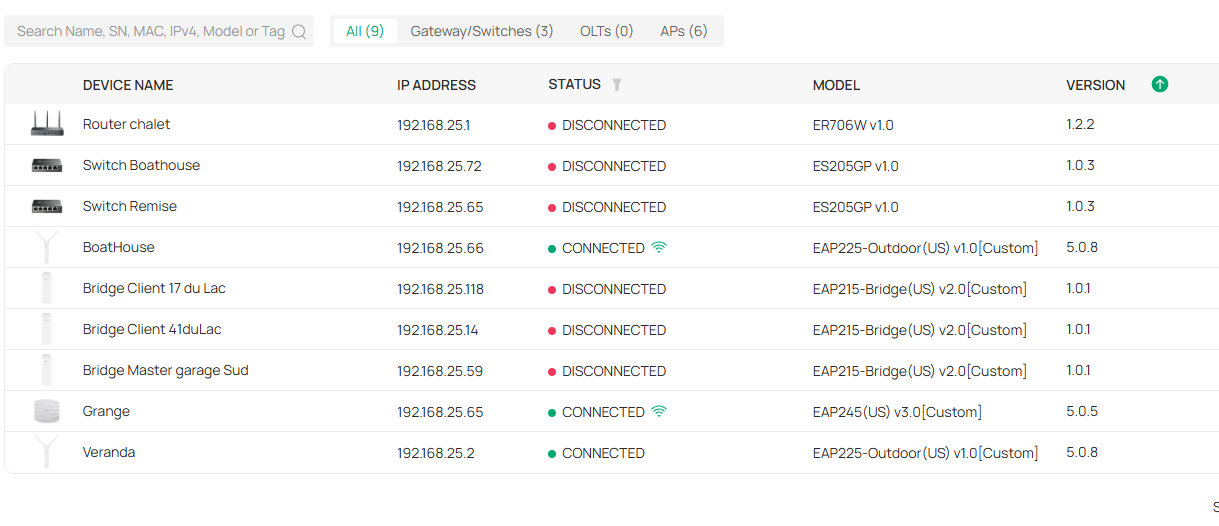
This winter each time I power up the system, the Er706w and some other device stay disconnected from remote Omada controller (home)
The VPN (wireguard) don't come up so cabin is completly isolated from remote control (2 hours car drive)
The cabin network use Starlink as provider
The only way to reconnect the Er706 is to reset it and readopt it with the controller, doing this made configuration come back and other device automaticly reappear connected to the controller. Not very usefull for my wife and guest.
The power of the cabin Been on a timer in the winter for monitoring heating and battery, this problem cause lot of trouble managing the cabin. Adding time consuming to reconfigring it. The system is presently unreliable.
Firmware has been updated since last winter (firmware problem) , the system work flawless until this new winter
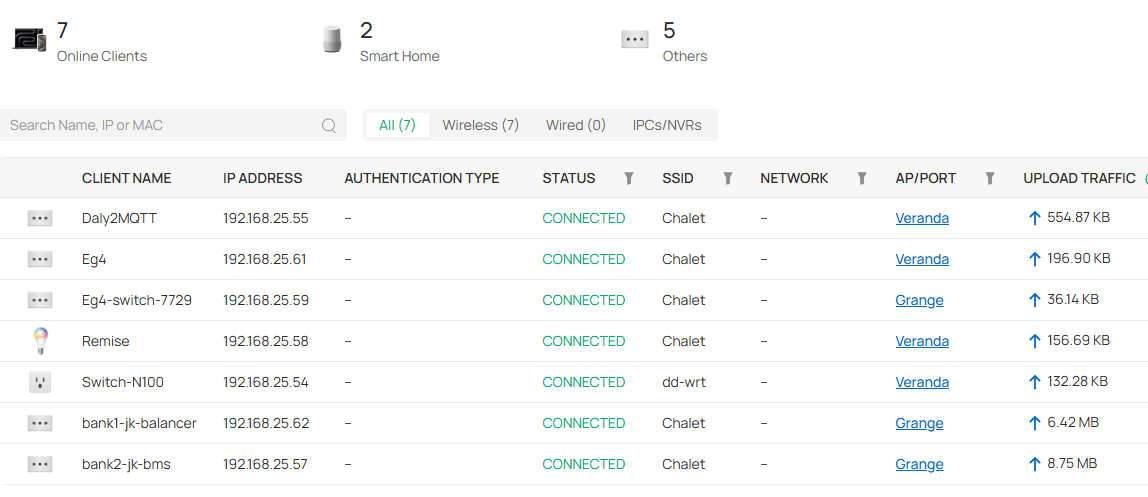
I joined the screenshot of the controller (cabin Site)
My best regards
Thank you
Gaétan
- Copy Link
- Subscribe
- Bookmark
- Report Inappropriate Content
Hi everyone,
I finaly found the reason of my problem.
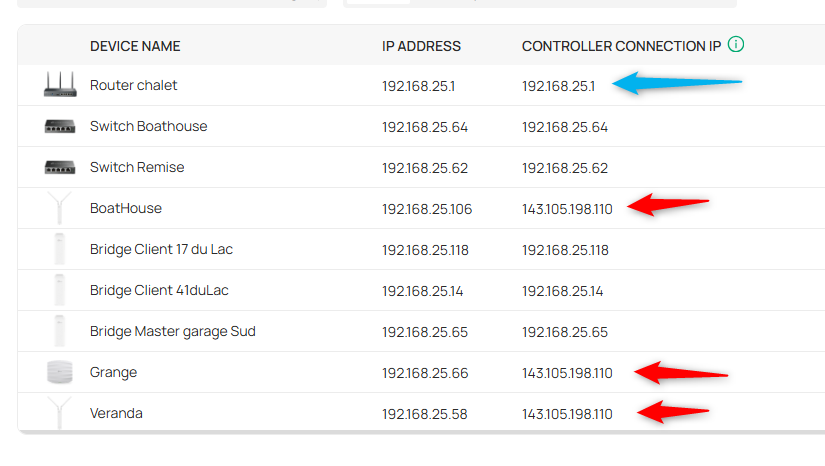
For unknow reason, older device of the cabin use external IP to connect to the controler (inform URL) and newer device used the local IP of the controller(been linked with VPN everything work until power fail)
So when the vpn is Up, everything work well.
Gateway suddenly also use local IP (inform URL) probably after a firmware update, so after a reboot (power up of the cabin), he does reach the controller and failed to mount the wireguard VPN.
Problem was discover in winter because in summer the cabin is always power on.
In the last year, update was made of the firmware of the cabin gateway (er706w) and few time the controller version.
What Happen? Inform url changed after a update of the controller, then a firmware update of the gateway also change the inform URL in the gateway.
Changing back the InformURL in the controller solve everything.
I used omada discovery to update Inform URL of failling device (fast and effective)
I cannot use the omada discovery for the gateway (not detected) so I reset the gateway another time and readopt it, then everything Work perfectly since last week (one power on each day)
In the picture red arrow means old device with good informURL, blue arrow is the gateway with bad informURL
I hope this can help
PS: sorry for my english
- Copy Link
- Report Inappropriate Content


Hi @Firemen027
Thanks for posting here.
The VPN (wireguard) don't come up so cabin is completely isolated from remote control
>>>VPN do not need to connect to the controller to take effect. It appears that the router has not started successfully, or the network functions have not been restored. In this regard, please provide the following information to understand the specific situation.
1. What kind of controller are you using? What's the firmware version?
2. The topology of the two sites, including the main site and the cabin, please also note the model number of the Omada devices you are using;
3. How did you manage the remote site? via VPN connection? Please share the screenshots of the related config.
4. When the router is disconnected, is it possible to check the router's LED status? is the Internet in the cabin still working?
- Copy Link
- Report Inappropriate Content
Answer 1: Controlller ver: 6.0.0.25 in virtual linux machine running under proxmox, The port for the controller (ip 192.168.27.233) are forwarded to public IP, 
Answer 2: Home (main) topology; the gateway is a ER707-M2 v1.0, firmware 1.3.1 Build 20251009 Rel.67687
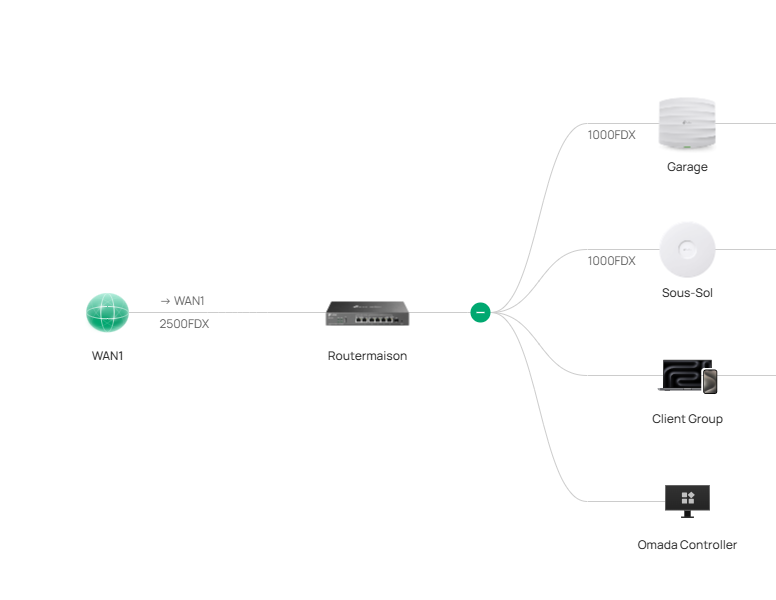
Topology of the cabin: The router ER706W v1.0 firmware 1.2.2 Build 20250821 Rel.60581 receive the IP from starlink (Starlink is in Bypass mode like a nomal provider)
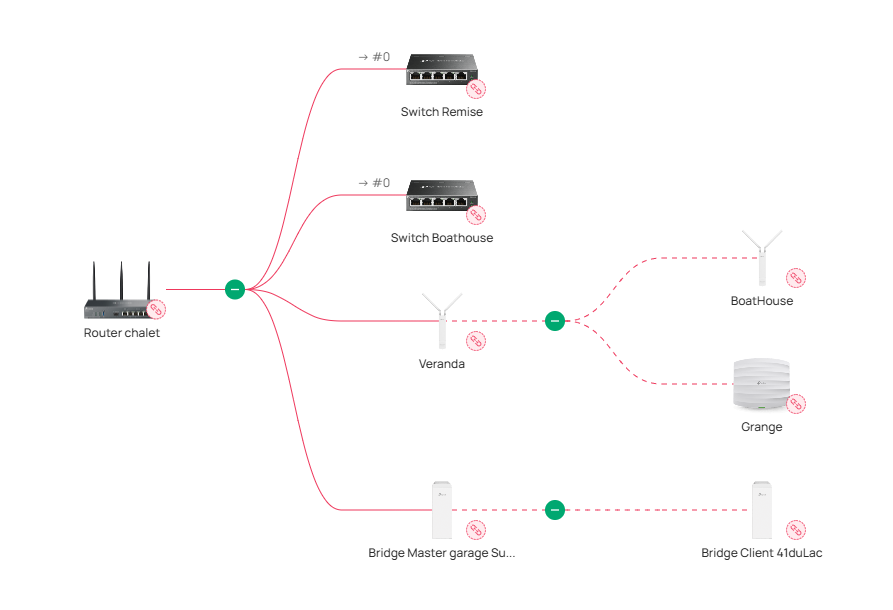
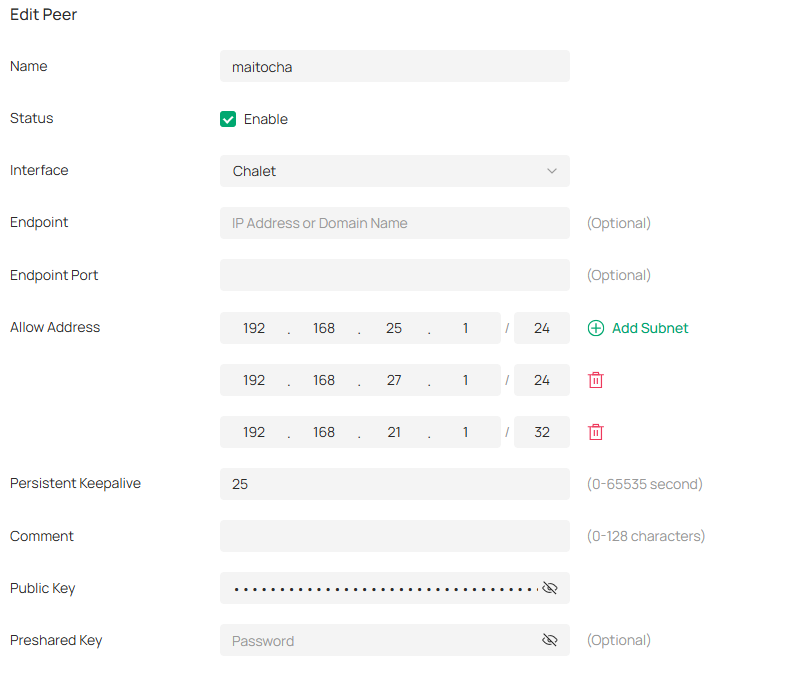
Answer 3: When the cabin gateway boot normaly, it reach the controler on the public IP of home network. It also built up a VPN a birectionnal Wiregard connection to home Gateway. The home is the server and the cabin is the client. (note those part work flawless when the Cabin gateway boot normaly)
Cabin Peers
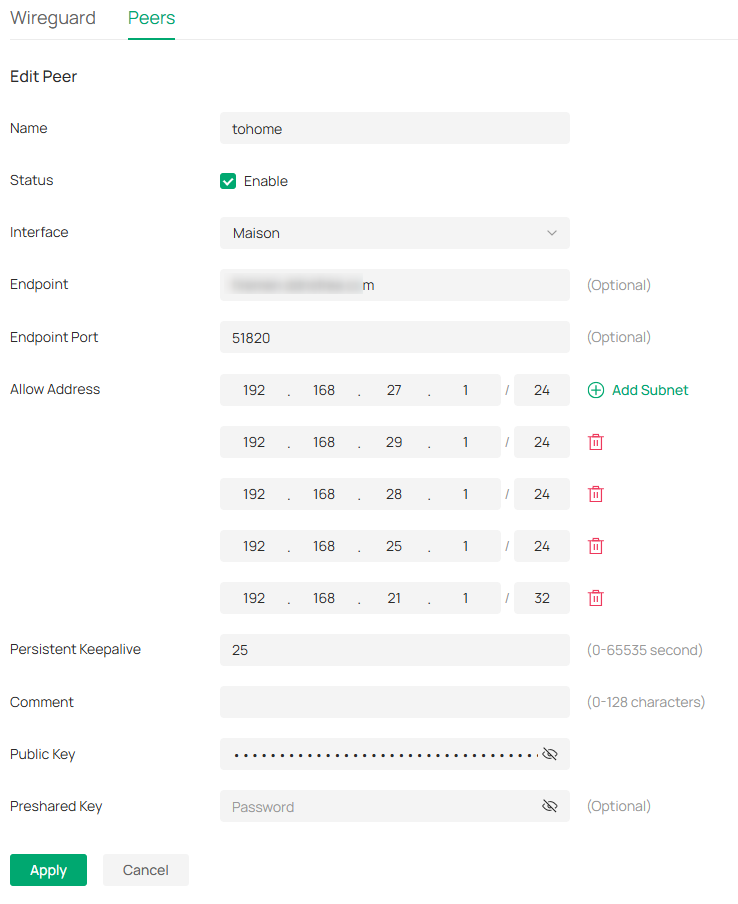
Home peers
Answer 4: Some part of the internet work at the cabin because some client connect but other not., Some device also connect to the controller wired and wireless but not the gateway. Gateway, switch and bridge stay offlinebut All AP reconnect to the controller at the power up.
Last winter never a power up cause this probleme (same hardware)
What I change: Cabin gateway firmware, controler version, and maybe the home gateway firmware
For the LEdstatus , I will not be at the cabin until next weeks, the Power come on from 10h00am to 10h30 am
I think the problem is really in the firmware of the ER706W v1.0 (maybe a DNS issue at boot)
My best regards
Gaetan
- Copy Link
- Report Inappropriate Content

Hi @Firemen027, do you happen to know if you have Intrusion Detection/Prevention on your ER706W set to Detect and Prevent (IPS)?
In No internet after firmware upgrade ER706W (from 1.2.0 via 1.2.1 to 1.2.2) - Business Community I described that my second site had no internet after a firmware upgrade of my ER706W from 1.2.0 via 1.2.1 to 1.2.2. Disabling Intrusion Detection/Prevention at least was a temporary workaround.
Possibly your ER706W has the same issue which prevents it from reconnecting to your remote controller.
- Copy Link
- Report Inappropriate Content
Thank you @WM1 , but the intrusion detection is not enable. so that's not my problem here. Still searching
- Copy Link
- Report Inappropriate Content
Thank you for all the details.
One more thing I want to confirm:
Answer 4: Some part of the internet work at the cabin because some client connect but other not., Some device also connect to the controller wired and wireless but not the gateway. Gateway, switch and bridge stay offlinebut All AP reconnect to the controller at the power up.
The title of this post only mentions that the ER706W does not automatically reconnect; here, you also include the switch and the bridge APs. Please help us confirm if only the ER706W is affected?
To better assist you, I've created a support ticket via your registered email address and escalated it to our support engineer to look into the issue. The ticket ID is TKID251245597. Please check your email box and ensure the support email is well received. Thanks!
Once the issue is addressed or resolved, please update this topic thread with your solution to help others who may encounter the same problem as you did.
Many thanks for your excellent cooperation and patience!
- Copy Link
- Report Inappropriate Content
I confirm then some other device are not connected to the controller.
I don't explicitly report that because last time I reset the Er706 W and readopt it in the controller, everything come up normaly and very fast. So in my view the only problem is the gateway. But next power cut, the problem come back.
Adding some detail about device (both switch are in accessory building at the cabin and are connected to EAP one in shed and the other in boathouse). wired client of switch don't have internet, I believe then the lan port of the switch don't have network. The wifi Still work.
Here I make some annotation in the topology
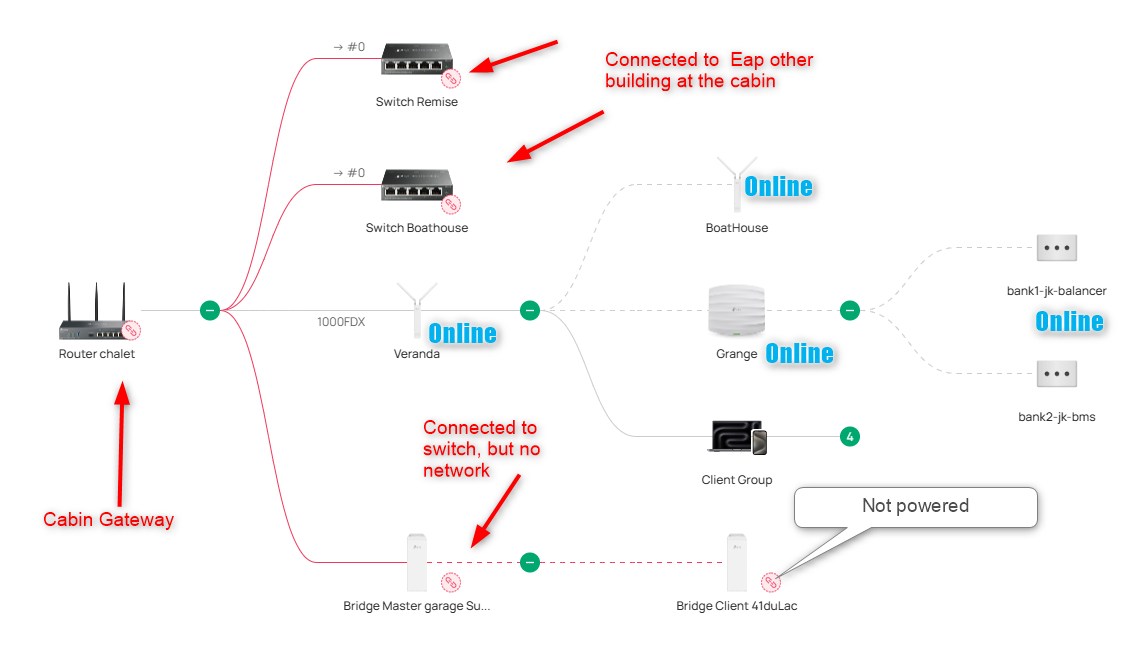
I will not be at the cabin until few day, so lot of testing will be hard to do until then.
Also, one of my easy test will be to roll back firmware of the Er706 to the one used last winter. I need to do that when i'm at the cabin for few day.
I will follow this part of the test here.
All other test will be by the ticket opened for my problem.
My best regards
- Copy Link
- Report Inappropriate Content
Hi everyone,
I finaly found the reason of my problem.
For unknow reason, older device of the cabin use external IP to connect to the controler (inform URL) and newer device used the local IP of the controller(been linked with VPN everything work until power fail)
So when the vpn is Up, everything work well.
Gateway suddenly also use local IP (inform URL) probably after a firmware update, so after a reboot (power up of the cabin), he does reach the controller and failed to mount the wireguard VPN.
Problem was discover in winter because in summer the cabin is always power on.
In the last year, update was made of the firmware of the cabin gateway (er706w) and few time the controller version.
What Happen? Inform url changed after a update of the controller, then a firmware update of the gateway also change the inform URL in the gateway.
Changing back the InformURL in the controller solve everything.
I used omada discovery to update Inform URL of failling device (fast and effective)
I cannot use the omada discovery for the gateway (not detected) so I reset the gateway another time and readopt it, then everything Work perfectly since last week (one power on each day)
In the picture red arrow means old device with good informURL, blue arrow is the gateway with bad informURL
I hope this can help
PS: sorry for my english
- Copy Link
- Report Inappropriate Content
Information
Helpful: 0
Views: 919
Replies: 7
Voters 0
No one has voted for it yet.