
ISSUE ON VPN CONNECTIVItY WITH FEDORA 43

I have created one VPN
Able to Connect with Windows and Mac Os
Not Able to Connect with Fedora 42/43
- Copy Link
- Subscribe
- Bookmark
- Report Inappropriate Content


As communicated in the email, the reason for this situation is that the gateway ER7212PC uses the default encryption algorithms ike=3des-md5-modp1024, 3des-sha1-modp1024, aes-sha1-modp2048!, while Fedora (using Fedora 43 Workstation + NetworkManager-l2tp-1.52.0 in our local lab) uses the default encryption algorithms aes256-sha2_256-modp2048, aes256-sha2_256-modp1536, aes256-sha1-modp2048, aes256-sha1-modp1536, aes256-sha1-ecp_384, aes128-sha1-ecp_256, 3des-sha1-modp2048, which have no common algorithms causing the Fedora cannot connect to the L2TP VPN properly.
If you would like a beta firmware to fix it, please reply to that email. Thanks.
- Copy Link
- Report Inappropriate Content

Thanks for posting in our business forum.
May I ask what kind of client to site VPN you configured? Can you provide the configuration screenshots and the error when you tried to connect to the VPN via the Fedora?
- Copy Link
- Report Inappropriate Content
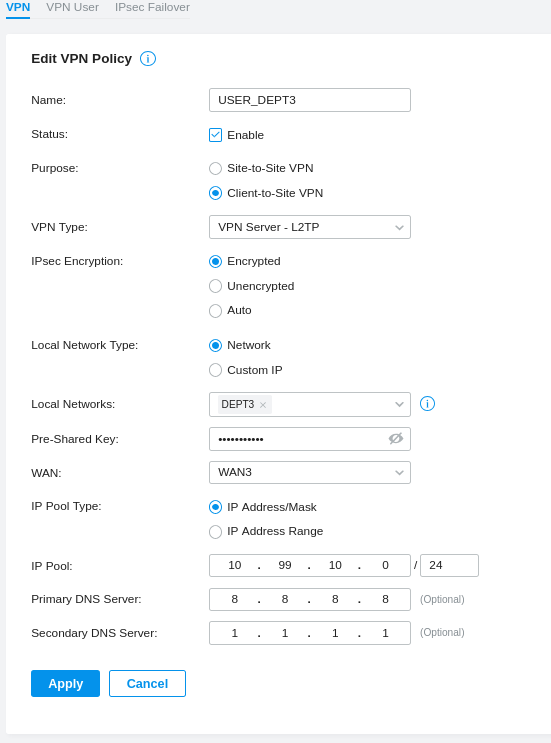

- Copy Link
- Report Inappropriate Content
Thank you so much for taking the time to post the issue on the TP-Link community!
To better assist you, I've created a support ticket via your registered email address and escalated it to our support engineer to look into the issue. The ticket ID is TKID260116213 please check your email box and ensure the support email is well received. Thanks!
Once the issue is addressed or resolved, welcome to update this topic thread with your solution to help others who may encounter the same issue as you did.
Many thanks for your great cooperation and patience!
- Copy Link
- Report Inappropriate Content
As communicated in the email, the reason for this situation is that the gateway ER7212PC uses the default encryption algorithms ike=3des-md5-modp1024, 3des-sha1-modp1024, aes-sha1-modp2048!, while Fedora (using Fedora 43 Workstation + NetworkManager-l2tp-1.52.0 in our local lab) uses the default encryption algorithms aes256-sha2_256-modp2048, aes256-sha2_256-modp1536, aes256-sha1-modp2048, aes256-sha1-modp1536, aes256-sha1-ecp_384, aes128-sha1-ecp_256, 3des-sha1-modp2048, which have no common algorithms causing the Fedora cannot connect to the L2TP VPN properly.
If you would like a beta firmware to fix it, please reply to that email. Thanks.
- Copy Link
- Report Inappropriate Content
Information
Helpful: 0
Views: 407
Replies: 4
Voters 0
No one has voted for it yet.