
Best Learning Resources for TP Link products in controller mode

Hi there,
Just wanted to ask what the best learning resources are for the Omada platform? (docs, training, or otherwise)
I'll be honest I had a rough time getting a basic guest VLAN working, and a lot of that came down to how information is presented in the UI. Critical state is communicated through colors and topology shapes rather than explicit text, which made troubleshooting unnecessarily difficult.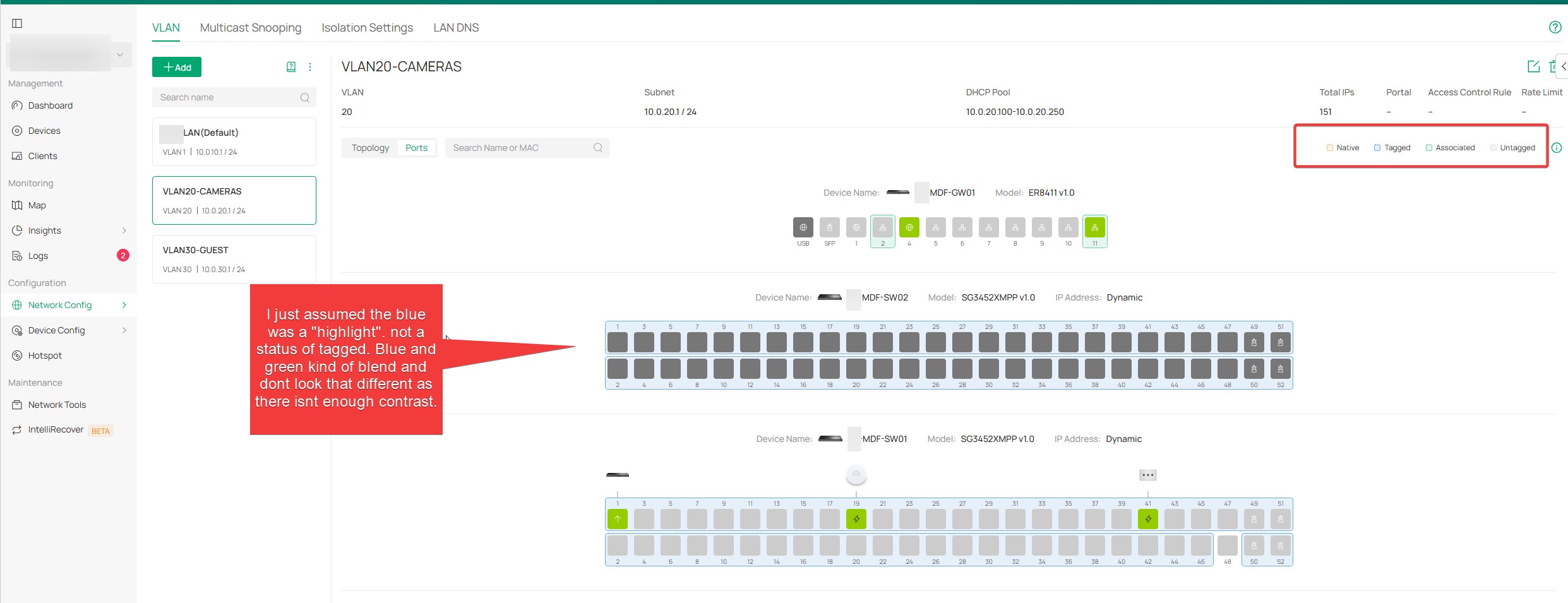
Here’s what bit me:
When I first unpacked and deployed the system, I created a Guest VLAN and it was associated with Port 11 on the gateway. Later, as the deployment evolved, all TP-Link switches ended up connected through Port 10 instead. So things stopped working but nothing LOOKED wrong.
DHCP existed and enabled. VLAN existed and enabled in AP and switches. Trunk ports configured. APs were tagging VLANS correctly. However, authenticated clients on guest SSID were getting 169.254.X.X addresses.
What I eventually discovered is that viewing or changing VLAN-to-gateway port associations requires going through a wizard, not the port editor. Network Config > Wired Networks> LAN > Edit LAN > Hit Next to go to Page 2.
Only in this wizard was I able to see or change which gateway ports are "Associated" with VLANS (1, 10, 30)
I kept trying to search for this information in Devices > Gateway > Ports, expecting to see tagged or untagged information. Don't get me started on how data is inferred through color coding in the topology view rather than labels or text.
I found this after having resolved the issue on my own, which I would of found it earlier or connected the dots sooner: How to configure VLAN with Omada Network v6 | Omada Network Support
Anyways as much as I would like to blame TP Link, the error is user training and expectations (maybe UI a bit), which would be me.
So my question, other than paying basically multiple thousands of dollars for both wireless and Routing Omada e-learning what is everyone else doing to get up to speed properly.
Are there recommended docs, diagrams, or training paths that focus on real-world deployment pitfalls like this?
Maybe I should have called support, are there different levels of support? Do they assist with deployments or just "device powers on and off" kind of support. If it is the latter I think I made an uninformed purchase.

