
Starlink in bridge mode: fast upload, 0.7mbps download. duplex mode issue (possibly) on tp-link

Starlink in bridge mode: fast upload, 0.7mbps download. duplex mode issue (possibly) on tp-link

Starlink in bridge mode: fast upload, 0.7mbps download. duplex mode issue (possibly) on tp-link
Wednesday
Model: EX141  
Hardware Version: V2
Firmware Version:

I've put my Starlink (gen 3 with gen 3 router) in bridge mode and connected it to the WAN of a TP-Link router (EX-141/EX-220/Ax1800). I can connect to the internet, but download is really slow (0.7mbps) while upload is high (30mbps).

AI told me this is a duplex problem, when the WAN port speed is misidentified. Indeed, it shows up as 100mbps only:


LAN1 - Disconnected

LAN2 - 1000mbps

LAN3 - Disconnected

WAN - 100mbps


I already tried: another brand new router, another brand new cable, and connecting to the second starlink LAN port. All give the same behavior: either fast download, or fast upload, but not both.


Is this a common problem? What can I do?


TP-Link is in router mode, but I also tried AP mode, etc. I have an IPv4 and also tried with IPV6. I resetted the router multiple times, did a brand new configuration, etc. 
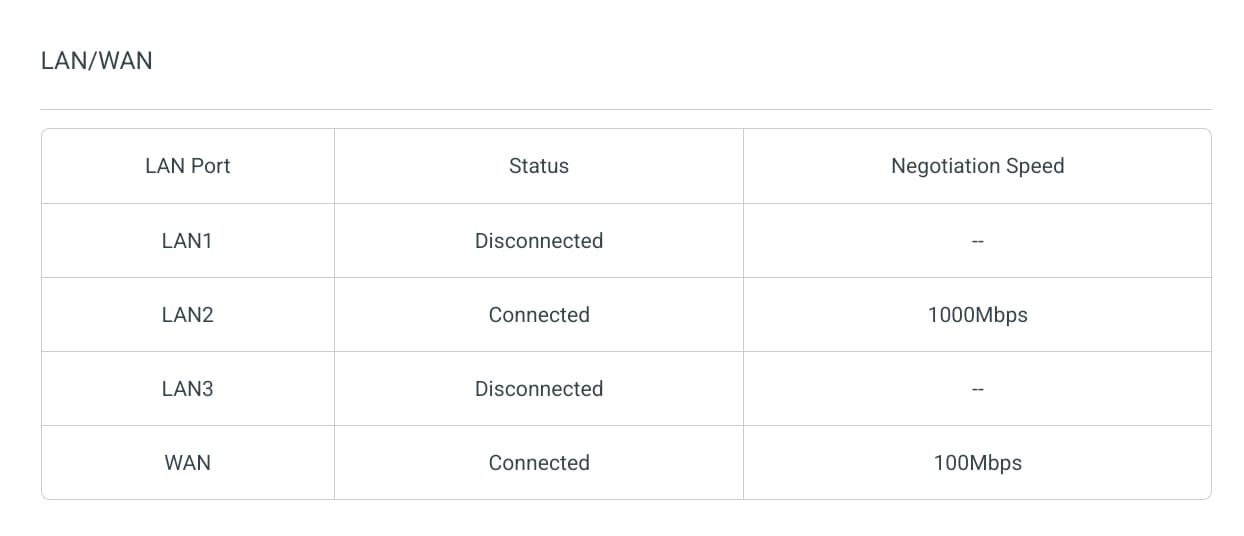
image tp link image widget

  0      
  0      
#1
Options
1 Reply
Re:Starlink in bridge mode: fast upload, 0.7mbps download. duplex mode issue (possibly) on tp-link
Yesterday

Hello@avocr ,

Welcome to our community.


Have you used a different client to test Starlink Gen 3 router? This step is to rule out abnormal uplink and downlink speeds on the Gen 3 router.


EX141 is a customized device specifically designed for local Service Providers. Its software is tailored to meet the unique requirements of these providers, ensuring alignment with their specific needs.

Due to the specialized nature of the firmware on your device, our ability to provide troubleshooting may be limited. We recommend contacting the technical support of your Service Provider, who supplied the device, as they are best suited to provide the necessary assistance.

  0  
  0  
#2
Options
