make a Dead USB Port Live Again!

make a Dead USB Port Live Again!

make a Dead USB Port Live Again!
Friday - last edited Monday
Model: Archer AXE75  
Hardware Version: V1
Firmware Version: 1.5.2 Build 20260113 rel.53105(4555)

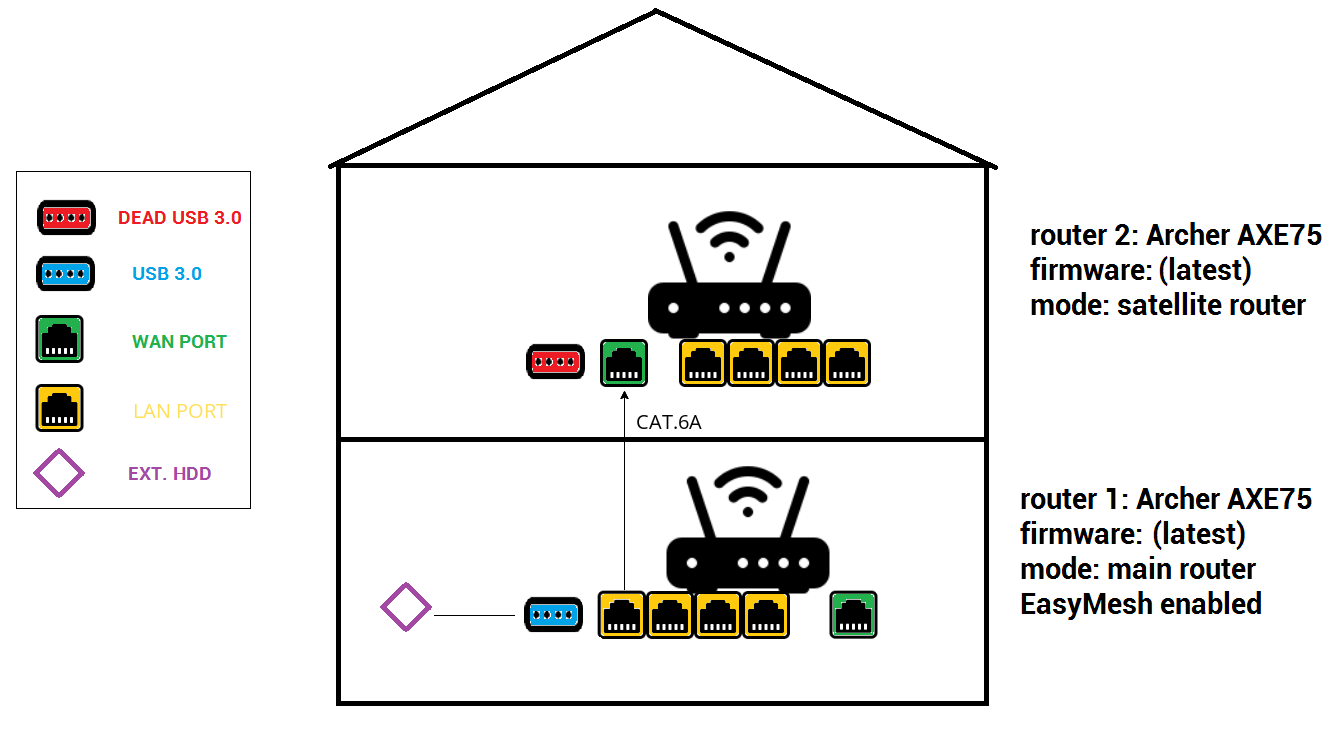
as per title, and per image bellow:


it is absolutely useless to offer USB port on the router if connecting two routers in mode MAIN_ROUTER---SATELITE_ROUTER will KILL the USB port on the satelite router!


what kind of dirty marketing lies we are fed here. If I buy 2 high-end routers with USB ports I demand that both USB ports are WORKING!


why there is no hammer packed in the box as well, so we could just smash these piece of junk routers, that you do not develop properly!


this is outrageous! 

#revive_the_Dead_USB_Port

  1      
  1      
#1
Options
1 Reply
Re:make a Dead USB Port Live Again!
22 hours ago

  @hWmMzIfYNRISEgn 


As per this post the USB port is working after the AXE75 is set up as a satellite router.

Is you issue that you can't access the satellite router USB media server settings or that its USB port is not working at all ?

If this was helpful click on the arrow pointing upward to make it blue. If this solves your issue, click the star to make it blue and mark the post as a "Recommended Solution".
  1  
  1  
#2
Options