
TD-W8961N V4 - Settings Reset After Power Cycle & Infinite Reboot Loop

TD-W8961N V4 - Settings Reset After Power Cycle & Infinite Reboot Loop

TD-W8961N V4 - Settings Reset After Power Cycle & Infinite Reboot Loop
2 weeks ago - last edited 2 weeks ago
Model: TD-W8961N  
Hardware Version: V4
Firmware Version: 3.2.0 Build 210914 Rel.24052

The Problem

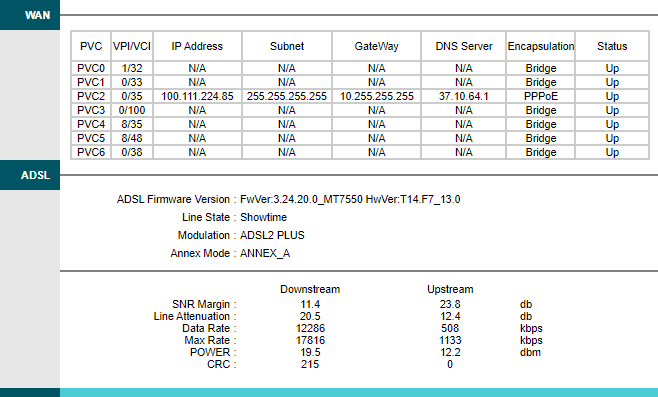
I am experiencing a critical issue where my modem loses all configuration settings every time it is powered off or if there is a power outage. Instead of reconnecting, the device requires a full factory reset and manual reconfiguration to access the internet again.


Detailed Symptoms

Whenever the power is cycled, the modem enters a specific reboot loop:

  1. DSL LED turns on (syncing).

  2. WAN and LAN LEDs suddenly shut off.

  3. The DSL LED turns off immediately after.

  4. The sequence repeats indefinitely until a manual factory reset is performed.

Troubleshooting Already Performed

  • Isolation Test: I tested my older modem on the same line; it connects instantly and retains settings without any issues. This confirms the problem is specific to the TD-W8961N V4 unit.

  • Consistency: This happens every single time the power is cut.


Request

Is there a firmware update specifically addressing NVRAM (memory) retention for the V4 hardware? Or is this a known hardware defect requiring an RMA?

Any advice or official firmware links would be greatly appreciated.
  0      
  0      
#1
Options
1 Reply
Re:TD-W8961N V4 - Settings Reset After Power Cycle & Infinite Reboot Loop
2 hours ago

Hello @Moz4020,

Welcome to our community.


When did you buy the modem? Here are some general suggestions:

1. Update the firmware: If the device is accessible, try updating to the latest firmware version, as this may resolve configuration.

2. Check power supply: Ensure you're using the original power adapter with correct specifications, as inadequate power could affect the device's ability to save settings properly.

3. Backup configuration: As a temporary workaround, you can backup your configuration file when the modem is working and restore it after power cycles, though this doesn't solve the root cause.


If the suggestions above don't help, please contact Local Support for further assistance.

  0  
  0  
#2
Options
