
BE230 v2 reboots frequently after update to 1.3.1 Build 20260106

Hello,
I am using TP-Link BE230 v2 at home and it was working perfectly fine before I updated it to 1.3.1 Build 20260106 rel.39388(4555) yesterday.
Now the router restarts frequently (at least 4 times for the last 12 hours, maybe even more). I lose all connection to the router wifi or ethernet, also the LED are turning off and back on again so I am sure it restarts. Also at least one time it restarted and restarted again right after that, it looked like some kind of bootloop.
I have tried to downgrade to 1.1.3 but the router gave me error while trying.
Please do something fast about it because I am trying to work here :)
- Copy Link
- Subscribe
- Bookmark
- Report Inappropriate Content


Hello @Ayman777adam ,
Thanks for contacting our community.
Please try the beta firmware: After Updating to 1.3.1, Archer BE230 V2 May Experience Auto Reboot When SMB Is On.
- Copy Link
- Report Inappropriate Content
Hello @Bohera ,
Welcome to our community.
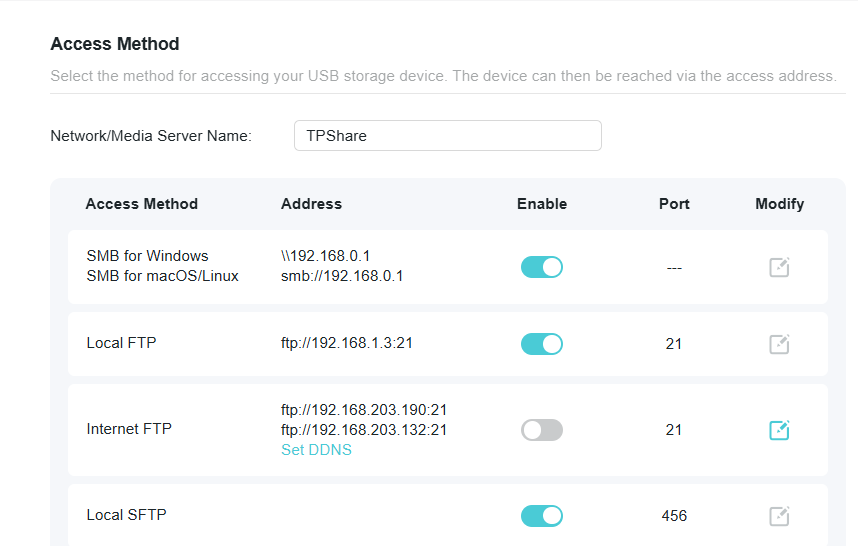
Have you enabled SMB sharing? If so, please turn it off and compare again.
- Copy Link
- Report Inappropriate Content
Hello @Joseph-TP,
Thank you for the fast reply!
Yes it is enabled in the settings as I am using a USB HDD connected to the router. I will turn it off and see if that stops the reboots but I hope that this is some kind of temporal solution as I need this enabled :) I will use the FTP option for now but it is not as convenient for me. I will report back with the results and in the meantime I hope you will release firmware update fix for this soon.
- Copy Link
- Report Inappropriate Content
Hello @Bohera ,
Is there any update?
Bohera wrote
Hello @Joseph-TP,
Thank you for the fast reply!
Yes it is enabled in the settings as I am using a USB HDD connected to the router. I will turn it off and see if that stops the reboots but I hope that this is some kind of temporal solution as I need this enabled :) I will use the FTP option for now but it is not as convenient for me. I will report back with the results and in the meantime I hope you will release firmware update fix for this soon.
- Copy Link
- Report Inappropriate Content
Hi @Joseph-TP,
yes, the constant reboots stopped after I turned off the SMB option as you suggested. Everything now works as normal. I hope this will be solved soon with a firmware update so I can again use the SMB option.
Thanks for the temporal fix!
- Copy Link
- Report Inappropriate Content
Hello @Bohera ,
Thanks for your feedback.
We have a beta firmware build and will send it to you via email. If possible, please test if the beta firmware helps.
The tech team will likely reach out to you via email to continue troubleshooting. Please check your email inbox and confirm.
- Copy Link
- Report Inappropriate Content

@Joseph-TP hello. I have similar issue. I need smb sharing so pls send me the beta firmware. Thanks.
- Copy Link
- Report Inappropriate Content
Hello @gabriehoog ,
The tech team has been made aware of your case; they will likely reach out to you via email to continue troubleshooting. Please check your email inbox and confirm.
- Copy Link
- Report Inappropriate Content

@Joseph-TP Same problem here. new frirmware realy sucks!
- Copy Link
- Report Inappropriate Content
Hi @Victorre ,
Welcome to our community.
The model of your router is also Archer BE230-v2-1.3.1 Build 20260106, right?
Do you encounter the same anomaly as below? If SMB option disabled can help?
In addition, what client devices do you have? Like MacBook.
The tech team will likely reach out to you via email to continue troubleshooting. Please check your email inbox and confirm.
Hi @Joseph-TP,
yes, the constant reboots stopped after I turned off the SMB option as you suggested. Everything now works as normal. I hope this will be solved soon with a firmware update so I can again use the SMB option.
Thanks for the temporal fix!
@gabriehoog , Our Tech team contacted you via TKID260316289 last time and sent you a beta firmware. Have you tried the beta firmware? Is there any progress?
- Copy Link
- Report Inappropriate Content

@Joseph-TP How does one also get that firmware, please? I have the same issue and can't find a file to revert back the firmware to an earlier version. I've also turned off the same SMB settings as OP.
- Copy Link
- Report Inappropriate Content
Information
Helpful: 0
Views: 2053
Replies: 22
Voters 0
No one has voted for it yet.