VPN and ACL rule to block gateway management page

VPN and ACL rule to block gateway management page

VPN and ACL rule to block gateway management page
Tuesday
Model: ER707-M2  
Hardware Version: V1
Firmware Version: 1.3.1 Build 20251009 Rel.67687

Evening,
I setup a VPN server (OpenVPN), which worked fine until the classical problem of an ISP changing the public IP got revealed. Since the router has support for dynamic DNS, I created a domain and configured it in the router. I also configured both an OpenVPN and WireGuard VPN to work with the new domain, and was able to connect from remote.


Since I could reach the gateway management page by typing the domain name in the browser, I setup a Deny rule:
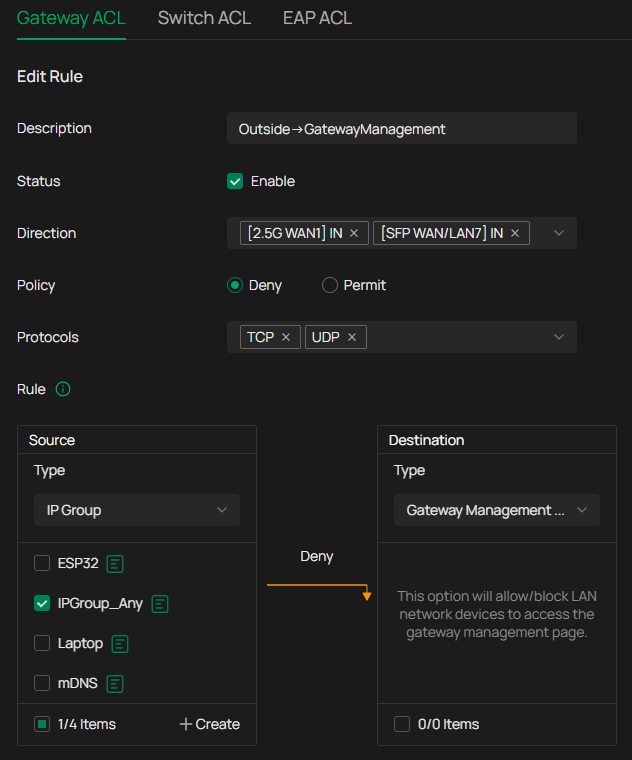
 

This prevented outside access to the Gateway Management Page, but also stopped the VPN tunnels from connecting.


I therefore added a Permit rule above the Deny rule:
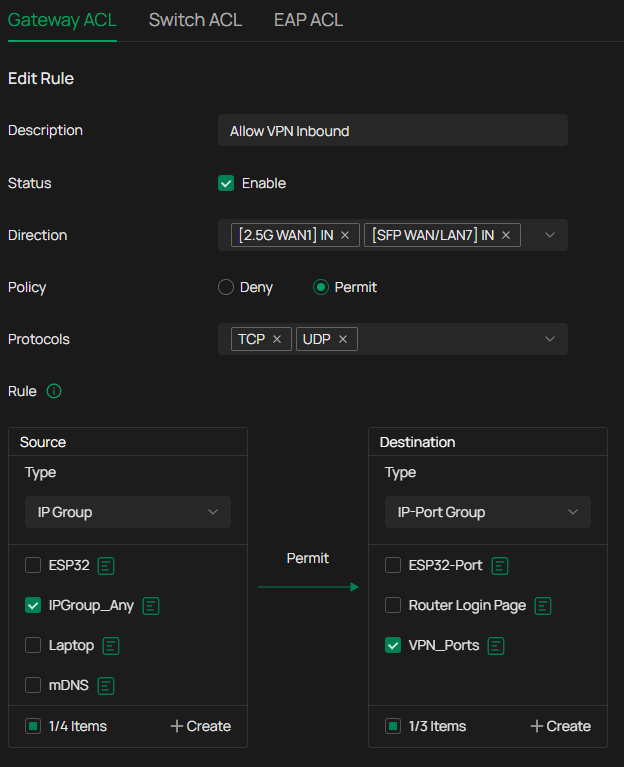
 

However, I still am not able to connect using either of the VPN solutions.


Am I missing something obvious?

  0      
  0      
#1
Options
4 Reply
Re:VPN and ACL rule to block gateway management page
Thursday

 Hi @doublemac 

With the management of Omada Controller, if you setup the VPN connection, when trying to access the IP of gateway, it would redirect you to the Omada Controller login page. Thus, the remote or outside devices are unable to access the gateway management page directly even without the gateway ACL.

Best Regards! >> Omada EAP Firmware Trial Available Here << >> Get the Latest Omada SDN Controller Releases Here << *Try filtering posts on each forum by Label of [Early Access]*
  0  
  0  
#2
Options
Re:VPN and ACL rule to block gateway management page
Saturday - last edited Saturday

@Hank21 Thanks for the reply. The Gateway Management page which I could see, should have corresponded to the routers original one. However, on the page, it was noted that the device now was controlled by the controller with IP x.x.x.x. So I couldnt change any settings even if I logged in.

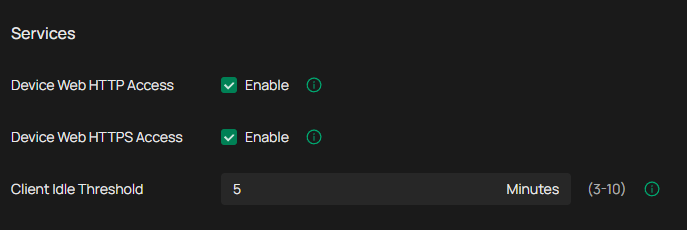
However, I tested again to disable the extra DENY and PERMIT rule in the ACL mentioned in the original post. Then I disconnected the cellphone from the WiFi and tried to access my domain name again, as before. Now I was not able to reach the Gateway Management page! Not entirely sure why I this worked before. It might have been because I also removed some checkbox under Site Settings, e.g. under Services I disabled both Device Web HTTP/HTTPS Access.
 

  0  
  0  
#3
Options
Re:VPN and ACL rule to block gateway management page
Sunday

  @Hank21 


Im not sure where you got this information, but this does not occur at all on any form of VPN on a controller managed network....


  0  
  0  
#4
Options
Re:VPN and ACL rule to block gateway management page
Sunday

  @doublemac 


Before Controller 5.15 and corresponding gateway firmware, you could block GMP from VPN users with this rule (as you did, although you only need TCP)


WAN IN > Block > [TCP] [IPGroup] > GMP


However, since controller 5.15 something was changed internally in the gateway firmware and this no longer functions.


Happily, it is coming back and will be working again on controller 6.2 and adapted gateway firmwares as I logged it with technical support several times, you can see it in the beta gateway firmware release notes too

  0  
  0  
#5
Options