
Anyone else having issues with Tapo C201 camera security and network setup?

Anyone else having issues with Tapo C201 camera security and network setup?

Anyone else having issues with Tapo C201 camera security and network setup?
Saturday
Tags: #C201 security
Model: Tapo C201  
Hardware Version: V5
Firmware Version: 1.3.5 Build 260228 Rel. 36932n

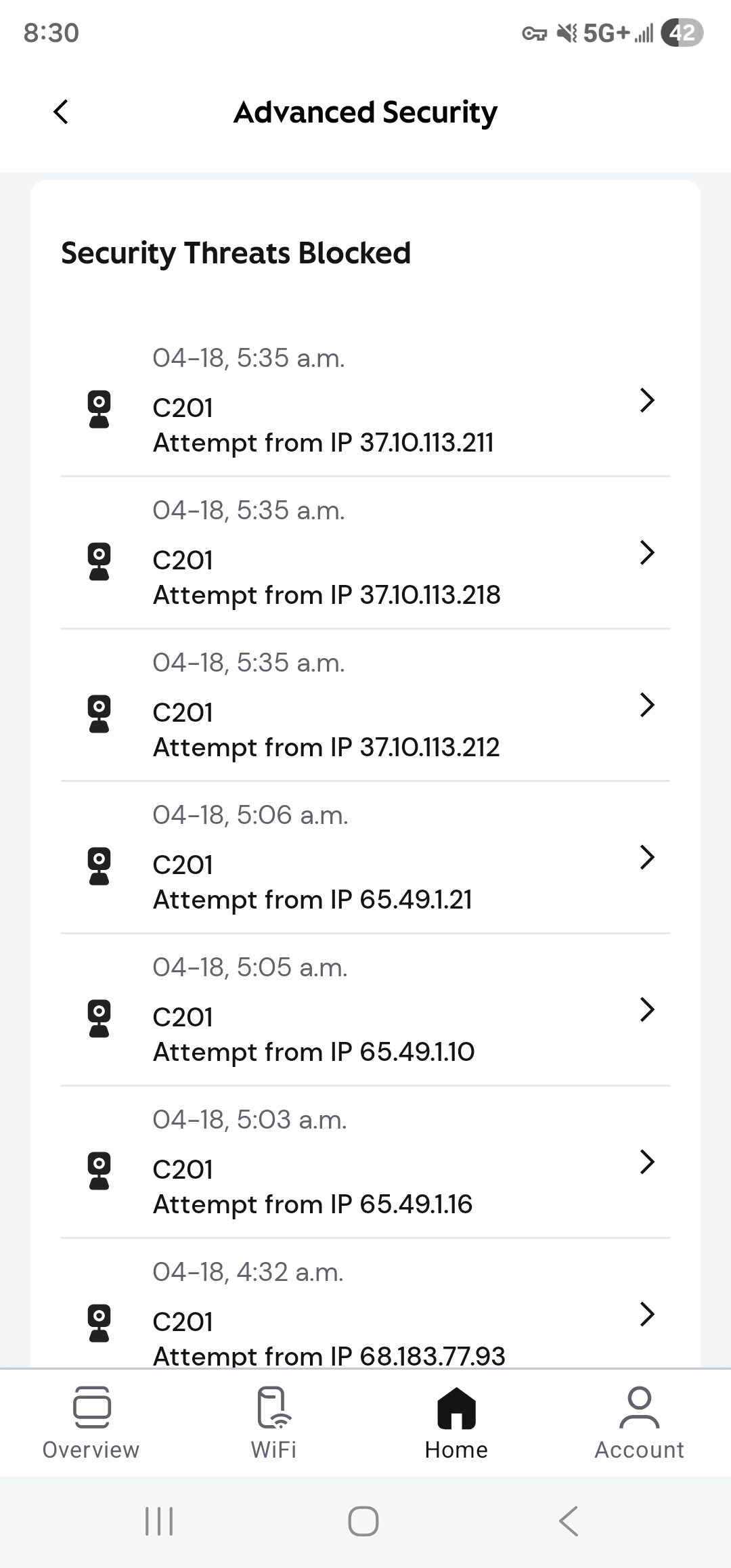
Router Screenshot Hi everyone, is anyone else facing a similar issue with the Tapo C201 camera?


I bought this camera within the last week, and I noticed that only this particular camera, the C201, appears to have been targeted with multiple hack attempts. What also stood out to me was that when I first tried to set it up on my network, it would not connect. After 4 or 5 attempts, it finally connected.


What is strange is that all of my other Tapo cameras, which are different models, are working fine without any issues. Another detail that may or may not matter: this C201 was purchased from Amazon USA, while my other cameras were bought in Canada.


I will provide the model number and version details below.


Has anyone else experienced this with the Tapo C201. Any thoughts on whether this could be a regional firmware issue, a security concern, or just a one-off setup problem?

  0      
  0      
#1
Options
1 Reply
Re:Anyone else having issues with Tapo C201 camera security and network setup?
8 hours ago - last edited 8 hours ago

 @Whitehorseking 

Hi,
Thank you for sharing your experience and for providing the detailed background information. We understand your concern, and we take security‑related feedback very seriously.
Normally Tapo camera operating within a local network cannot be directly “hacked”. Based on the screenshots you provided, the access attempts you observed appear to be coming from external IP addresses.


To help us investigate this further, we kindly ask you to check and provide the following information:
1.Please check the UPnP setting on the camera by going to Camera Settings > Advanced Settings > UPnP, and ensure that UPnP is disabled.
2.In the list shown in your screenshot, could you please tap the small arrow on the right side of one of the entries to see if additional details are available? If so, please take a screenshot and share it with us.
Once we receive this information, we will continue the investigation accordingly.


In the meantime, as a precautionary measure, we also recommend:
1. Resetting the camera and setting it up again
2. Changing your Tapo account password
3. Enabling Two‑Factor Authentication (2FA) in the Tapo app to further enhance account security


Regarding your question, the region where the camera was purchased (US vs. Canada) would not cause the behavior you described, nor would it result in increased security risks or targeted access attempts. 
That said, we would like to kindly note that products purchased in the US are not eligible for warranty service in Canada, as warranty coverage is region‑specific. This does not affect normal operation, but it is important to be aware of in case warranty support is needed in the future.


Best Regards.

  1  
  1  
#2
Options