
DHCP for VLAN not working

After performing firmware updates on for the Omada Controller (OC200), router, and switches, I started having problems with my VLAN behavior.
I deleted everything and created a new VLAN. Wired clients to the VLAN are not getting IP address assigned. Even when I staticlly assign the IP address in the range of the VLAN they fail to get a response from the DHCP server.
My default(1) lan DHCP server is working correclty both wired and via the EAP. It's just the VLAN that's not working. I didn't setup any ACL's, I've reviewed the Port settings.
I must be missing something. What should I be looking at to get this working?
- Copy Link
- Subscribe
- Bookmark
- Report Inappropriate Content

Thanks for reaching out to TP-Link Business Forums.
May I confirm what's the current version of your controller?
This seems to be related to the configuration. After setting up the VLAN, did you assign it to a certain port only?
You can refer to this How to configure VLAN with Omada Network v6 | Omada Network Support
- Copy Link
- Report Inappropriate Content

Make sure you have trunked all ports between gateway and EAP to carry the untagged 1st vlan and the tagged 2nd, make sure you set the SSID vlan tag correctly, and this should just work
- Copy Link
- Report Inappropriate Content
Thanks for the reply. The versions are below. The problem isn't with the EAP, that only provides DHCP to the default(1) lan which is still working. The problem is with a wired only VLAN. Before upgrading the router from 2.2.6, the vlan setup was functioning correctly. After the upgrade is when the problems started. I did remove the vlan, leaving only the default in place, and rebuilt everything, and I did follow the guide in the link you provided.
Further reading of various threads, I found some mention that resetting all devices to factory default and starting completely over resolved their problems. Unless I have another option I'll have to try that next, but it takes a bit more planning.
| MODEL | VERSION |
| EAP225-Outdoor(US) v1.0 | 5.0.5 Build 20210604 Rel. 51118 |
| ER605 v2.0 | 2.3.3 Build 20251029 Rel.18054 |
| SG2210MP v4.20 | 4.20.20 Build 20260310 Rel.10715 |
| ES205GP v1.0 | 1.0.3 Build 20250609 Rel.74647 |
| SG3428X v1.30 | 1.30.19 Build 20260310 Rel.11233 |
| SG2210MP v5.0 | 5.0.17 Build 20260310 Rel.10715 |
| EAP660 HD(US) v1.0 | 1.4.3 Build 20250714 Rel. 64055 |
- Copy Link
- Report Inappropriate Content
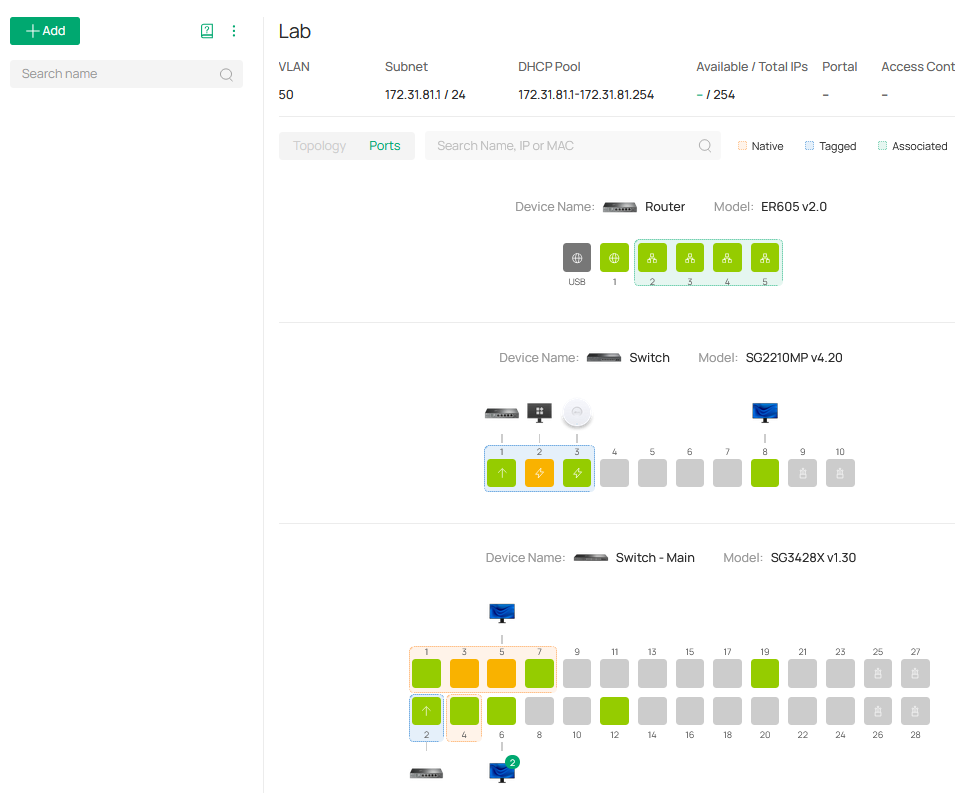
In the screen shot, you can see all the ports (blue highlight) are trunked and the (red highlight) are the ports for the devices that are in the vlan.
- Copy Link
- Report Inappropriate Content
Today I did a full factory reset on all the gear. In reconfiguring my network I discovered what I think is the problem.
I've discovered a routing behavior that did not exist in the 2.2.6 firmware for the router. The setup involves a default LAN, a VLAN, and a VPN Client connection. Summary: with the VPN active DHCP does not work in the VLAN, routing isn't working as expected between the different subnets.
LAN uses subnet A
VLAN uses subnet B
VPN routes to subnet C and supports routing to subnet B
Without the VPN active:
A pings B
B pings A
B devices DHCP is works as expected.
VPN configuration set with Local Network type including Default(A) and VLAN(B)
A pings B
A cannot ping C
B devices DHCP stops working.
VPN configuration set with Local Network type including only VLAN(B)
A pings B
A cannot ping C
B DHCP does not work.
VPN configuration set with Local Network type to custom using IP B/24
A pings B
A cannot ping C
B DHCP does not work
VPN configuration set with Local Network type to custom using IP B/24 and A/24
A cannot ping B
A pings C
B DHCP does not work
What worked in version 2.2.6
VPN configuration set with Local Network type including LAN(A) and VLAN(B)
A pings B
A pings C
B pings C
DHCP in B works.
I am unable to find a configuration, using static routes or other settings that allows routing shown in that last configuration.
I also feel this was the problem I thought I was having with DHCP first posted. I would have seen this disabling the VPN without the need to reset to factory defaults.
- Copy Link
- Report Inappropriate Content
To better assist in your case, may I confirm the following:
1. What's the entire network topology, i.e., ER605 - - SG3428X - - Switch 2 - - EAP, etc. ?
2. Who's your VPN Service Provider? What type of VPN did you configure on the controller?
3. Except for the upgrade of the ER605's firmware, did you change any settings or upgrade other devices' firmware?
You mentioned that you have performed updates on the router, switch, controller, etc., right?
4. Please check VLAN B's settings (navigate to Site View > Network Config > LAN > VLAN B), modify the Default Gateway and enable DHCP Relay to see if it helps.
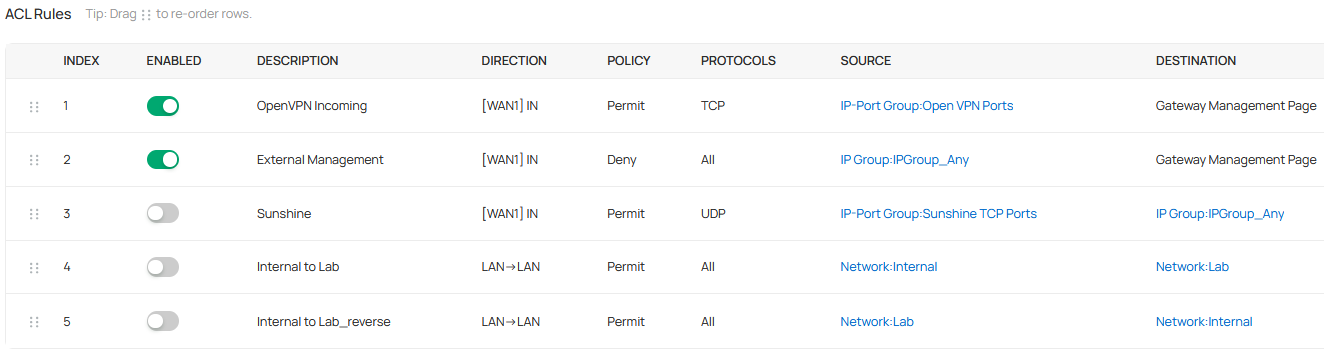
5. Please check or screenshot the ACL rules to see if you block traffic B accessing other networks.
- Copy Link
- Report Inappropriate Content
1. What's the entire network topology, i.e., ER605 - - SG3428X - - Switch 2 - - EAP, etc. ?
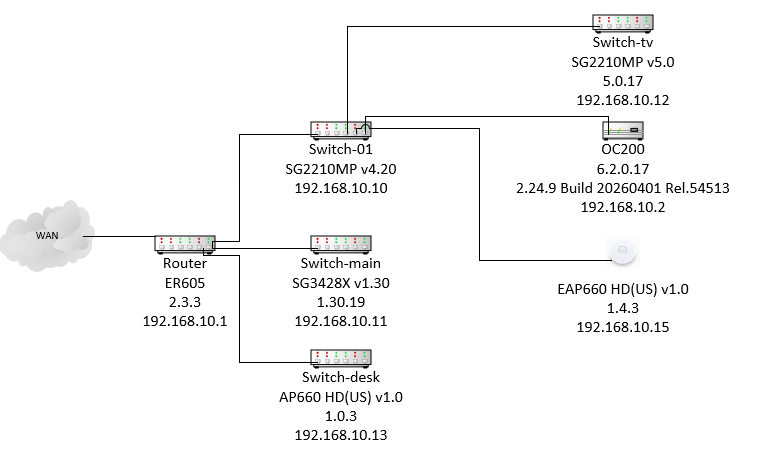
All the devices involved in the VLAN (20) are connected through Switch-main.
2. Who's your VPN Service Provider? What type of VPN did you configure on the controller?
This is a private VPN, the server running OPNSense, using openVPN. On my router it's setup as a VPN Client. The network option is set to VLAN(20) and default(1)
3. Except for the upgrade of the ER605's firmware, did you change any settings or upgrade other devices' firmware? You mentioned that you have performed updates on the router, switch, controller, etc., right?
All the device firmware was at the latest revision before I upgraded the router from 2.2.6. I had noticed the Controller and one of the switches had updates. I did those first and there were no problems once everything except the router were on the latst firmware versions. The last device was updating the router. The problems began after this update. Even after performing a full factory reset on every device and going through the full provision, VLAN setup, VPN setup, and defining the addresses, the problem persists.
4. Please check VLAN B's settings (navigate to Site View > Network Config > LAN > VLAN B), modify the Default Gateway and enable DHCP Relay to see if it helps.
I have checked this multiple times. Enabled DHCP Relay as well. The behavior is simple. With the VPN connected, I use a machine on VLAN(20).
sudo nmcli con down "Wired connection 1"
Connection 'Wired connection 1' successfully deactivated (D-Bus active path: /org/freedesktop/NetworkManager/ActiveConnection/163)
Then
sudo nmcli con up "Wired connection 1"
Error: Connection activation failed: IP configuration could not be reserved (no available address, timeout, etc.)
I then change the status of the VPN client to disabled and the command immediately is successful.
sudo nmcli con up "Wired connection 1"
Connection successfully activated (D-Bus active path: /org/freedesktop/NetworkManager/ActiveConnection/167)
5. Please check or screenshot the ACL rules to see if you block traffic B accessing other networks.
VLAN(20) = Lab
As shown the ACL's are disabled.
Extra details:
Two machines: C1 in the default(1) lan 192.168.10.1/24, C2 in the VLAN(20) 172.31.81.1/24
Both run: Every 2.0s: fping 192.168.10.1 172.31.81.1 172.31.81.6
Start with VPN Client OFF.
| C1 [default(1)] |
C2 [VLAN(20)] |
| 192.168.10.1 is alive 192.168.10.50 is alive 172.31.81.1 is alive |
192.168.10.1 is alive 172.31.81.1 is alive 172.31.81.6 is alive |
Now turn on the VPN Client
| C1 [default(1)] |
C2 [VLAN(20)] |
| 192.168.10.1 is alive 172.31.81.1 is alive 172.31.81.6 is unreachable |
192.168.10.1 is alive 192.168.10.50 is alive 172.31.81.1 is unreachable |
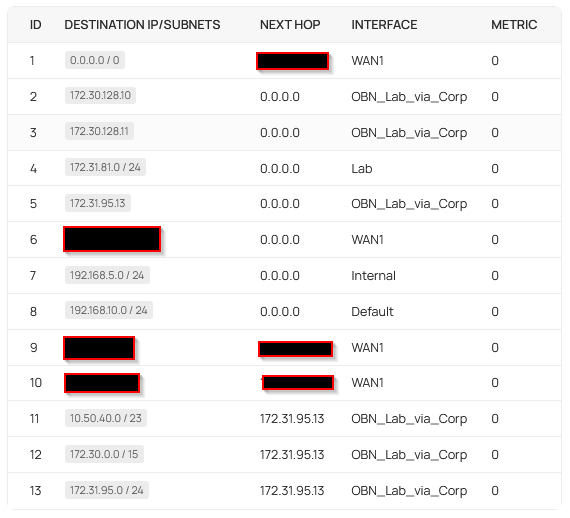
I feel like there is problem with the routing of traffic when the VPN is active.
The route table with the VPN Turned off (hiding public IP addresses)
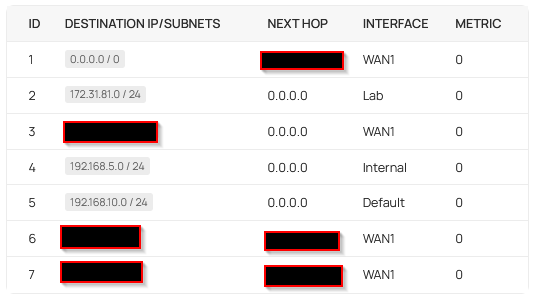
I turn on the VPN
- Copy Link
- Report Inappropriate Content

Hi,@Chrisasnyder
Thank you very much for providing this information.
For your case, we recommend sending the following details to the listed Support Email on your region’s support page:https://support.omadanetworks.com/contact-support/
Subject: [Forum Escalation][ID 862792]
Forum Nickname:
Thread URL: <https://community.tp-link.com/en/business/forum/topic/862792>
Model & Version:
Description:
The controller Backup File:
Once sent, a ticket will be created in our support system, and a team member will follow up to gather more information or troubleshoot the issue. If you would like our team to ensure your ticket is responded to in a timely manner, feel free to reply with your Ticket ID Number.
Thanks for your Cooperation.
- Copy Link
- Report Inappropriate Content
- Copy Link
- Report Inappropriate Content
Information
Helpful: 0
Views: 415
Replies: 9
Voters 0
No one has voted for it yet.