
maximum data transfer rate Archer be800

I have an Archer be800 router. What is the maximum data transfer rate for this device in both 6 MHz and 5 MHz modes? And also in MLO mode (5+6 MHz)? I want to know the actual maximum data transfer rate!!! Not the numbers you have in a lab somewhere or on paper in your router manuals! My transfer rate is reportedly 2.5 Gbps maximum! But the packaging and online show completely different numbers; they're faster than mine! I don't understand why this is? Where's the problem!? I have an Asus ROG Strix G814jv gaming laptop (fast SSD drives, a powerful Intel i7 processor, 64 GB of DDR5 memory!), manufactured in 2023. I replaced the network card in my Asus laptop with an Intel Wi-Fi 7 be200. I also have a Samsung Galaxy S26 Ultra smartphone, which has high-speed UFS 4.1 memory and Wi-Fi 7 be. I want to know the real truth! I'm running a speed test from my Galaxy S26 Ultra to an Asus laptop, and I'm not entirely satisfied with the results. I don't have any iron, wood, or concrete obstacles. I don't have any other (foreign) Wi-Fi networks at 6 GHz frequencies; I have two Wi-Fi networks at 5 MHz and several at 2.4 MHz. All my equipment is located 3 meters away in the same room! I ran the speed test from the laptop to my smartphone and from the smartphone to the laptop using the Wi-Fi speed test program Open Speed Test. There are no other devices connected to the Archer be800 router. I've attached a screenshot of the test to my message. Thank you.

- Copy Link
- Subscribe
- Bookmark
- Report Inappropriate Content


Hello @ppredator83 ,
Thanks for your reply.
Based on the information you have provided so far, your primary objective is to achieve the highest possible local network transmission speeds (i.e., LAN speeds).
According to the test data you supplied (please feel free to correct me if there are any discrepancies):
1. S26 Ultra link rate on the 6GHz band: 4803/4803 Mbps
2. ASUS laptop link rate on the 6GHz band: 5764/5764 Mbps
3. Measured bidirectional LAN transfer speeds: approximately 2017 Mbps (downlink) / 2302 Mbps (uplink)
First, regarding the conversion of wireless speeds, it is important to clarify the following: A Wi-Fi "link rate" represents a theoretical physical-layer limit; it does not equate to the actual usable application-layer throughput. When translating this figure into the file transfer speeds or speed test results you ultimately perceive, a significant portion of the bandwidth is consumed by the protocol itself. The primary overheads involved include protocol signaling and environmental attenuation.
Based on your data, your current actual transfer speeds are achieving approximately 35% to 48% of the theoretical link rate. In a real-world home Wi-Fi 7 environment, this level of conversion efficiency is considered exceptionally good performance.
Second, your Local Area Network (LAN) speed and your Wide Area Network (WAN—i.e., the Internet) bandwidth operate as two independent channels. Theoretically, a change in your broadband subscription plan should not directly impact the LAN-internal speeds you measure.
You mentioned that everything—both wired and wireless—was "perfect" back when you were on the 500 Mbps broadband plan. This is a valuable observation. To help us pinpoint the issue more clearly, could you recall or provide additional details regarding this? Specifically, what were the device-to-device transfer speeds you measured within your LAN—using the exact same testing methodology—during that previous 500 Mbps era? This information will help us determine whether your current results (hovering around 2.3 Gbps) reflect normal fluctuations or a genuine discrepancy.
All things considered, your current wireless LAN performance is already quite outstanding. Measured speeds exceeding 2 Gbps are more than sufficient for the vast majority of high-bandwidth internal network applications—such as large-scale file synchronization, high-definition media editing, and high-speed data backups. If you anticipate even higher demands in the future, you might consider equipping your laptop with a high-speed wired network adapter; however, your existing wireless setup is already capable of delivering a truly superior user experience. I hope this analysis proves helpful to you!
- Copy Link
- Report Inappropriate Content

Here's a guide that you can use to measure the bandwidth of your router avoiding the ISP limitations.
This approach would give you the real bandwidth of your current hardware.
- Copy Link
- Report Inappropriate Content
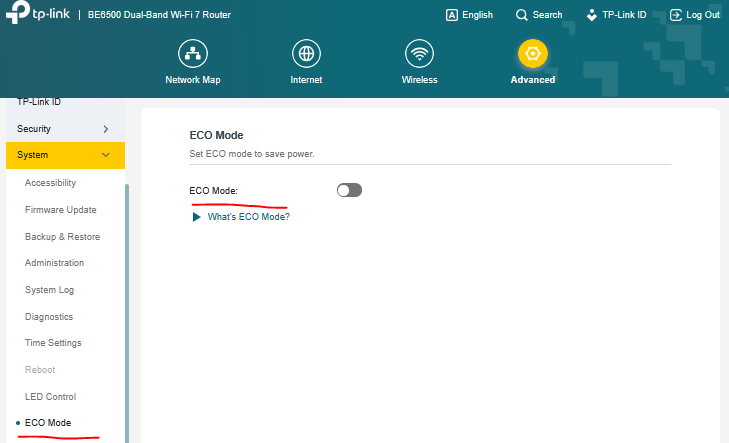
@terziyski This manual is full of generalities! The numbers in there don't correspond to reality! I need real numbers, not numbers on paper! This router's data transfer speed should be 4000 Mbps, but I'm only getting 2000 Mbps! Where's the other 50% of the speed? There's information on this forum about how the ECO mode in the firmware significantly limits the speed! Then disable the ECO mode on the Be800 router! I need full data transfer speed, not the energy-saving ECO mode!!!
- Copy Link
- Report Inappropriate Content
To disable ECO mode on your TP-Link Archer BE800, you can log in to the router's web management interface and navigate to Advanced > System > ECO Mode. From there, turn off or adjust the Power Mode to Normal mode, Wireless Schedule, and LED Control according to your preferences - details.
Probably, in a new FW reease a turn off switch would be implemented like in BE400:
Then you can make the same test as described above and compare if there's any difference.
- Copy Link
- Report Inappropriate Content
@terziyski Apparently you misunderstood me! Eco mode is built into the Be800 router firmware! Even if I disable it, the transfer speed remains the same! Eco mode for data transfer speed CANNOT BE DISABLED and has no effect! Did you understand me? Developers, remove eco mode from the firmware! I don't want it to limit my data transfer speed! The speed was supposed to be the maximum for my data transfer!!!!
- Copy Link
- Report Inappropriate Content

ppredator83 wrote
@terziyski Apparently you misunderstood me! Eco mode is built into the Be800 router firmware! Even if I disable it, the transfer speed remains the same! Eco mode for data transfer speed CANNOT BE DISABLED and has no effect! Did you understand me? Developers, remove eco mode from the firmware! I don't want it to limit my data transfer speed! The speed was supposed to be the maximum for my data transfer!!!!
Eco mode is not the culprit, sounds like you do not have 320mhz channel width enabled for 6ghz (the only way to get higher than 2882mbps link rate and even then you need to be within a few feet of the router).
Not all wifi 7 devices with 6ghz band support 320mhz channel width. Most Wi-Fi devices only have 2 antennas and can only receive 2 spatial streams. You would need a device with 4 antennas and support 4 spatial streams to get higher than 2882 mbps over 5ghz /6ghz using 160mhz channel width on a be800 router.
Not all devices support MLO types that combine the frequencies (phones generally do rapid switching between frequencies instead of combining for higher link rate)
- Copy Link
- Report Inappropriate Content
@MDA400 Where can I get firmware 1.0.6 for the be800 router? (The old firmware was the one that came with it, and the speed was higher!
- Copy Link
- Report Inappropriate Content
You can't downgrade to older firmware at your current firmware version.
Make sure your 6ghz band has 320mhz channel width selected and that your 6ghz client devices (like your phone, laptop, etc) can use the 320mhz channel width.
Otherwise you will not see higher than 1.5 - 2 gigabits per second over wireless (unless you have a 4x4 wireless device which are very rare).
- Copy Link
- Report Inappropriate Content
@MDA400 I only have 320 MHz here! I've never changed anything else here!
- Copy Link
- Report Inappropriate Content
@MDA400 Tell me, how can you comment on messages in this forum? Скорость выгрузки Archer BE800 WiFi 7 (6 ГГц - 320 МГц) была полностью нарушена. - Сообщество домашней сети I'm particularly interested in the message from 2026-01-07 05:33:10
I would like to see ironclad arguments and facts!!! And not just words, so that I can answer and forget this answer for me!
- Copy Link
- Report Inappropriate Content
ppredator83 wrote
@MDA400 I only have 320 MHz here! I've never changed anything else here!
@ppredator83 have you tried with higher transmit power? It's currently set to low in your screenshot.
What does the link rate show on your Samsung phone when you are right by the router?
If flow controlller is turned on under Internet and lan sections of the router, try turning them off and testing speed.
- Copy Link
- Report Inappropriate Content
Information
Helpful: 0
Views: 929
Replies: 23
Voters 0
No one has voted for it yet.