
Can not ping to all device on Network

This thread has been locked for further replies. You can start a new thread to share your ideas or ask questions.

Can not ping to all device on Network

This thread has been locked for further replies. You can start a new thread to share your ideas or ask questions.

Can not ping to all device on Network
2019-08-28 08:09:16 - last edited 2019-08-28 08:38:32
Model: TL-PA4010  
Hardware Version: V3
Firmware Version: 1.3.1.2141-00_401193_160717_901

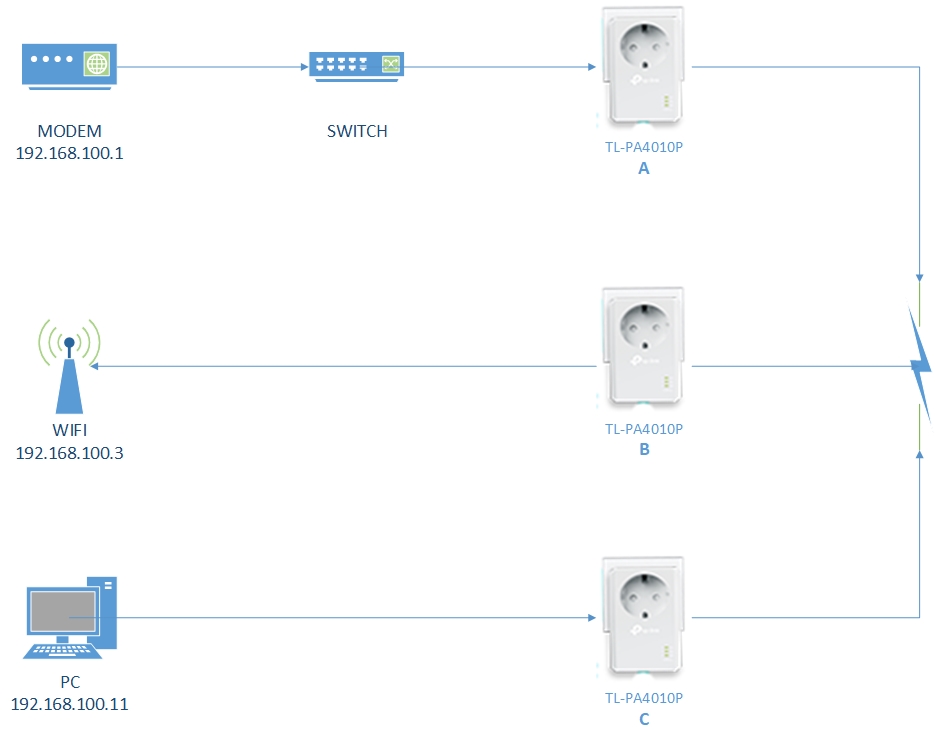
I want to add one TL-PA4010P (C Ver.4) to the existing TL-PA4010P Kit (A & B Ver.3) network. The connection was successful but is not connected to all devices in the network. I can ping from my PC (192.168.100.11) to 192.168.100.3, but can not ping to 192.168.100.1. Does the version affect this all?
  0      
  0      
#1
Options
1 Reply
Re:Can not ping to all device on Network
2019-08-29 03:31:07

@Otram 


The current network diagram should be fine; the connection works well as you mentioned. Theoreticall, all the local devices can ping the gateway of modem, which is 192.168.100.1.


I suspect that the switch between the modem and the adapter A cause the unpingable issue. 


It is suggested to connect the adapter A to the modem directly, bypass the switch, and then try to ping 192.168.100.1 from the 192.168.100.3/11. 


May it help and have a nice day. 


Nice to Meet You in Our TP-Link Community. Check Out the Latest Posts: Introducing AI QoS: Elevate Your Gaming Experience on the Archer GE800 Gaming Router! Connect TP-Link Archer BE550 to Germany's DS-Lite (Dual Stack Lite) Internet via WAN Archer GE550 - BE9300 Tri-Band Wi-Fi 7 Gaming Router Archer AX90 New Firmware Added Support for EasyMesh and Ethernet Backhaul If you found a post or response helpful, please click Helpful (arrow pointing upward icon). If you are the author of a topic, remember to mark a helpful reply as the "Recommended Solution" (star icon) so that others can benefit from it.
  0  
  0  
#2
Options