
Troubleshooting What if my Router Speed is capped at 100 Mbps?


This Article Applies to:
TP-Link Routers
Issue Description/Phenomenon:
Some customers may report the speed is limited to 100 Mbps when connected to the TP-Link router, while the speed is much faster and can reach up to 500+ or 900+ Mbps when connecting to the ISP modem directly. If this is what you are experiencing, follow this article to get it resolved.
Troubleshooting Suggestions:
1. Mark certain you are getting a gigabit router, which has gigabit WAN/LAN ports. Some models like Archer C20 and Archer C50 only support 10/100 Mbps WAN/LAN ports, you can find that in the product specifications here and here. If your router only has 10/100 Mbps WAN/LAN ports, you cannot get a higher speed than 100 Mbps, and you need to get a gigabit router.
2. Login to the web GUI of the router, go to Basic > Network Map > click on the Icon for TP-Link router, slide down to the bottom of the page, and you will see the Negotiation Speed of the Ethernet ports in the Ethernet part. You can refer to this article to find more detailed instructions.

3. If the Internet Port Negotiation Speed is not 1000Mbps, go to Advanced > Network > Internet page, choose 1000Mbps Full Duplex, save and reboot the router:

4. If it's still connected at 100 Mbps, try with another Cat5e/6 cable or change the port of your ISP device, where you're connecting the TP-Link router (if possible).
5. If the Internet speed is negotiated correctly at 1000 Mbps, but the LAN gets stuck at 100 Mbps, it is also suggested to try with another Cat5e/6 cable between the router LAN and the client device, try with another client device if that is possible. Follow this thread to troubleshoot further.
6. Try to reset the router to the default factory following the FAQ.
7. Upgrade the router firmware to the latest. You can follow this guide.
If the speed still gets stuck at 100 Mbps after checking all the above, it is suggested to comment below and be sure to provide the following information:
1. Model number, hardware, and firmware version of your TP-Link Router.
2. What troubleshooting have you done, and what are the results? Send us the screenshots about the Negotiation speed.
3. What are the devices that you are testing the LAN speed, and what are the models of the adapters?
4. When did you purchase the TP-Link router, and when did the issue begin to happen?
5. What is the model of the ISP modem that this TP-Link router connects to?
Related Articles:
What if my LAN speed is capped at 100 Mbps
[Solution] Killer Software lower down AX1100's Speed
How to check the negotiation speed of Ethernet ports on the TP-Link Wireless Router?
What should I do if my internet connection is slow?
How to place your wireless router for optimal reception and performance?
- Copy Link
- Subscribe
- Bookmark
- Report Inappropriate Content
Hello @nerka99 ,
Welcome to our community.
May I know the model and hardware version of your router?
How to find the model number of your TP-Link device
How to find the hardware version on a TP-Link device
This sounds like an unstable WAN connection anomaly. Here are some troubleshooting steps that may help:
First, ensure your firmware is up to date:
Log in to the web interface of the router (http://tplinkwifi.net), go to Advanced > System > Firmware Update and make sure the firmware is current.
For the WAN connection instability:
1) Verify ISP stability: Connect a PC directly to your modem to verify if your ISP Internet is stable and consistently providing the expected speed.
2) Cable connections: Since you've ordered a new cable, definitely test with that when it arrives • cable degradation can cause intermittent issues like this.
3) Change DNS Server: Login to the web management interface, go to Advanced > Network > Internet > Advanced Settings, and change the two DNS Servers to 1.1.1.1 and 8.8.8.8.
4) Adjust WAN Port Negotiation Speed: Go to Advanced > Internet > Internet Port Negotiation Speed Setting. Try setting it to "100Mbps Full Duplex" instead of auto-negotiation to see if this stabilizes the connection. While this reduces maximum speed, it can help identify if there's a negotiation issue.
- Copy Link
- Report Inappropriate Content

1. Model number - TP-Link Archer C6 , hardware- Archer C6 v3.20 , and firmware version - 1.1.1 Build 20250716 Rel. 74574(5553)
2. What troubleshooting have you done, and what are the results?
- have set to 1000Mbps full duplex and the wan port is capped at 100Mbps.
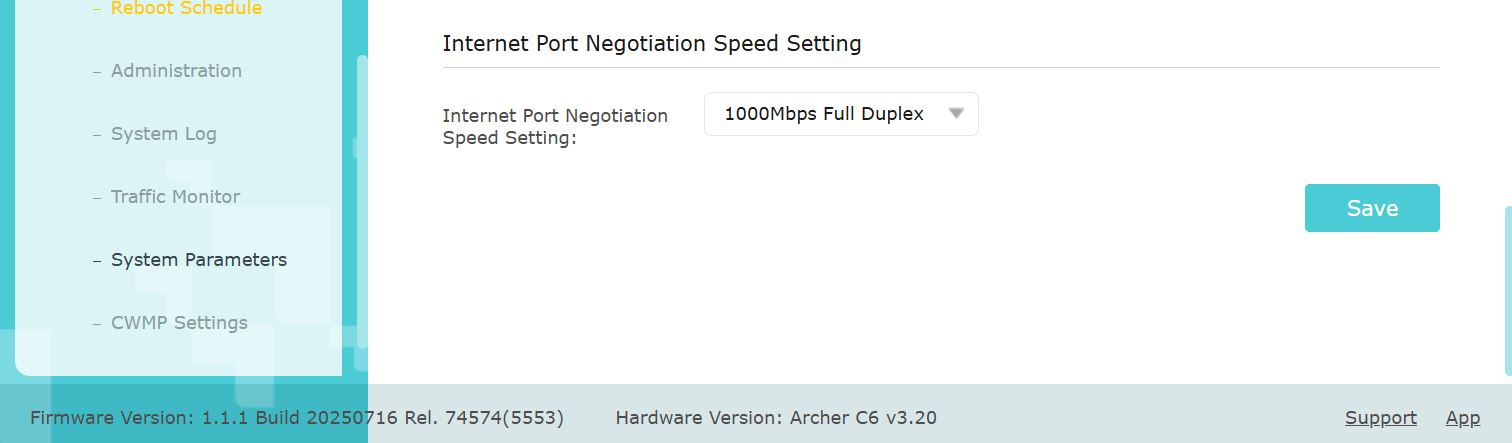 Negotiation speed set to full duplex
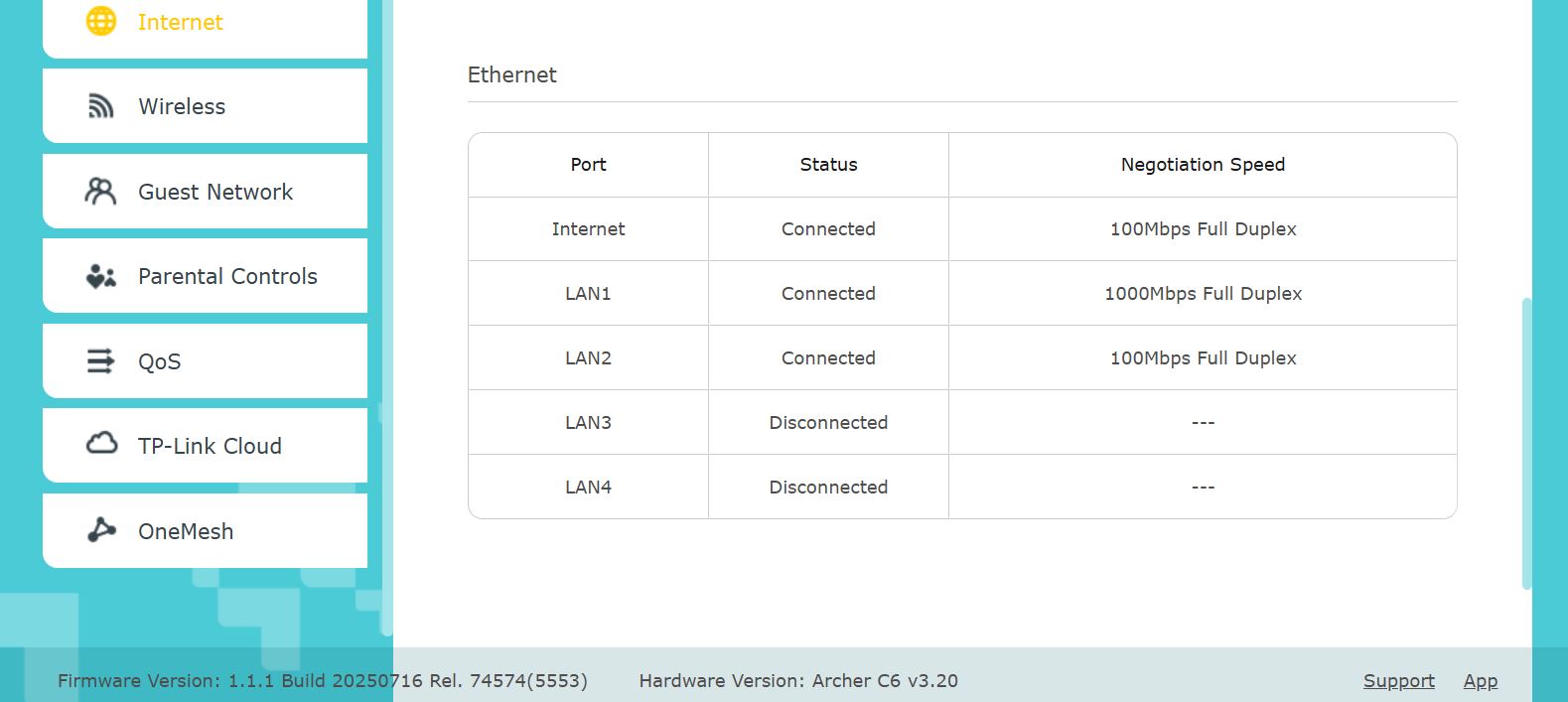
Send us the screenshots about the Negotiation speed.
- Connected wire from ISP directly to computer - gives a speed of 230Mbps, when connected to WAN port of router - speed drops to 93Mbps.
- Connected wire from ISP to LAN port , it negotiaties to 1000Mbps.
- Tried Resetting router to factory default and still issue persists
- Upgraded Router firmware to latest and yet issue persists
3. What are the devices that you are testing the LAN speed, and what are the models of the adapters?
- Devices tested on :
1) TP-LINK TG-3468 Gigabit PCI Express Network Adapter – Green, 32-bit 10/100/1000 Mbps RJ45 Port, IEEE 802.3X Flow Control, Win 11/10/8.1/8/7/Vista/XP, PCIe Ethernet Card
2) Ethernet port of MSI B450M - A Pro MAX ; Realtek 8111H Gigabit LAN
4. When did you purchase the TP-Link router, and when did the issue begin to happen?
- Purchased in 2022 , didnt identify any issue untill my ISP upgraded my speed to 200Mbps from 100Mbps
5. What is the model of the ISP modem that this TP-Link router connects to?
- connected directly to Junction box from ACT fibernet .
- Copy Link
- Report Inappropriate Content
Hello @sourab2724 ,
Thanks for providing all those additional details! It indicates that the WAN port on your Archer C6 v3.20 is physically faulty and stuck at 100Mbps. Please contact Local Support for further assistance.
- Copy Link
- Report Inappropriate Content
Information
Helpful: 12
Views: 232074
Replies: 153
Voters 4



