Power Adapter Lockouts

This thread has been locked for further replies. You can start a new thread to share your ideas or ask questions.

Power Adapter Lockouts

This thread has been locked for further replies. You can start a new thread to share your ideas or ask questions.

Power Adapter Lockouts
2022-10-19 07:23:09

I have 5 power->Ethernet adapters in my house, sorry i don't know the models as I'm now at work but I'm sure 2 had "600" and 3 have "500" in the models.


What has started happening is that they will all lock out, buy this I mean that the units 3 lights are all on and the top one isn't blinking. While they are in this state there is no network traffic and my PC shows as "no internet"


On my PC I have the tpLink software which normally shows all 5 devices, however while it's like this it can't see any. This includes the one that it's directly linked to the PC which is odd but proves the unit is "locked out" rather than just not communicating.


To fix it, i disconnect all 5 units then plug them back in again. The problem however is getting more frequent these days.


Has anybody had this before, if so did you know what the cause was? i.e. faulty adapter, power spikes etc?


This way I can try and fix the problem.

0
0
#1
2 Reply
Re:Power Adapter Lockouts
2022-10-20 05:40:29

 Hello @BlofeldsCat 

Thank you for reahcing out to us. 

May I know what are the models of your powerline devices? Do you mean all the powerline device lock up or lose internet at the same time, or only a specific unit lose internet?


-  Please confirm the powerline units are on the latest firmware; (note: select hardware version' first and download the corresponding firmware )

Firmware for WPA4220: https://www.tp-link.com/support/download/tl-wpa4220/
Firmware for PA4010: https://www.tp-link.com/support/download/tl-pa4010-kit/#Firmware
 

- To help isolate if the issue with the main powerline adapter connected to router,  use a different power line unit as the main adapter 


When did you purchase the powerline devices and when did the issue start, thank you. 


0
0
#2
Re:Power Adapter Lockouts
2022-10-20 08:02:56

  @BlofeldsCat 


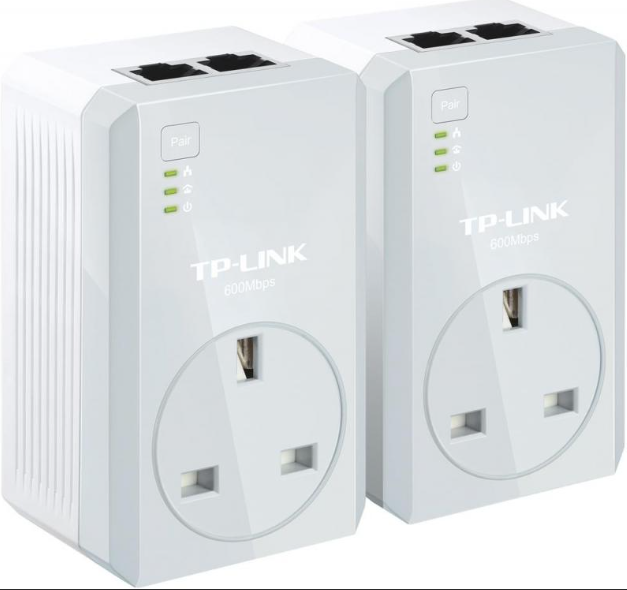
Sorry, I forget to check the models last night. After a quick google I believe they are 2x AV600 and 3xAV500. They all look like the ones below. 


They have been working OK for since I installed them several years ago, I'd get random instances of this issue say every few months but this week it keeps on happening.I'll try and explain in more detail.


I don't need to turn my PC on to know they're not working, If I look at the adapter with the PC all three lights are permanently on, if I go round and check the other 4 units they are all in the same "3 lights state". If I turn my PC on I get the wonderful you have no internet icon so there's definitely no throughput.


What I do have is a program which gives me a visual representation of the 5 units and the speed to each one from the PC. When these units are in the "3 light state" then the TP link application can't see any of the 5 units, not even the one which is with the PC. If the router is simply offline I still see all 5 units showing.


To get these adapters working again I have to unplug them all, once they are all out I count to 10, not sure if this is needed, I then plug them back in starting with the router one, for no reason other than the Virgin router takes an ice age to restart. Once they're all plugged in then they all start to work again,


I have a few thoughts

- There is something happening on my power line, like micro surges or something which is causing these to lock out

- One of the 5 is faulty

- They're not talking properly and some packets are bouncing round never to disappear


For Reference: -

AV600 - Router

AV600 - PC

AV500 - Newly added Access Point (wifi coverage is awful in my house hence these)

AV500 - TV in Main Bedroom
AV500 - TV in Spare Bedroom


0
0
#3