When using a signal extender, the router turns off the device's LAN.

This thread has been locked for further replies. You can start a new thread to share your ideas or ask questions.

When using a signal extender, the router turns off the device's LAN.

This thread has been locked for further replies. You can start a new thread to share your ideas or ask questions.
When using a signal extender, the router turns off the device's LAN.
2023-11-04 15:42:45
Model: TD-W9960   TL-WA854RE  
Hardware Version: V1
Firmware Version: 1.4.0 0.8.0 v009d.0 Build 220621 Rel.58110n

At my home, the Internet is connected to a router with a Tp-Link TD-W9960 modem (software version 1.4.0 0.8.0 v009d.0 Build 220621 Rel.58110n). A game console and a smart TV are connected to this router via LAN ports. Due to the fact that the Wi-Fi signal strength is not enough to cover the entire living area, a Tp-Link TL-WA854RE signal amplifier was purchased. The signal booster connected to my router without any problems and expanded the coverage area of the Wi-Fi signal, but there were problems with LAN devices; they stopped accessing the Internet. If you disable the signal extender, Internet access returns to LAN devices. If you view the connected devices to the router when the signal extender is connected, wired clients (LAN) are displayed as connected. I reset both devices (router and signal extender) to factory settings, but that didn't help. Please tell me what could be the problem and how to solve it?

  0      
  0      
#1
Options
5 Reply
Re:When using a signal extender, the router turns off the device's LAN.
2023-11-08 11:26:21

  @Predator-117 


Hi, when the issue happens, wireless client devices of the router and also the extender are all working fine, only the LAN devices connected to the router have no internet, right?

If you unplug the LAN cable and reconnect it on the two LAN devices, will they work again? If not, do they still obtain valid IP address from the router?


By the way, how did you configure the extender? via WPS button, web interface or Tether App? and did you configure static IP address for the extender?

Nice to Meet You in Our TP-Link Community. Check Out the Latest Posts: Archer GE550 - BE9300 Tri-Band Wi-Fi 7 Gaming Router EasyMesh Is Available When Wi-Fi Routers Work in AP Mode as A Controller. Archer BE550 New Software Enhances System Stability and Optimizes MLO Network Stability. TL-WA3001 Supports EasyMesh, Speed Limit, Guest Network in AP Mode and/or Multi-SSID Mode. If you found the post or response helpful, please click Helpful. If an answer solves your problem, click "Recommended Solution" so that others can benefit from it.
  0  
  0  
#2
Options
Re:When using a signal extender, the router turns off the device's LAN.
2023-11-08 15:40:57

  @Sunshine 

When the signal amplifier is connected, the router's Wi-Fi does not have access to the Internet.

Reconnecting local devices to other LAN ports does not help.

The signal amplifier was configured via the web interface. I did not set up a static IP address, I connected it solely according to the instructions from the quick setup.
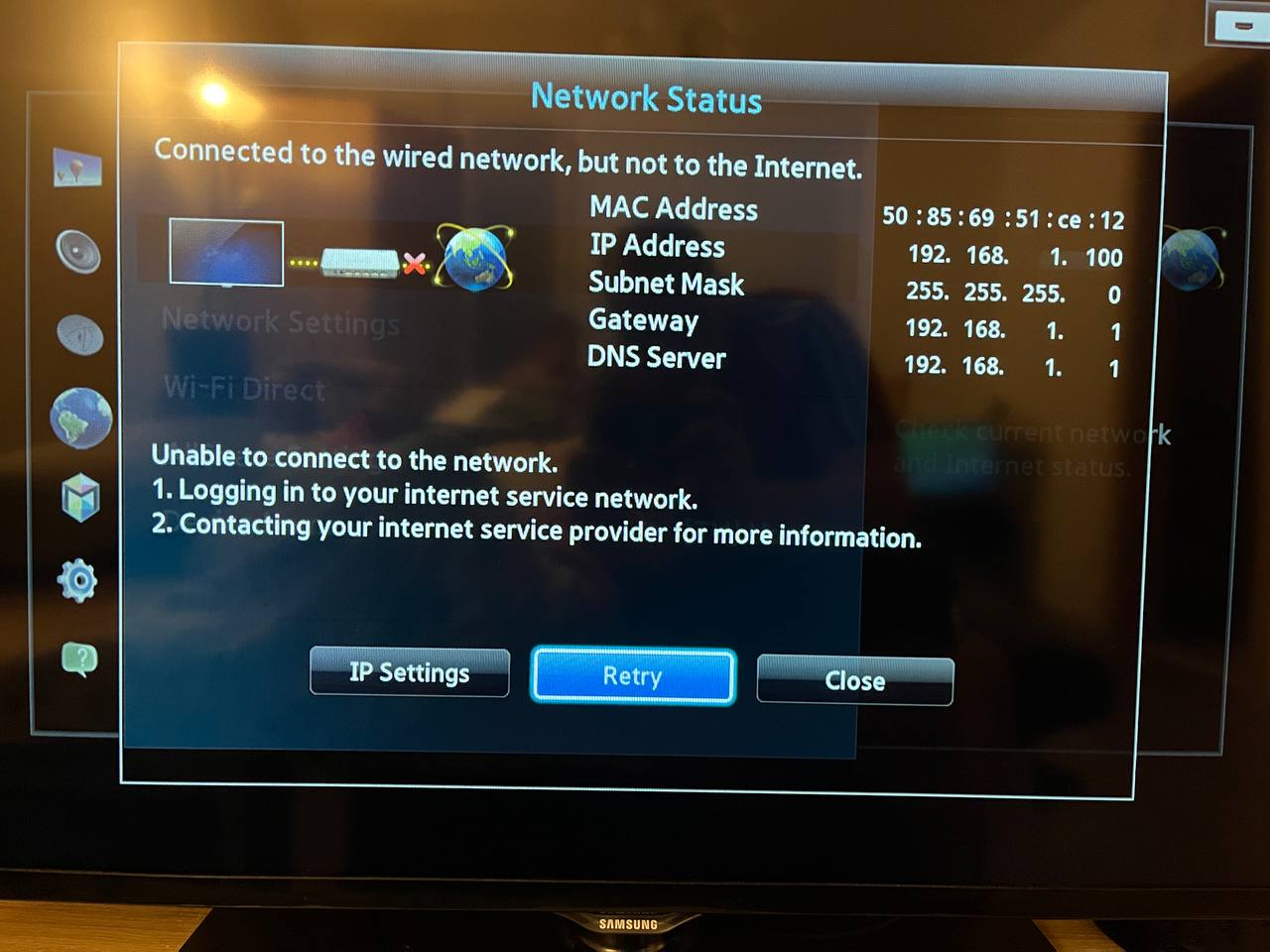
Smart TV displays the following connection information:

  0  
  0  
#3
Options
Re:When using a signal extender, the router turns off the device's LAN.
2023-11-09 06:01:43

  @Predator-117 


Hi, do when the extender is connected, all devices connected to the TD-W9960 will lose internet no matter they are connected via WiFi or via LAN port.


Please provide the hardware and firmware version of the extender TL-WA854RE, then I will forward your case to support engineer via email for further debugging.

Nice to Meet You in Our TP-Link Community. Check Out the Latest Posts: Archer GE550 - BE9300 Tri-Band Wi-Fi 7 Gaming Router EasyMesh Is Available When Wi-Fi Routers Work in AP Mode as A Controller. Archer BE550 New Software Enhances System Stability and Optimizes MLO Network Stability. TL-WA3001 Supports EasyMesh, Speed Limit, Guest Network in AP Mode and/or Multi-SSID Mode. If you found the post or response helpful, please click Helpful. If an answer solves your problem, click "Recommended Solution" so that others can benefit from it.
  0  
  0  
#4
Options
Re:When using a signal extender, the router turns off the device's LAN.
2023-11-09 14:47:41

  @Sunshine 

Yes, that’s right, when you connect the signal extender to the router, all devices connected to the router lose their connection to the Internet (regardless of whether they are connected via LAN or wireless network).

Router software version TD-W9960: 1.4.0 0.8.0 v009d.0 Build 220621 Rel.58110n 

Signal extender software version TL-WA854RE: 1.0.12 Build 221109 Rel.31477n (6985)

  0  
  0  
#5
Options
Re:When using a signal extender, the router turns off the device's LAN.
2023-11-10 01:29:33

  @Predator-117 


Hi, 

To assist you efficiently, I've forwarded your case to the TP-Link support engineers who will contact you with your registered email address later.

Please pay attention to your email box for follow-up.


Nice to Meet You in Our TP-Link Community. Check Out the Latest Posts: Archer GE550 - BE9300 Tri-Band Wi-Fi 7 Gaming Router EasyMesh Is Available When Wi-Fi Routers Work in AP Mode as A Controller. Archer BE550 New Software Enhances System Stability and Optimizes MLO Network Stability. TL-WA3001 Supports EasyMesh, Speed Limit, Guest Network in AP Mode and/or Multi-SSID Mode. If you found the post or response helpful, please click Helpful. If an answer solves your problem, click "Recommended Solution" so that others can benefit from it.
  0  
  0  
#6
Options