
Wireless connection not working

This thread has been locked for further replies. You can start a new thread to share your ideas or ask questions.

Wireless connection not working

This thread has been locked for further replies. You can start a new thread to share your ideas or ask questions.

Wireless connection not working
2023-11-15 19:10:23
Model: Archer VR1210v  
Hardware Version: V1
Firmware Version: 2.0.0 0.9 v6041.0 Build 221027 Rel.12900n

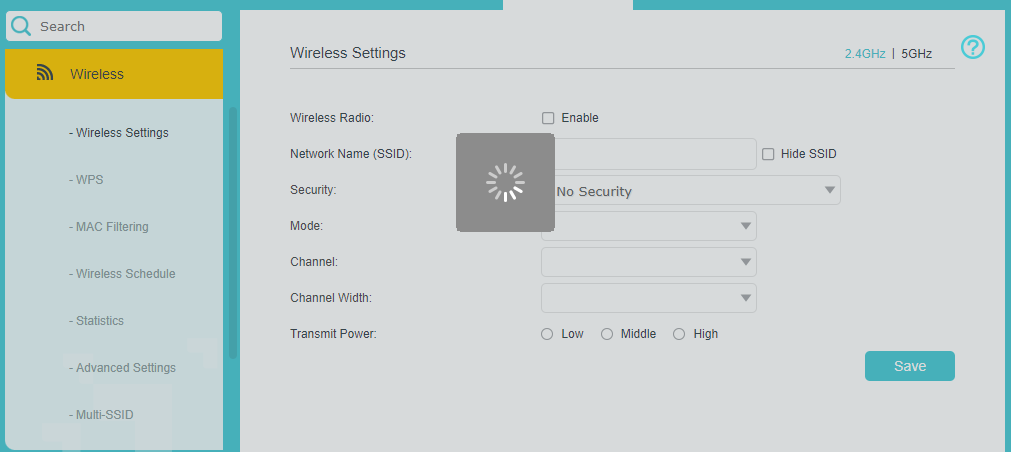
I have a problem with the Wi-Fi of my router, I cannot find the network neither from Pcs, nor from smartphones. In the last week I've tried several attempts, like doing a factory restore, which caused the wireless settings to not load, and upgrading to the lastest firmware, which I already had, but everything was useless. Can somebody help me?

  0      
  0      
#1
Options
3 Reply
Re:Wireless connection not working
2023-11-15 22:00:12

  @Naomi14 


Archer VR1210v seems to be a wireless modem router that is provided by your ISP.

If your ISP provided the device you should contact the ISP and ask for help on this issue.

Can you share a screenshot of your wireless settings (just cover your SSIDs and password for privacy).

If this was helpful click on the arrow pointing upward to make it blue. If this solves your issue, click the star to make it blue and mark the post as a "Recommended Solution".
  0  
  0  
#2
Options
Re:Wireless connection not working
2023-11-16 08:43:16

  @Naomi14

Hi I bought this modem of my own, because I saw it was one of the best. 

As you can see in the screenshot, when I click on the Wireless Settings the page doesn't load, so I can't change SSID or password.

  0  
  0  
#3
Options
Re:Wireless connection not working
2023-11-16 12:16:10

  @Naomi14 


I would try to reset the modem again while holding the reset button for 10 seconds to see if any difference.

If that doesn't help replacing the modem at the retailer would be your last resort.

If this was helpful click on the arrow pointing upward to make it blue. If this solves your issue, click the star to make it blue and mark the post as a "Recommended Solution".
  0  
  0  
#4
Options