Deco is connected via ethernet but chooses wifi

This thread has been locked for further replies. You can start a new thread to share your ideas or ask questions.

Deco is connected via ethernet but chooses wifi

This thread has been locked for further replies. You can start a new thread to share your ideas or ask questions.

Deco is connected via ethernet but chooses wifi
2024-07-07 18:47:08 - last edited 2024-07-13 16:59:59
Model: Deco X50-Outdoor  
Hardware Version: V1
Firmware Version: 1.2.5

Hi all,


This is referencing to another topic where I didnt find the answer for my specific case so starting a new thread: https://community.tp-link.com/en/home/forum/topic/599348


I do not know the hardware version of the X50 so I put v1 - it was bought in 2023.

All the other Deco's are M4R firmware 1.6.1


Connection is as follows:


From the main switch, a Zyxel GS1100-16v3 16-Port Gigabit Ethernet Unmanaged Switch it goes to all the M4Rs or directly to synology or another switch which then connects to another M4R called Office = works fine and is showing as ethernet connected. All are working correctly as ethernet except Wellness.


The issue is the M4R called Wellness, it has given me a lot of trouble to connect in the first place. Initially it was showing as wired, now it says wifi and I don't want to mess with it as previously it didn't connect at all.


The M4R Wellness is connected as following:

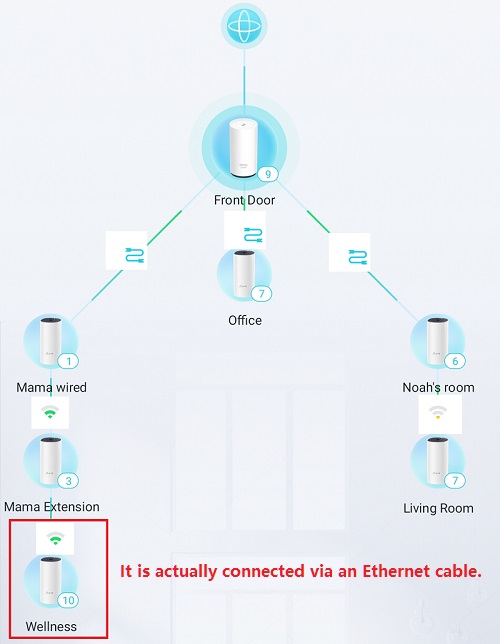
  • Internet > Router > Main Deco X50 > Switch Zyxel > Mama Wired (ethernet) > Mama extension (wifi, no ethernet possibility) > Wellness (wired but showing wifi)
  • As stated in the past it showed Wired but was a pain to get working...had to reset and retry multiple times
  • The wifi signal is now showing as high but can also be low, so prefer it to be wired


Any ideas? thanks


  0      
  0      
#1
Options
1 Accepted Solution
Re:Deco is connected via ethernet but chooses wifi-Solution
2024-07-13 16:59:53 - last edited 2024-07-13 16:59:59

Hi all,


I got it fixed!


  • Updated firmware of Wellness (and others)
  • It stopped working...
  • Connected Office instead of Wellness = didnt work
  • Connected Wellness again = worked and its showing ethernet!


Thanks everyone!

Recommended Solution
  0  
  0  
#4
Options
4 Reply
Re:Deco is connected via ethernet but chooses wifi
2024-07-09 02:27:48

  @Randomname47335 

Hi, Thank you very much for the feedback.

Does the network topology look like this:

Since all satellite M4 units work the same, Could you please try to swap the "Wellness" Deco with "Living Room" for example to see whether a new Deco M4 would maintain a stable Ethernet Backhaul?

Wait for your reply and best regards.

  0  
  0  
#2
Options
Re:Deco is connected via ethernet but chooses wifi
2024-07-10 08:43:14

  @David-TP thank you for your reply!


Slight difference in your overview:

  • Mama wired to Mama extension = via wifi like you show
  • Mama extension to Wellness = via ethernet BUT showing wifi in your and my overview


When you say 'its actually connected to ethernet' then only the picture is incorrect in the Deco app?


If I swap and it goes wrong what do I do? Last time I had to reset 3 times, move it near the main one (front door), move it back and pray...

Ideally I want to avoid doing that again or know what to do if it does happen again.


Thank you

  0  
  0  
#3
Options
Re:Deco is connected via ethernet but chooses wifi-Solution
2024-07-13 16:59:53 - last edited 2024-07-13 16:59:59

Hi all,


I got it fixed!


  • Updated firmware of Wellness (and others)
  • It stopped working...
  • Connected Office instead of Wellness = didnt work
  • Connected Wellness again = worked and its showing ethernet!


Thanks everyone!

Recommended Solution
  0  
  0  
#4
Options
Re:Deco is connected via ethernet but chooses wifi
2024-07-20 17:36:32

  @David-TP Unfortunately its back to being connected via Wifi...signal with ethernet had maximum speed, now its 1 bar and slow.


Any ideas? Should I connect Mama extension to a switch and then to the deco? Should I connect the switch to another router in AP mode or router mode?

  0  
  0  
#5
Options