New Arrival Archer TX1U Nano-Wide Compatibility including Linux (Kemel 3.10 and later)
Archer TX1U Nano-AX300 Nano Wi-Fi 6 Wireless USB Adapter

Specifications
Hardware Features |
Interface | USB 2.0 |
| Wireless Standards | IEEE 802.11 b/g/n/ax | |
| Dimensions | 0.69 × 0.62 × 0.28 in (17.5 × 15.8 × 7.1 mm) | |
| Antenna | 1 internal antenna | |
Wireless Security |
Wireless Security | WEP, WPA-PSK/WPA2-PSK |
Highlighted Features
-
Compact and Portable

It is Nano-sized (0.69×0.62×0.28 in) for lightning-fast wireless - perfect for travel and remote work.
-
Easy to Setup

It is preloaded with an internal driver for instant connectivity, eliminating tedious processes and allowing for a simple plug-and-perform experience without any hitches.
-
Wide Compatibility
Archer TX1U Nano supports Windows (11/10/7) and Linux (Kernel 3.10 and later), ensuring universal connectivity across a broad spectrum of devices for hassle-free usage.

Please free to comment below if you want to know more about Archer TX1U Nano!

- Copy Link
- Subscribe
- Bookmark
- Report Inappropriate Content
Hi Team, I am facing issue in configuring wifi ( hotspot ) driver, using Archer TX1U nano Ax300 mode,
I didn't find drivers for the following operating system configurations.
OS : Ubuntu 24.04 LTS
Kernel : 6.11.0-29-generic
Any suggestions for this please.
- Copy Link
- Report Inappropriate Content
- Copy Link
- Report Inappropriate Content
@woozle can i use this on raspberry pi os kernel 6.6
- Copy Link
- Report Inappropriate Content
@David-TP
Hii,
I'm having issues with driver installation for my archer tx1u dongle on my Ubuntu machine
The official driver from tp-link download center is giving error. Ig because it's officially supported on older kernels(<6.2) than mine(6.17).
OS: Ubuntu 25.10
Kernel: 6.17.0-8-generic
pls suggest solutions,
I need wifi :(
- Copy Link
- Report Inappropriate Content
Hi,
The easiest solution would be to buy a different USB Wi-Fi adapter that is already supported in kernel 6.17.
Another solution could be to downgrade to Ubuntu 25.04 with kernel 6.14 and then use this https://github.com/shenmintao/aic8800dc driver.
Note that this driver does not contain the USB ID 3625:0110 of the Archer TX1U Nano, but it can be integrated into the driver by merely modifying one file. For example, like how it's described in this thread -> https://community.tp-link.com/en/home/forum/topic/842344?replyId=1620186
A more challenging solution would be to take the relevant changes (i.e. "commits") related to kernels 6.15, 6.16 and 6.17 from this https://github.com/shenmintao/aic8800d80 driver belonging to the similar aic8800d80 Wi-Fi chip and implement them into the source code of the above mentioned driver for the aic8800dc Wi-Fi chip. It's cumbersome, but doable.
https://github.com/shenmintao/aic8800d80/commit/1c7d0833724c80536584b8848b08b35580108771
https://github.com/shenmintao/aic8800d80/commit/09d4dcee987c119085d5dcdec8739d9059c035c9
https://github.com/shenmintao/aic8800d80/commit/d32efa71a51920a96e9656aadc9a073bf7d9d70e

- Copy Link
- Report Inappropriate Content
Thanks a lot for the solution, it worked for me :D
Here's the updated repo: https://github.com/saish660/aic8800dc
but the dongle gets recognized as a storage device on startup, and I have to manually switch it's mode every time after startup using
sudo usb_modeswitch -v 0xa69c -p 0x5721 -M "5553424312345678000000000000061b000000020000000000000000000000"
How do I permanently fix it?
- Copy Link
- Report Inappropriate Content
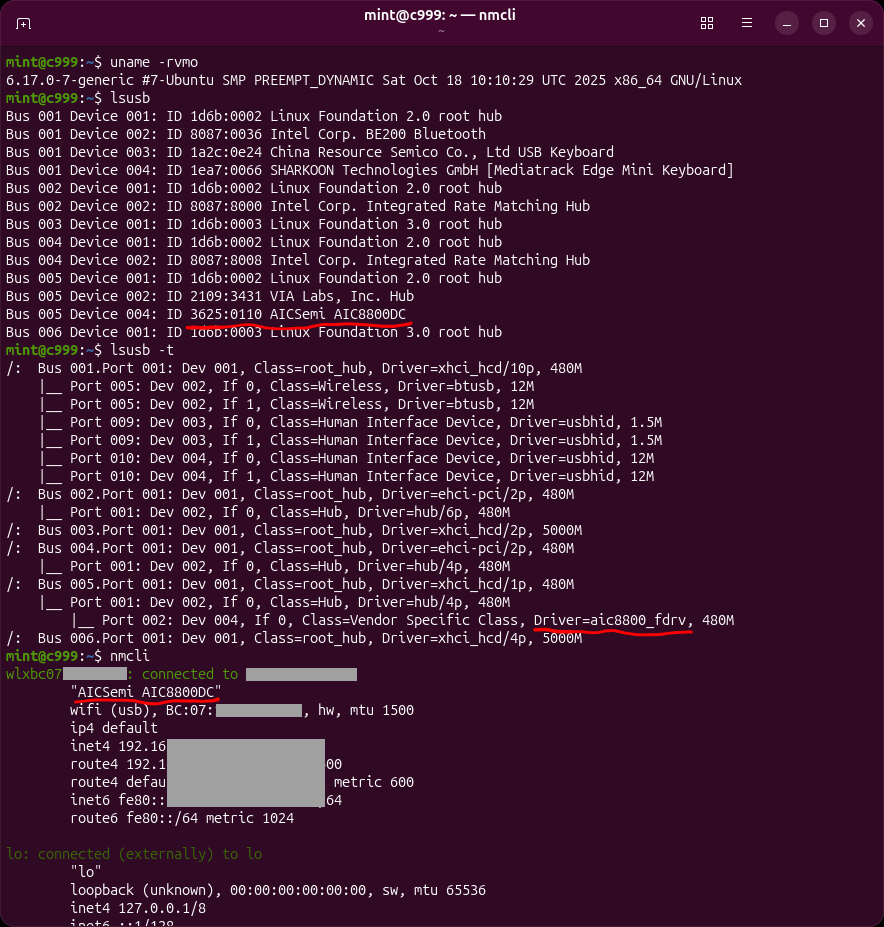
Many thanks for creating the fork with the modifications required for kernel 6.17! Great work!
I've never had to bother with the mode switching on my Ubuntu PC. The TX1U always shows up as "3625:0110 AICSemi AIC8800DC" right away. It also did so before I installed the driver.
Now that I checked the log (see attached file) I see that something weird is happening. usb_modeswitch doesn't get triggered, but instead the TX1U appears to reset itself, which results in the mode being switched. I don't know why this happens. (but I am not unhappy about it
)
For comparison I tested with another USB Wi-Fi adapter that also has a built-in storage for the driver and this one is doing a proper usb_modeswitch, fully automatic without my intervention. (also in the attached file)
As a cross-check I've just plugged my TX1U into a Windows PC and the internal storage device came up normally and was readable. So the TX1U I have is certainly not broken.
My installation of Ubuntu 25.10 is still fairly "fresh" and it was a clean installation. I haven't tinkered around with it much yet.
- Copy Link
- Report Inappropriate Content
Information
Helpful: 0
Views: 6895
Replies: 7
Voters 0
No one has voted for it yet.