
Cannot set up static route via VPN interface
 This thread has been locked for further replies. You can start a new thread to share your ideas or ask questions.
Hi. I am trying to set up VPN client on the router. I need the router to route traffic to certain IP ranges to a VPN server, and the rest of the traffic to go straight to WAN. I would expect this to be set up in "routing" section of the router. However, I can only set up routes to WAN and LAN, not VPN. The only way to configure VPN is to choose the client - which works as intended. However, it routes all traffic to a VPN server, and I only need to route it for all clients but for select IP ranges. Where can I do it? Is there any advanced way to tweak VPN routing (telnet/ssh)?
- Copy Link
- Subscribe
- Bookmark
- Report Inappropriate Content


Hi @nick_007j,
Sorry for the late reply.
To customize routing in your OpenVPN setup, use the route directive in your .ovpn file to specify networks or IPs to route through the VPN.
For example: route 192.168.100.0 255.255.255.0 vpn_gateway
This routes traffic for the 192.168.100.0/24 subnet via the VPN.
If you are unsure or have problems with the changes, you can email support.forum@tp-link.com, attaching [Forum ID 768514] and details, and we will have a dedicated person to assist in analysis and follow-up.
- Copy Link
- Report Inappropriate Content
Hi @nick_007j,
For your need, you can consider set OpenVPN client on the router. For detailed instructions, please refer to this FAQ: https://www.tp-link.com/support/faq/3135/.
- Copy Link
- Report Inappropriate Content
@Joseph-TP Hi, thank you for the reply. Yes, I have already set up VPN client and it's working. What I cannot configure is that I want the router to route packets to certain IP ranges but for all network clients, instead of for for all packets for selected clients. Essentially, static routing except I cannot choose VPN as interface. Is it possible to do?
- Copy Link
- Report Inappropriate Content
For clarity, this is another router that I am using, and its "static route" window: 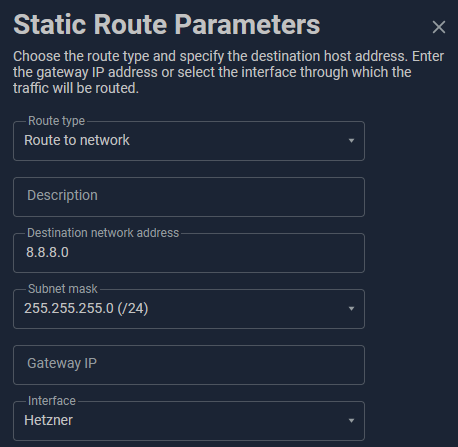
It is very similar to the one I see in TP-LINK one: 
In the first screenshot "Hetzner" is the name of the OpenVPN client that I have similarly set up, and it routes anything from the router clients to the VPN tunnel. In the configuration this results in the following configuration line "ip route 8.8.8.0 255.255.255.0 OpenVPN1 auto".
I want something similar in TP-LINK. The VPN client I have set up, but unfortunately the only options I am getting are LAN/WLAN and WAN. And I cannot find a way for more advanced tweak for static routing. As I mentioned, no issues with VPN itself - if I enable the clients in the interface, all their traffic will be router through VPN but that's not exactly what I am aiming for.
Is there a way to achieve similar routing?
- Copy Link
- Report Inappropriate Content
Hi @nick_007j,
Sorry for the late reply.
To customize routing in your OpenVPN setup, use the route directive in your .ovpn file to specify networks or IPs to route through the VPN.
For example: route 192.168.100.0 255.255.255.0 vpn_gateway
This routes traffic for the 192.168.100.0/24 subnet via the VPN.
If you are unsure or have problems with the changes, you can email support.forum@tp-link.com, attaching [Forum ID 768514] and details, and we will have a dedicated person to assist in analysis and follow-up.
- Copy Link
- Report Inappropriate Content
Information
Helpful: 0
Views: 567
Replies: 4
Voters 0
No one has voted for it yet.