
Official Release Deco X50/X55_V1_1.6.7 Optimized the Client Network Stability


This Article Applied to:
Deco X50/X55_V1_1.6.1/1.6.4
Modifications and Bug fixes:
- Supported EasyMesh
- Supported TSS_V2(TP-Link Simple Setup) function, which enables thed device to quickly discover and pair with TP-Link smart home and EasyMesh-compatible devices.
- Fixed the bugs of frequent client disconnections;
- Fixed the bug that clients cannot access the Internet after enabling the DoH server.
Download Link:
| Deco X50/X55_V1/V1.6 | 1.6.7_build20250314_Official |
Update Advice:
1. How to manually update the firmware via web UI- How to Update the Firmware of Deco.
2. The 1.6.7 could revert to the official 1.6.3/1.6.1 directly via web UI.
- Copy Link
- Subscribe
- Bookmark
- Report Inappropriate Content
Hi, Thanks for the update. I think you can try to temporarily turn off the 2*Deco X50-V1.2 and Deco X50-outdoor to see whether it helps this time.
Wait for your reply.
Best regards.
- Copy Link
- Report Inappropriate Content

Since upgrading to this release (1.6.7) I've had huge network issues, my network uses 3x X55 plus one X50-5g, and I use main and IoT networks. I had to remove the X50 as main as it simply could not maintain the traffic and the network became unreliable. I moved back to X55 as main on previous 1.6 (.4) firmware, this solidified things, happy days.
1.6.7 was installed 4 days ago - and problems are back with devices losing connection, struggling to connect, my Home Assistant monitor recorded a significant leap in average CPU usage (since the day of the update). I have also noted that my Zigbee devices and ARLO have also become flakey (I hadn't correlated the dates until now), they all seemed to have connection issues.
I was trying to work out the issues (repeaters not working?) when I noticed an ESP device log struggling to connect to my IoT network, and trying to use "hidden networks". The Deco network channel optimisation was constantly suggesting new 2g channels.
After a little research I found that EasyMesh (new in 1.6.7) creates new hidden channels, I have turned this off (as I don't need other vendors devices as access points) and observed a significant reduction in CPU usage, the wifi network appears to have stabilised, as have my Zigbee devices.
It's early days, I will keep monitoring, but the EasyMesh function appears to be creating a lot of (unnecessary) extra CPU requirements, and the (WiFi and Zigbee) channels appear less congested without it.
- Copy Link
- Report Inappropriate Content

@David-TP Hello, ist this Firmware also compatible with the EU/German X55 V1 ?
- Copy Link
- Report Inappropriate Content

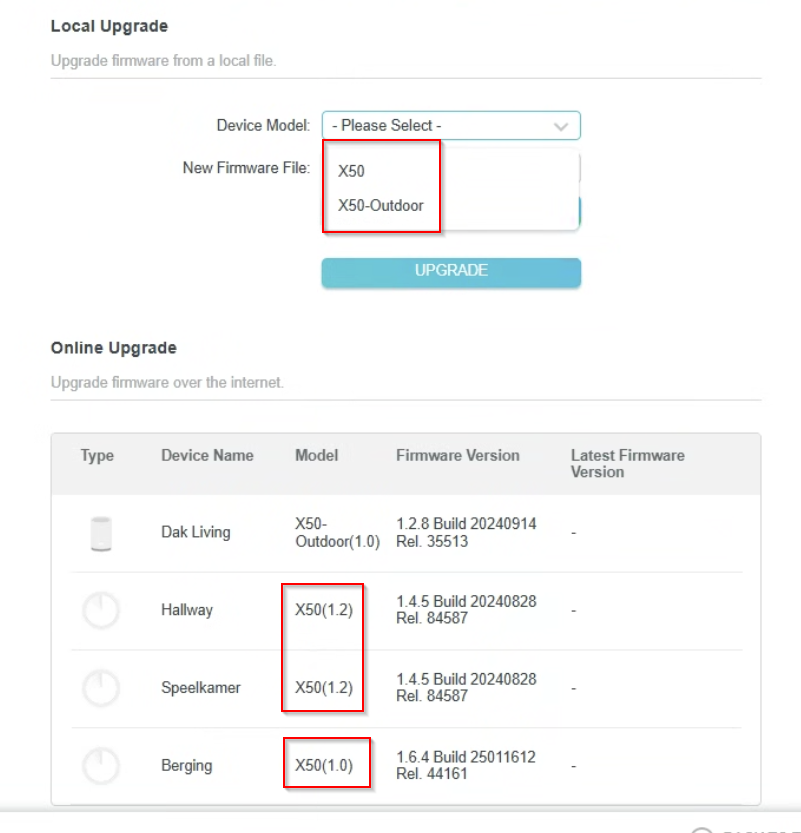
@David-TP I did try that but as I said: it is on that page (tplinkdeco.net) impossible to choose only my main router unit. I can only choose between x50 and x50-outdoor. I suspect that when I choose x50, the software also tries to update "Hallway" and "Speelkamer" which are another hardware revision so the update fails.
- Copy Link
- Report Inappropriate Content
n0zkl3r wrote
Hi, it seems like your Deco APP hasn't received the firmware push notification.
If you want to test this version, you might need to manually install it via the web UI.
Or you can also wait for a while to automatically install it via the Deco APP.
Thank you very much.
Best regards.
- Copy Link
- Report Inappropriate Content
HorlaTheGreat wrote
@David-TP I get a "firmware update failed" message when I try to update the firmware. I have 4 Deco X50 units, 2x a 1.2 version, 1 (the main router) v1 and 1 x50-outdoor. On the web page to update the firmware (in the deco app the 1.6.7 version is not visible although you can download it from the site) I can only choose x50 and x50-outdoor. Is it possible it tries to update al three x50 devices? Then it is logical it failes because for the v1.2 this update doesn't exist. Seems a bug in your sofware then that you can't specify which hardware version you want to update...
Hi, the 1.6.7 is only for Deco X50_V1. Neither Deco X50-V1.2 nor Deco X50-outdoor_V1 can use this version.
Have you tried to select "Deco X50_V1 only" to update the 1.6.7 firmware?
It is also suggested to access the web UI via the IP address of the main Deco 192.168.68.1, instead of tplinkdeco.net, to see whether you can install the 1.6.7 version.
Wait for your reply.
Best regards.
- Copy Link
- Report Inappropriate Content
@David-TP I get a "firmware update failed" message when I try to update the firmware. I have 4 Deco X50 units, 2x a 1.2 version, 1 (the main router) v1 and 1 x50-outdoor. On the web page to update the firmware (in the deco app the 1.6.7 version is not visible although you can download it from the site) I can only choose x50 and x50-outdoor. Is it possible it tries to update al three x50 devices? Then it is logical it failes because for the v1.2 this update doesn't exist. Seems a bug in your sofware then that you can't specify which hardware version you want to update...
- Copy Link
- Report Inappropriate Content

- Copy Link
- Report Inappropriate Content

@David-TP Okay Of Course I wait for that's.....
- Copy Link
- Report Inappropriate Content
Hi, I think you can update to the 1.6.7 version first. The bin file can be downloaded from the official EN site.
https://www.tp-link.com/en/support/download/deco-x50/v1/#Firmware
The 1.6.7 can revert to the official 1.6.1/1.6.4 directly via the web UI.
The 1.2.10 is still the latest version for Deco X50_V1.3. If there is any further news about the new version, I'm sure you'll be informed.
Thank you very much.
Best regards.
- Copy Link
- Report Inappropriate Content
Information
Helpful: 1
Views: 27596
Replies: 125
Voters 0
No one has voted for it yet.