
Official Release Deco X50/X55_V1_1.6.7 Optimized the Client Network Stability


This Article Applied to:
Deco X50/X55_V1_1.6.1/1.6.4
Modifications and Bug fixes:
- Supported EasyMesh
- Supported TSS_V2(TP-Link Simple Setup) function, which enables thed device to quickly discover and pair with TP-Link smart home and EasyMesh-compatible devices.
- Fixed the bugs of frequent client disconnections;
- Fixed the bug that clients cannot access the Internet after enabling the DoH server.
Download Link:
| Deco X50/X55_V1/V1.6 | 1.6.7_build20250314_Official |
Update Advice:
1. How to manually update the firmware via web UI- How to Update the Firmware of Deco.
2. The 1.6.7 could revert to the official 1.6.3/1.6.1 directly via web UI.
- Copy Link
- Subscribe
- Bookmark
- Report Inappropriate Content

Hi David, is this version is totally stable ?, I have the 1.5.3 Build 20240523 Rel. 47917 and I have a lot of fear to update, because all the past versions of this one, not worked for me, I have more than 100 devices connected, so Layne of support helped so much and we see after a while that the only version that works for me is the one I have, but right now my internet connection was improved because I add an Asus RT-AX86U router to leave it as a main router (my Decos are in Mode AP) and now my internet/wifi is working pretty awesome, becuase some days agoo I didn´t receive my whatsap messages, also a pain to see the emails with my cellphone, but with this new router now all is working good, because I discover the biggest problem was my Router of my Internet company.
But I am sad because really want to have my Decos (X55,X60 an Outdoor X50) updated to the last firmware and have all the new features, security, etc. and I think they will work better.
What do you think ?, my concern is that I see I can´t downgrade to the version I have right now.
Let me know and thank you so much!!
- Copy Link
- Report Inappropriate Content

Hi,

I uploaded the log from the app to support.
I want to run the VX800V as the central unit and then connect the decoders to it; it wouldn't make sense for me to do it the other way around.
There are no error messages for the decoders, just that they can't be connected.
The Vx800V says it hasn't found a suitable device.- Copy Link
- Report Inappropriate Content
Hi, Thanks for the feedback.
I didn't have any other tips. I'll need to escalate your case to the engineer later via email.
In the meantime, can you help me check the following details:
Did you plan to set Deco X55 as an EasyMesh Agent of VX800V?
Would there be any error message when Deco failed to be added as an EasyMesh Agent?
Please also refer to this link to help me submit the Deco APP log:How to submit Deco APP log
Wait for your reply.
Best regards.
- Copy Link
- Report Inappropriate Content
Hi,
Since today I have the VX800V (0.9.0 3.0.0 v603c.0 Build 240926 Rel.39238n) for my fiber optic connection, since it supports Easymesh and my three Deco x55 with the firmware here as well, I thought, hey great.
Unfortunately, I can't get the Decos to connect to the VX800V, whether by searching or using the WPS button.
Do you have any tips or ideas?
- Copy Link
- Report Inappropriate Content
Hi, the EA version here has the same firmware bin file as the official version. In some ways, it is basically an official version, and the community had it uploaded as a beta download early, mainly for testing.
Best regards.
- Copy Link
- Report Inappropriate Content

@David-TP thank you for your honest reply. Hoping that I will be able to install 1.6.7 manually without crashing te router. Do you know when it will be released?
- Copy Link
- Report Inappropriate Content
Hi, when the engineer approved the community to launch the Beta/EA testing, they hoped community users could help find out some hidden issues in the real user scenarios. If certain feedback has gone through many firmware versions, it would not be what they're expecting to see. While all feedback is valuable and important, it's just not their main focus for the EA testing.
You're right that there is similar feedback about "online Clients" on different models, so it is not dedicated to a particular version. The latest beta/EA versions not only introduce new features but also incorporate potential fixes identified by engineers during previous troubleshooting sessions with users. I can't guarantee it will 100% fix the similar issue, and it did mitigate some potential problems. Quoting "having the same issue" might not be helpful, and could prevent other users from installing the tested version. Starting a new thread with more details and submitting the APP log would offer more valuable clues for troubleshooting.
Since you asked, I'd like to talk more about email escalation. Many users prefer engaging directly in community chats as they believe it can benefit others. That's true, and it is also what all moderators tend to achieve. While some complicated and unusual issues are out of our control. So, if users can constantly reproduce this issue, I think it could expedite the resolution process if the engineers are involved, which, of course, needs your cooperation with the engineers. If the suggestions are approved as useful, I'll share them with the community as well.
Thanks for your patience.
Best regards.
- Copy Link
- Report Inappropriate Content
@David-TP this is een ongoing issue widespread along many firmware versions on different Deco X models. Why start a new thread? Why not solve the issue.
- Copy Link
- Report Inappropriate Content
xplodzs wrote
I have the same problem with deco x50v1 1.6.7 and X20v4 1.5.5. Devices appear and disappear. Deleting. Rebooting doesn't help. Maybe the problem is in x20?
Hi, nice to see you again.
It would be much better if you could start a new thread and add more details:
https://community.tp-link.com/en/home/forum/edit/topic?moduleId=39
"Devices appear and disappear. Deleting. Rebooting doesn't help."
What are these "devices"? Can I have their model numbers?
Can you constantly reproduce this issue?
By the way, how about your current network map on the Deco App, such as:
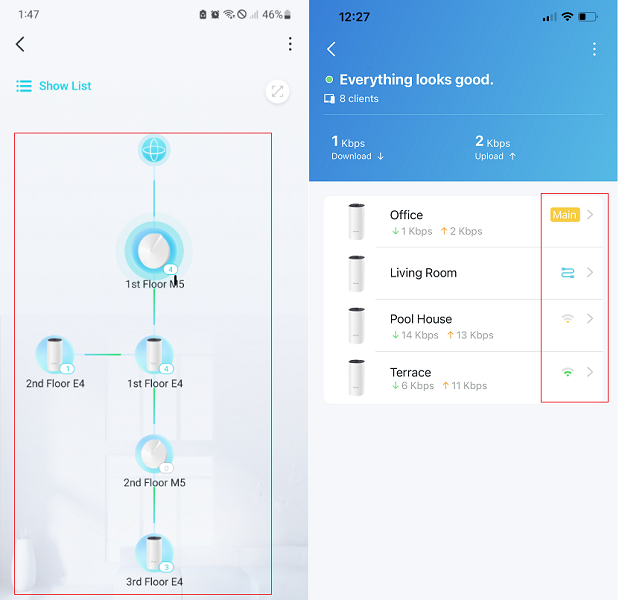
Best regards.
- Copy Link
- Report Inappropriate Content
Thanks for the feedback.
The CPU of Deco is limited, and newly introduced features will increase its workload. Additionally, more satellite units in the Mesh network will also add to CPU usage. Despite the rise in CPU utilization, as long as the Mesh system continues to operate effectively, it remains within acceptable CPU load parameters.
Best regards.
- Copy Link
- Report Inappropriate Content
Information
Helpful: 1
Views: 27611
Replies: 125
Voters 0
No one has voted for it yet.