
TP-Link Archer C3150 limitando a velocidade do WI-FI em 100 Mb/s

This thread has been locked for further replies. You can start a new thread to share your ideas or ask questions.

TP-Link Archer C3150 limitando a velocidade do WI-FI em 100 Mb/s

This thread has been locked for further replies. You can start a new thread to share your ideas or ask questions.

TP-Link Archer C3150 limitando a velocidade do WI-FI em 100 Mb/s
2025-04-19 18:09:33 - last edited 2025-04-21 08:10:13
Model: Archer C3150  
Hardware Version: V2
Firmware Version: 3.2.0 0.9.1 v005f.0 Build 220919 Rel.64400n

Creio que várias versões da TPlink estão com o mesmo problema, pois ví inumeras reclamações e como consegui resolver meu problema, venho compartilhar a minha solução.


* Verificar o Cabo de Rede entre a (OPERADORA e o TPLINK) = no meu caso o cabo de conexão é CAT8

* Verifique a Versão do Modem e Atualize se disponível.


* Desative o pacote QOS no TP-Link = (Foi o que resolveu no meu caso)
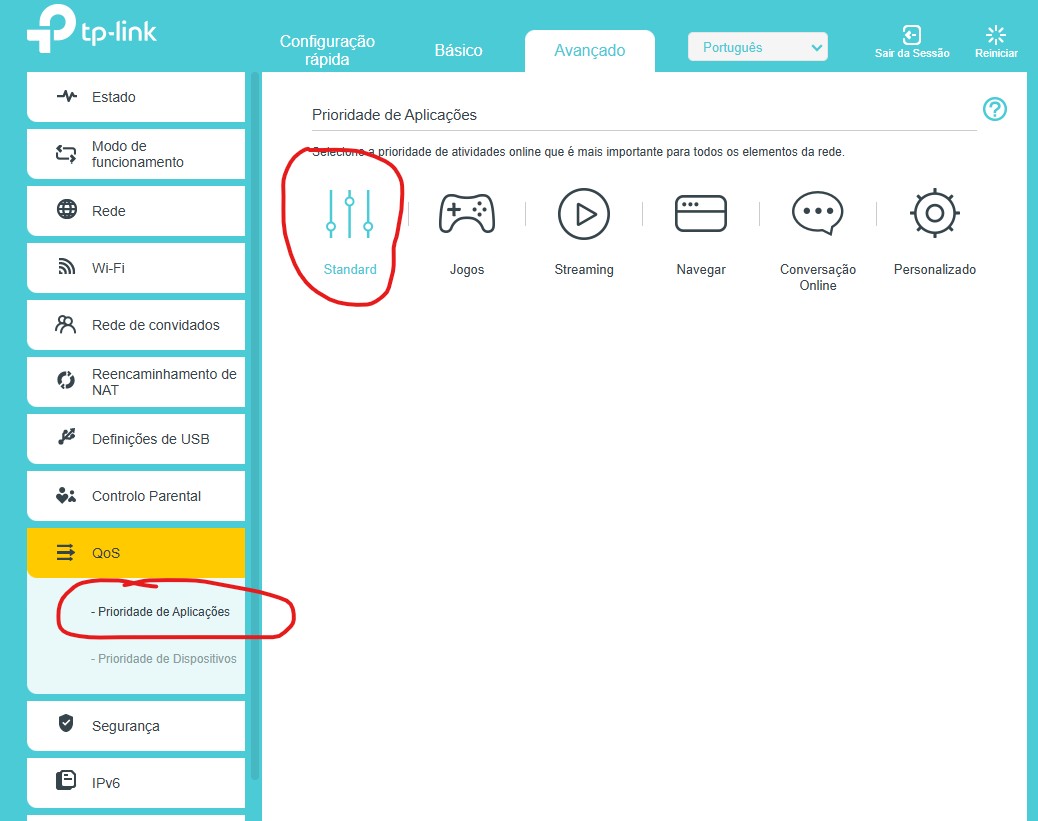
 

Desative o QOS DESATIVE O QOS = STANDART(ESTÁ DESATIVADO) 
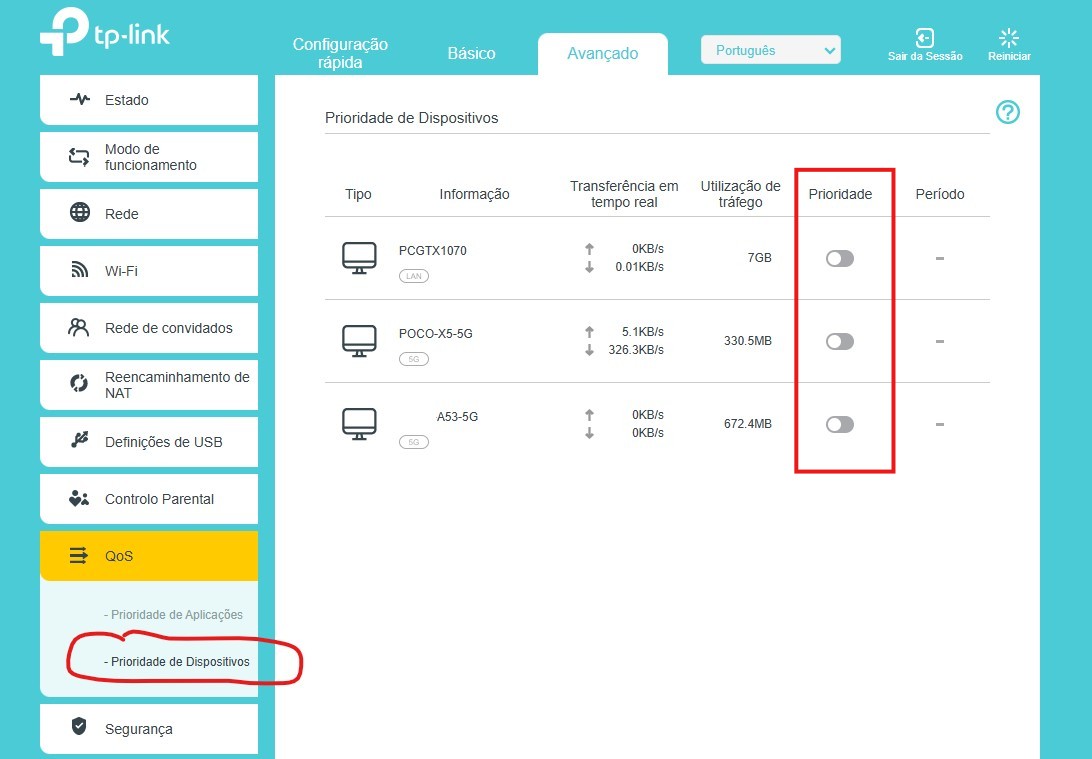
 

REMOVA AS PREFERENCIAS DE DISPOSITÍVOS REMOVA AS PREFERÊNCIAS DE DISPOSITIVOS
1
1
#1
1 Accepted Solution
Re:TP-Link Archer C3150 limitando a velocidade do WI-FI em 100 Mb/s-Solution
2025-04-21 08:10:05 - last edited 2025-04-21 08:11:07

Hi @MauerLiz,

Thank you for contacting our community.

According to the translation of Google Translate, I think that your question is to share your suggestions with other users. If there is any discrepancy, please describe it in English.


What you suggest are:

* Check the network cable between (service provider and TPLINK) = in my case, the connecting cable was CAT8
* Check the firmware version of the router and update it.
* Disable QoS on TP-Link, delete device preferences, delete device preferences.


Here are some tips which might improve the speed of your Archer Router:
    1) If Ethernet speed is slower than expected, please try different Ethernet cables (CAT5E or above) on the Router.
    2) Disable QoS, please access http://tplinkwifi.net and go to Advanced >> QoS to disable it.
    3) Disable Parental Control, please go to Advanced >> Parental Control to disable it.
    4) If wireless speed is slower than expected, please go to Advanced >> Wireless Settings to change the 5GHz Wi-Fi channel, you may try different channels to find the best one for your environment.
    5) Disable SIP ALG and UPNP, please go to Advanced >> NAT Forwarding >> UPNP to disable UPNP, go to Advance >> Security to disable SIP ALG.
    6) Try a few other speedtest servers, other servers might reach better speeds.


Thank you again for your sharing, which will be helpful for other users.
 

Welcome to Our Community! Get the latest posts: △New Firmware for Archer GE550/GE650 V1 Introduces AI-QoS, EasyMesh IoT Expansion, and More! △New Firmware Releases for Archer BE805 V1/BE450 V1 to Support VPN Merge, New ECO Mode, and More! More posts, please see: △ Get the Ongoing Pre-release Firmware for Wi-Fi Routers Here— Subscribe for Updates! Urgent problems with your Wi-Fi Router, Range Extender, or DSL Modem? Please reach out via private Messages or @Joesph-TP in your new thread directly. Click Or ☆Recommended Solution if the post/answer helps.
Recommended Solution
0
0
#2
1 Reply
Re:TP-Link Archer C3150 limitando a velocidade do WI-FI em 100 Mb/s-Solution
2025-04-21 08:10:05 - last edited 2025-04-21 08:11:07

Hi @MauerLiz,

Thank you for contacting our community.

According to the translation of Google Translate, I think that your question is to share your suggestions with other users. If there is any discrepancy, please describe it in English.


What you suggest are:

* Check the network cable between (service provider and TPLINK) = in my case, the connecting cable was CAT8
* Check the firmware version of the router and update it.
* Disable QoS on TP-Link, delete device preferences, delete device preferences.


Here are some tips which might improve the speed of your Archer Router:
    1) If Ethernet speed is slower than expected, please try different Ethernet cables (CAT5E or above) on the Router.
    2) Disable QoS, please access http://tplinkwifi.net and go to Advanced >> QoS to disable it.
    3) Disable Parental Control, please go to Advanced >> Parental Control to disable it.
    4) If wireless speed is slower than expected, please go to Advanced >> Wireless Settings to change the 5GHz Wi-Fi channel, you may try different channels to find the best one for your environment.
    5) Disable SIP ALG and UPNP, please go to Advanced >> NAT Forwarding >> UPNP to disable UPNP, go to Advance >> Security to disable SIP ALG.
    6) Try a few other speedtest servers, other servers might reach better speeds.


Thank you again for your sharing, which will be helpful for other users.
 

Welcome to Our Community! Get the latest posts: △New Firmware for Archer GE550/GE650 V1 Introduces AI-QoS, EasyMesh IoT Expansion, and More! △New Firmware Releases for Archer BE805 V1/BE450 V1 to Support VPN Merge, New ECO Mode, and More! More posts, please see: △ Get the Ongoing Pre-release Firmware for Wi-Fi Routers Here— Subscribe for Updates! Urgent problems with your Wi-Fi Router, Range Extender, or DSL Modem? Please reach out via private Messages or @Joesph-TP in your new thread directly. Click Or ☆Recommended Solution if the post/answer helps.
Recommended Solution
0
0
#2
