Archer AX72 AX5400 Tether security bug.

This thread has been locked for further replies. You can start a new thread to share your ideas or ask questions.

Archer AX72 AX5400 Tether security bug.

This thread has been locked for further replies. You can start a new thread to share your ideas or ask questions.

Archer AX72 AX5400 Tether security bug.
2025-05-02 13:59:19 - last edited 2025-05-28 07:53:35
Model: Archer AX72  
Hardware Version: V1
Firmware Version: 1.2.6 Build 20240619 rel 72016(4555)

1) Configure ACL as an allow list with AMC addresses added. This is to ensure parental controls work and prevent people from using randomized mac addresses which ignore profiles.
2) In Tether on ANDROID, select a device and Block it.

The above results in the router changing teh ACL from 'Allow list' (White List)  to a 'DENY list', adding the device blocked in Tether. Unfortunately, it also means all the parental controls can now be ignored if a person switches on random mac address. This renders the configuration and parental control subscriptions useless as they cannot be enforced..


Advanced Parental controls subscription active
Security + Subscription Active

Tether on SAMSUNG ANDROID 14 One UI version 6.1
 

WiFi Router Archer AX72

Firmware Version:

1.2.6 Build 20240619 rel.72016(4555)
Hardware Version:

Archer AX72 v1.0
 

One Extender connected

RE605X

1.0.6 Build 20240819 Rel. 59464

One AP connected


RE450

1.0.2 Build 230213 Rel. 555420n

  0      
  0      
#1
Options
1 Accepted Solution
Re:Archer AX72 AX5400 Tether security bug.-Solution
2025-05-07 09:52:13 - last edited 2025-05-28 07:53:35

Hi @IndigoBlue,

Thank you for reporting your issue to our community.


Parental control files settings identify devices by mac address, so we first need to make sure that the random mac function is turned off so that parental control can work properly on the clients to be managed.


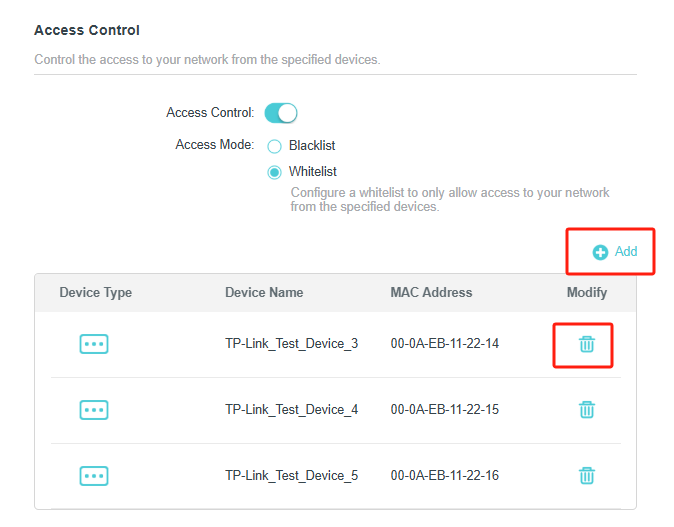
If you want to increase or decrease the clients of whitelist, it is recommended that you adjust it in the Access Control interface. The following screenshot:

If you click deny directly in the Clients interface of Tehter APP, it may cause a conflict in the rules.

After you click deny on one of the clients, are all the devices in the whitelist displayed as blocked? Or, does the whitelist directly become blacklist? Or are there other error messages?

Nice to Meet You in Our TP-Link Community. Check Out the Latest Posts: △Pre-release Firmware for Archer AX50 Introduces New Parental Control Features and Enhancements △Introducing AI QoS: Elevate Your Gaming Experience on the Archer GE800 Gaming Router △Connect TP-Link Archer BE550 to Germany's DS-Lite (Dual Stack Lite) Internet via WAN △Tether KidShield Test Recruitment - Safeguarding Children's Online Experience If you found the post or response helpful, please click Helpful. If an answer solves your problem, click "Recommended Solution" so that others can benefit from it.
Recommended Solution
  0  
  0  
#2
Options
1 Reply
Re:Archer AX72 AX5400 Tether security bug.-Solution
2025-05-07 09:52:13 - last edited 2025-05-28 07:53:35

Hi @IndigoBlue,

Thank you for reporting your issue to our community.


Parental control files settings identify devices by mac address, so we first need to make sure that the random mac function is turned off so that parental control can work properly on the clients to be managed.


If you want to increase or decrease the clients of whitelist, it is recommended that you adjust it in the Access Control interface. The following screenshot:

If you click deny directly in the Clients interface of Tehter APP, it may cause a conflict in the rules.

After you click deny on one of the clients, are all the devices in the whitelist displayed as blocked? Or, does the whitelist directly become blacklist? Or are there other error messages?

Nice to Meet You in Our TP-Link Community. Check Out the Latest Posts: △Pre-release Firmware for Archer AX50 Introduces New Parental Control Features and Enhancements △Introducing AI QoS: Elevate Your Gaming Experience on the Archer GE800 Gaming Router △Connect TP-Link Archer BE550 to Germany's DS-Lite (Dual Stack Lite) Internet via WAN △Tether KidShield Test Recruitment - Safeguarding Children's Online Experience If you found the post or response helpful, please click Helpful. If an answer solves your problem, click "Recommended Solution" so that others can benefit from it.
Recommended Solution
  0  
  0  
#2
Options