
TL-WPA7510 not delivering the speed I expected
 This thread has been locked for further replies. You can start a new thread to share your ideas or ask questions.
I wanted to improve my connection speed in my house, replacing my old TP-Link limited to 200 Mbps with a newer version that was supposed to deliver 1000 Mbps with a wifi at 750 Mbps.
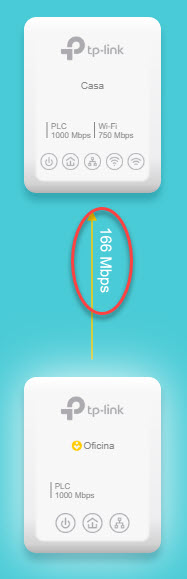
I just hooked up both devices and found out that nothing has changed in my house. My wife's notebook still shows a 32 Mbps connection when checking speed thru fast.com (I have a 980 Mbps connection, but I am connected to the router), and I noticed that the speed between the two TP-Link devices is 166 Mbps (I can't seem being able to insert neither a picture nor a link to a picture).
Any idea why ?
- Copy Link
- Subscribe
- Bookmark
- Report Inappropriate Content


Hi@Corobori,
Thank you for contacting our community.
May I know what is the model of your previous TP-Link device?
If you're experiencing low speed issues when connected to a TP-Link powerline device, there are several potential factors and troubleshooting steps you can take:
1. Check powerline adapters' placement: Ensure that the powerline adapters are plugged directly into a wall outlet and not into power strips, surge protectors, or extension cords.
2. Test different electrical outlets and move them into the same room for comparison.
3. Check powerline rates between the powerline devices via tpPLC utility/App, you could refer to this FAQ to understand the difference between powerline rate and actual internet speed: Explanation about the Powerline Rate and Actual speed of the Powerline Adapters
If the powerline rate is too low, refer to this FAQ to see if it will be better: What can I do if my powerline rate is very low?
4. If the wired speed is normal, only wireless connection is slow, please try to change the Wi-Fi channel and channel width on the powerline extender.
5. Check available firmware updates and ensure the powerline adapter and extender are both using the latest firmware.
- Copy Link
- Report Inappropriate Content
Hi@Corobori,
Thank you for contacting our community.
May I know what is the model of your previous TP-Link device?
If you're experiencing low speed issues when connected to a TP-Link powerline device, there are several potential factors and troubleshooting steps you can take:
1. Check powerline adapters' placement: Ensure that the powerline adapters are plugged directly into a wall outlet and not into power strips, surge protectors, or extension cords.
2. Test different electrical outlets and move them into the same room for comparison.
3. Check powerline rates between the powerline devices via tpPLC utility/App, you could refer to this FAQ to understand the difference between powerline rate and actual internet speed: Explanation about the Powerline Rate and Actual speed of the Powerline Adapters
If the powerline rate is too low, refer to this FAQ to see if it will be better: What can I do if my powerline rate is very low?
4. If the wired speed is normal, only wireless connection is slow, please try to change the Wi-Fi channel and channel width on the powerline extender.
5. Check available firmware updates and ensure the powerline adapter and extender are both using the latest firmware.
- Copy Link
- Report Inappropriate Content
1) My previous device was a TL-PA2010
2) My device is plugged in directly to the wall outlet
3) I did move the plug and it improved the speed.
See picture wwwDOTcoroboriDOTcomSLASHsosSLASH2025-05-28_12-11-22.jpg
- Copy Link
- Report Inappropriate Content
I have got a doubt about the firmware version. I have got the 2.0.1 Build 20190125 Rel.38797, but looking at this page, it seems mine is more up to date than the ones shown. Which firmware should I have ? I am located in Chile
- Copy Link
- Report Inappropriate Content
Hi@Corobori,
Thank you for your reply.
I cannot see what is the content of the screenshot that you sent. But if you can get a higher speed after you change adapter to a different wall socket, this means that the powerline rate of the wall socket you were previously using is not high. And it is subject to more resistance factors, making it unsuitable for users to build a powerline backhaul.
For the firmware update, it may be that the firmware for your region has not yet been synchronized to the official website. Since you are probably using the EU version, it is recommended that you download and manually update the firmware directly from the global official website, which may improve the performance of the powerline network.
How to update the firmware of Powerline ac Extender via web-based management interface (new logo)
- Copy Link
- Report Inappropriate Content
Thanks for replying. When going to the global page you're mentioning and trying to download a popup comes up with a text saying "Please upgrade firmware/software from the local TP-Link official website of the purchase location for your TP-Link device, otherwise it may cause upgrade failure or mistakes and be against the warranty." and I redirected to https://www.tp-link.com/cl/support/download/tl-wpa7510-kit/#Firmware where I could download TL-WPA7510(EU)_V2_190610, my device says 2.0.1 Build 20190125 Rel.38797.
Should I ignore the warning and download TL-WPA7510(EU)_V2_240306 anyway?
- Copy Link
- Report Inappropriate Content
Hi@Corobori,
Thank you for your reply.
You can check is the powerline adapter EU version?
To avoid update failures caused by a large span of firmware versions, you can install TL-WPA7510(EU)_V2_2.0.4 Build 20230428 firstly and update to it manually.
Best Regards~
- Copy Link
- Report Inappropriate Content
- Copy Link
- Report Inappropriate Content
Hi@Corobori,
Thanks for your update.
If the firmware update still fails to improve the speed, but you changed the wall socket before and the powerline network speed improved. This means that the circuit interference is large, and it is not suitable for the powerline system at present.
It is recommended that you change the wall socket and use it for a period of time to compare.
- Copy Link
- Report Inappropriate Content
Information
Helpful: 0
Views: 1023
Replies: 8
Voters 0
No one has voted for it yet.