
Future Time Machine Support on TP-Link Routers (macOS 27 Compatibility)

Hi there,
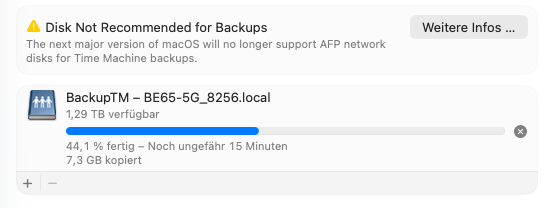
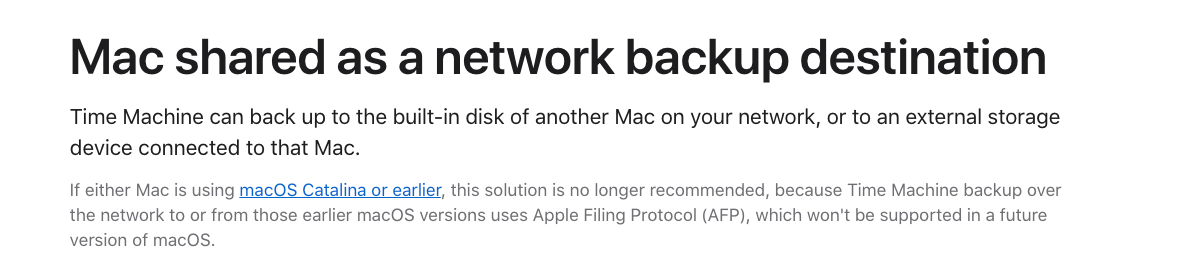
I just noticed that with the latest macOS 26 Tahoe beta, Apple has announced that AFP network volumes will no longer be supported for Time Machine backups starting with macOS 27.
Since I primarily use my Deco BE65 for Time Machine backups, I wanted to ask if there are any plans to support this functionality in the future – for example, by improving SMB support for Time Machine.
Currently, no TP-Link routers support the APFS file format required for Time Machine disks, and formats like exFAT or NTFS aren’t compatible with Time Machine over SMB either. So simply switching to SMB doesn’t work unless the router is explicitly designed to support Time Machine via SMB with a compatible backend (e.g., sparsebundle support and proper service advertisement).
Or maybe I’m just missing something – I haven’t found any additional Time Machine-specific settings in the Deco app besides the simple on/off toggle.
I’ve attached some screenshots from the current beta for context.
Thanks in advance and best regards!
- Copy Link
- Subscribe
- Bookmark
- Report Inappropriate Content
@Johndis same here. No update yet. I can't use Time Machine to backup to a usb-connected drive over deco.
- Copy Link
- Report Inappropriate Content
- Copy Link
- Report Inappropriate Content
- Copy Link
- Report Inappropriate Content
Do you have an update for the community on enabling this feature? (broadcast SMB over Bonjour)?
- Copy Link
- Report Inappropriate Content
- Copy Link
- Report Inappropriate Content

Hi, thanks for your time and patience. I'm afraid there hasn't been any updated news.
Sorry for the inconvenience.
Merry Christmas.
- Copy Link
- Report Inappropriate Content
TP will ultimately have to address this issue for new MacOS. Why not address it now for people who don't have a way to backup to existing macOS?!
TP has been dragging this for months and months. This should be a simple change to make usb disc available as SMB instead of AFP.
is anyone working on this? What is the timeline? When can we expect to be able to backup using Time Machine to a disc connected to TP?
- Copy Link
- Report Inappropriate Content
@C-Link Just to add on, I would also like to see this feature!
- Copy Link
- Report Inappropriate Content
- Copy Link
- Report Inappropriate Content
Sorry to break it for you, but I really don't think this will be fixed.
Here's what I've just posted on a related thread.
Wow, it occurred to me to search for APFS support on TP and the number of threads about this issue that have been locked without solution for the past 3 years is astounding. If I knew this before I bought TP router I would certainly have stayed away. The number of related issues are just piling up - all having to do with backing up using Time Machine.
The fact that TP doesn't currently support APFS is a big problem, because Time Machine formats drives using APFS and because APFS allows for multiple logical drives without specifying size (total disk size can be dynamically shared, so one can backup multiple Macs to same drive without having to physically divide drive and knowing ahead of time how big each portion is).
If TP supports APFS, at least we'd be able to start a backup on APFS formatted drive by connecting it to Mac and then moving it over to USB of router and have Time Machine continue using it (AFP support for wireless backup continues for now as long as backup had been done on drive before, but new backups cannot be done).
TP has been ignoring this for so long that people buying their products and counting on TP to solve the problem are sadly too optimistic. If you haven't bought their products yet and you need solutions like Time Machine backup over the network to a USB connected drive, look elsewhere. This thread should be enough evidence for you.
- Copy Link
- Report Inappropriate Content
Information
Helpful: 33
Views: 29541
Replies: 65
Voters 33


















