
TD-W8970 v3.0 Serial Firmware Restoration

This thread has been locked for further replies. You can start a new thread to share your ideas or ask questions.

TD-W8970 v3.0 Serial Firmware Restoration

This thread has been locked for further replies. You can start a new thread to share your ideas or ask questions.

TD-W8970 v3.0 Serial Firmware Restoration
2025-06-11 17:37:57 - last edited 2025-07-08 11:19:09
Model: TD-W8970  
Hardware Version: V3
Firmware Version:

Hello. After a firmware update gone wrong, I need to reinstall the firmware of a TP-Link TD-W8970 v3.0 !!
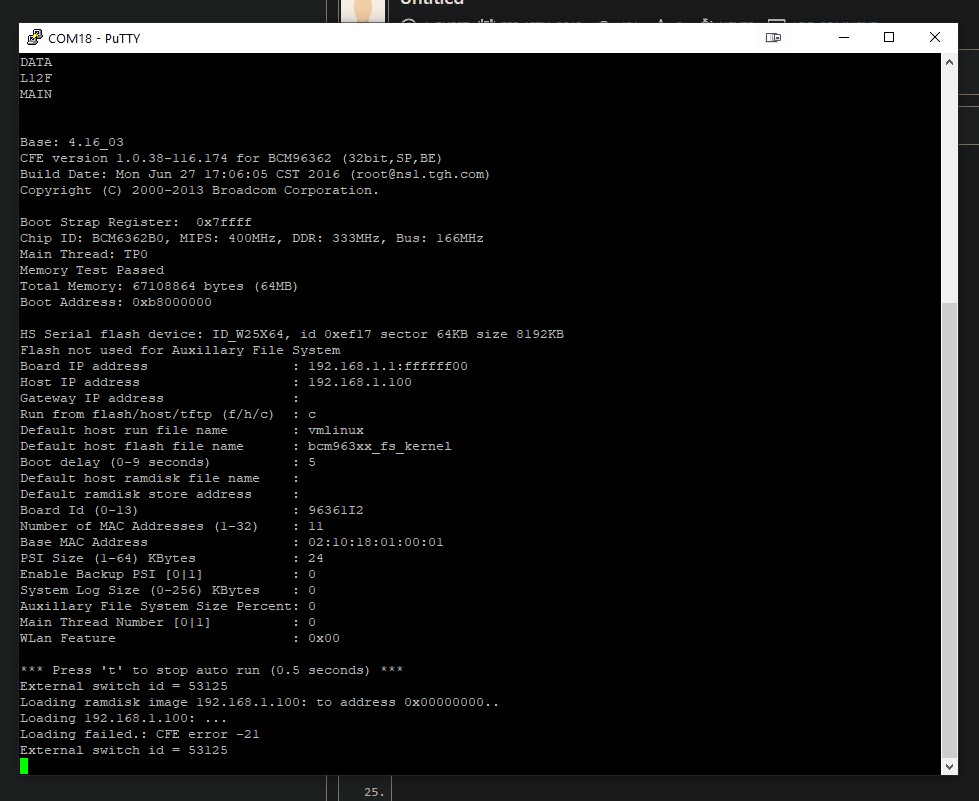
The router is without firmware, only accessible through Serial connection UART and some cp2102 usb.

Unfortunately the v3 version uses brcm63xx and Broadcom, and the Uboot is CFE bootloader, this updated version is very poor and not user friendly.
I tried to push the firmware, using TFTP server from Windows but I always end up with error CFE -21.

I looked a lot unfortunatly could dont find the correct process to restore this router through serial.
here are some stuffs I used :
https://openwrt.org/toh/tp-link/td-w8970_v1       just for reference

https://openwrt.org/toh/tp-link/td-w8970_v3.0

https://community.tp-link.com/en/home/forum/topic/581606


Can please someone recommand a way to restore this TD-W8970 v3.0.

Thx
 

  0      
  0      
#1
Options
1 Accepted Solution
Re:TD-W8970 v3.0 Serial Firmware Restoration-Solution
2025-06-13 02:37:13 - last edited 2025-07-08 11:19:09

Hi@DrZipZwan,

Thank you for your reply.


You can refer to page 3 of TD-W8970(EU)_V3_UG to learn about the LED Explanation.

If you cannot see the SSID of the modem, please hard reset the modem for a try:

With the modem router powered on, use a pin to press and hold the Reset button/hole for at least 5 seconds. The router will then reboot to its factory default settings.


For further help, it is recommended to contact local support.


Nice to Meet You in Our TP-Link Community. Check Out the Latest Posts: △Pre-release Firmware for Archer AX50 Introduces New Parental Control Features and Enhancements △Introducing AI QoS: Elevate Your Gaming Experience on the Archer GE800 Gaming Router △Connect TP-Link Archer BE550 to Germany's DS-Lite (Dual Stack Lite) Internet via WAN △Tether KidShield Test Recruitment - Safeguarding Children's Online Experience If you found the post or response helpful, please click Helpful. If an answer solves your problem, click "Recommended Solution" so that others can benefit from it.
Recommended Solution
  0  
  0  
#4
Options
3 Reply
Re:TD-W8970 v3.0 Serial Firmware Restoration
2025-06-12 09:40:03

Hi @DrZipZwan,

Welcome to our community.


We understand that you may choose to install third-party firmware to improve the performance or function of your device. However, installing third-party firmware may introduce instability or even damage your device. These firmwares have not been officially tested and certified by us and may not meet the safety and performance standards of our products. We do not recommend the use of third-party firmware. According to your description, the product may malfunction due to upgrading to third-party firmware. You need to try to restore to the official firmware yourself before we can continue to provide corresponding technical guidance. If you cannot restore, according to our product warranty policy, we cannot provide you with warranty services.


Thanks.


Nice to Meet You in Our TP-Link Community. Check Out the Latest Posts: △Pre-release Firmware for Archer AX50 Introduces New Parental Control Features and Enhancements △Introducing AI QoS: Elevate Your Gaming Experience on the Archer GE800 Gaming Router △Connect TP-Link Archer BE550 to Germany's DS-Lite (Dual Stack Lite) Internet via WAN △Tether KidShield Test Recruitment - Safeguarding Children's Online Experience If you found the post or response helpful, please click Helpful. If an answer solves your problem, click "Recommended Solution" so that others can benefit from it.
  0  
  0  
#2
Options
Re:TD-W8970 v3.0 Serial Firmware Restoration
2025-06-12 16:19:56 - last edited 2025-06-12 16:22:35

  @Joseph-TP Thank very much.

I did not try to install any custom firmware, and I would not come to the official site to look for help, I know that once you install any thing custom on a product, it is not on the official site to go.
An accident happened during update of official TP firmware from PC to Router, the power went down in my house! Such a luck right ?
So now the router is turning on, with only 1 led ON, and only through serial it is accessible. Router not usable.
As explained I looked around how to restore it, but this model is a little different , so maybe some users, came around Broadcom and CFE bootloader .

Thx

  0  
  0  
#3
Options
Re:TD-W8970 v3.0 Serial Firmware Restoration-Solution
2025-06-13 02:37:13 - last edited 2025-07-08 11:19:09

Hi@DrZipZwan,

Thank you for your reply.


You can refer to page 3 of TD-W8970(EU)_V3_UG to learn about the LED Explanation.

If you cannot see the SSID of the modem, please hard reset the modem for a try:

With the modem router powered on, use a pin to press and hold the Reset button/hole for at least 5 seconds. The router will then reboot to its factory default settings.


For further help, it is recommended to contact local support.


Nice to Meet You in Our TP-Link Community. Check Out the Latest Posts: △Pre-release Firmware for Archer AX50 Introduces New Parental Control Features and Enhancements △Introducing AI QoS: Elevate Your Gaming Experience on the Archer GE800 Gaming Router △Connect TP-Link Archer BE550 to Germany's DS-Lite (Dual Stack Lite) Internet via WAN △Tether KidShield Test Recruitment - Safeguarding Children's Online Experience If you found the post or response helpful, please click Helpful. If an answer solves your problem, click "Recommended Solution" so that others can benefit from it.
Recommended Solution
  0  
  0  
#4
Options
