easy Mesh displayed wrong after Upgrade

This thread has been locked for further replies. You can start a new thread to share your ideas or ask questions.

easy Mesh displayed wrong after Upgrade

This thread has been locked for further replies. You can start a new thread to share your ideas or ask questions.

easy Mesh displayed wrong after Upgrade
2025-08-11 10:48:44
Model: Archer AX55  
Hardware Version: V1
Firmware Version: v1.0 1.3.5 Build 20241211 rel.34816

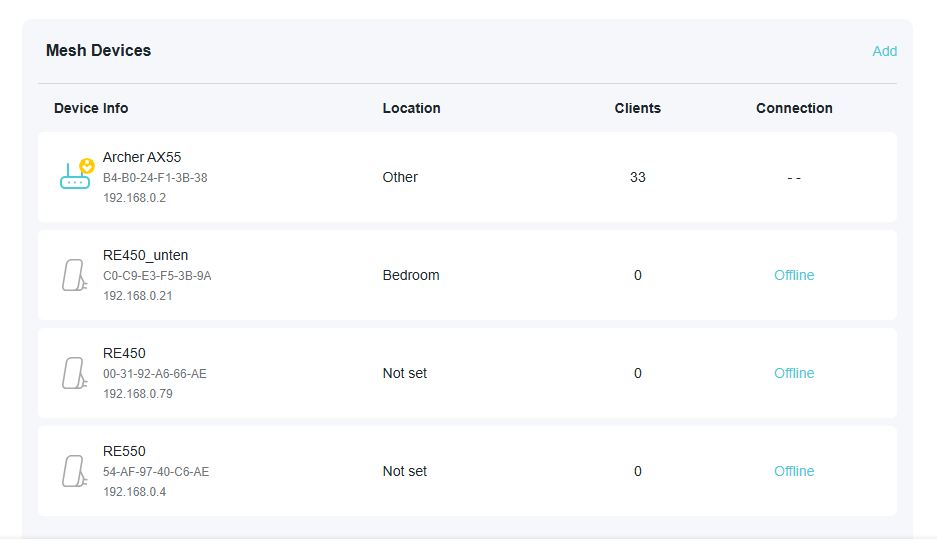
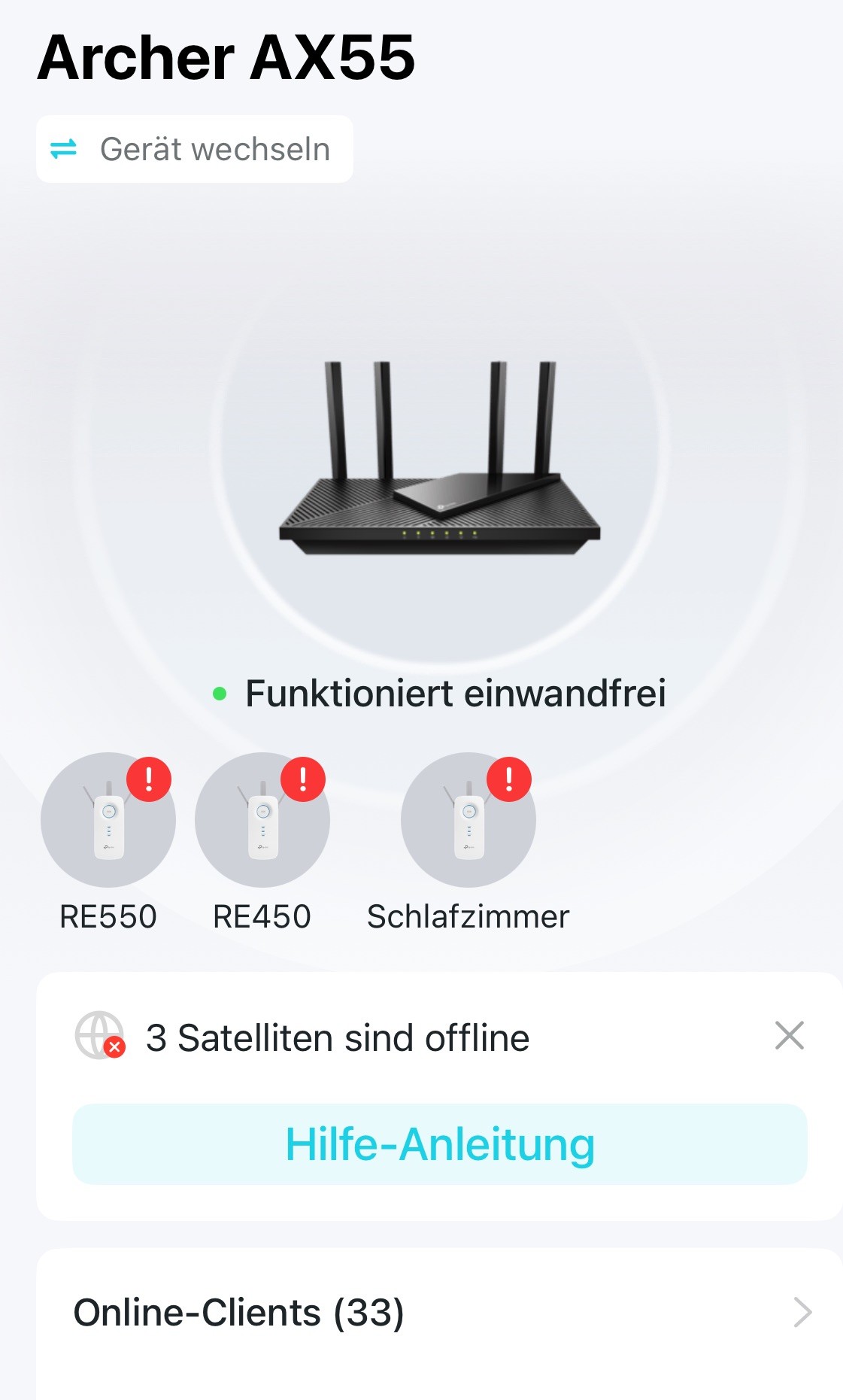
Nach dem Upgrade auf die Firmware v1.0 1.3.5 Build 20241211 rel.34816  weren mir die 3 genutzten Satelliten (RE450 und RE550) leider immer wieder als offline (im Browser oder Tether) im Mesh angezeigt obwohl Sie Verbindungen von Clients halten. Gibt es hier Abhilfe?



  0      
  0      
#1
Options
4 Reply
Re:easy Mesh displayed wrong after Upgrade
2025-08-12 10:42:06

Hello@K_G ,

Welcome to our community!


According to Google Translate, your problem is that satellite units often show offline. If there is any discrepancy, please describe it in English.

Please let me know if your network topology diagram is as follows:

ISP modem — router  )))(((  RE450/RE550

(Note: — stands for wired connection,)))((( stands for wireless connection )


Please confirm that you have updated all clients to the latest version.

Rebooting all network clients may be helpful.


Welcome to Community! Get the latest posts: △New Firmware for Archer GE550/GE650 V1 Introduces AI-QoS, EasyMesh IoT Expansion, and More! △New Firmware Releases for Archer BE805 V1/BE450 V1 to Support VPN Merge, New ECO Mode, and More! More posts, please see: △ Get the Ongoing Pre-release Firmware for Wi-Fi Routers Here— Subscribe for Updates! Urgent problems with your Wi-Fi Router, Range Extender, or DSL Modem? Please reach out via private Messages or @Joesph-TP in your new thread directly. Click Or ☆Recommended Solution if the post/answer helps.
  0  
  0  
#2
Options
Re:easy Mesh displayed wrong after Upgrade
2025-08-12 13:04:23

  @Joseph-TP topology view is correct. Archer AX is used in AP mode. it`s Hardware v1. Firmware 1.3.5 Build 20241211 rel 34816, RE 450 4.0 is firmware 1.0.20 Build 230213 Rel.55420n (6985), second RE450 4.0 is firmware 1.0.20 Build 230213 Rel.55420n (6985) and RE550 1.0 is 1.0.20 Build 230213 Rel.55420n (6985). All RE`s have connected clients, also the AX55 .

Screenshot from Web-Management Router 

Screenshot

Tether:

  0  
  0  
#3
Options
Re:easy Mesh displayed wrong after Upgrade
2025-08-14 03:27:14

Hi@K_G ,

Thanks for getting back to me.

We have reported the issue to our support engineers, and they will likely contact you via email to continue troubleshooting your issue. Please check your email inbox and confirm.


Welcome to Community! Get the latest posts: △New Firmware for Archer GE550/GE650 V1 Introduces AI-QoS, EasyMesh IoT Expansion, and More! △New Firmware Releases for Archer BE805 V1/BE450 V1 to Support VPN Merge, New ECO Mode, and More! More posts, please see: △ Get the Ongoing Pre-release Firmware for Wi-Fi Routers Here— Subscribe for Updates! Urgent problems with your Wi-Fi Router, Range Extender, or DSL Modem? Please reach out via private Messages or @Joesph-TP in your new thread directly. Click Or ☆Recommended Solution if the post/answer helps.
  0  
  0  
#4
Options
Re:easy Mesh displayed wrong after Upgrade
2025-08-25 13:53:07
Still waiting for a debug Firmware Regards
  0  
  0  
#5
Options