
Losing connection on AX12, possibly from lastest firmware

Archer AX12 purchased maybe a year ago, never any issues until this week were my WAN connection drops every 10 minute or so, only to come back a few minute later. Router is connected to some kind of hub in the house, and only the devices connected to the router are affected. WAN light turns orange when disconnected.
I've tried to things in the troubleshooting section with no luck, and now I'm trying to revert the firmwave version to the previous one (because it worked) but when i try to do it manually i just get an update error. I've reset the router to factory settings but that didn't seem to change the firmware.
I've used my regions website to get the offical previous firmwave here https://www.tp-link.com/nordic/support/download/archer-ax12/#Firmware
Location: Sweden
ISP: Bahnhof Fiber connection
How do i flash or overwrite the lastest firmware?
Forum won't let me upload my log so I'll post it below.
####################################################################
# Archer AX12 System Log
# Time = 2025-08-16 20:56:29
# H-Ver = 1.0.0 ; S-Ver = 1.2.1 Build 20250729 Rel. 73566
# LAN: I = 192.168.0.1 ; M = 255.255.255.0 ; MAC = 40:AE:30:39:5C:EC
# WAN: W = dhcp ; I = 178.174.129.164 ; M = 255.255.255.0 ; MAC = 40:AE:30:39:5C:ED
# G = 178.174.129.1 ; D1 = 213.80.98.2 ; D2 = 213.80.101.3
# Clients connected: 6 ; WI-FI : 5
####################################################################
2025-08-16 20:53:59 led-controller[1805]: <6> 288051 Start to run WAN1_OFF
2025-08-16 20:53:59 led-controller[1805]: <6> 288051 Start to run WAN0_ON
2025-08-16 20:53:59 led-controller[1805]: <3> 288753 Config importing failed
2025-08-16 20:53:59 led-controller[1805]: <7> 288009 Failed to read LAN_ON
2025-08-16 20:50:53 dhcpc[21768]: <6> 210054 receive ack from server with ip 178.174.129.164, options(subnet=255.255.255.0;router=178.174.129.1;serverid=178.174.129.1;dns=213.80.98.2 213.80.101.3;lease=900;)
2025-08-16 20:50:53 dhcpc[21768]: <6> 210053 send select request with options(cliid=01/40:ae:30:39:5c:ed:;)
2025-08-16 20:50:53 dhcpc[21768]: <6> 210058 1/2 lease passed, enter renewing state
2025-08-16 20:43:19 dhcpc[21768]: <6> 210054 receive ack from server with ip 178.174.129.164, options(subnet=255.255.255.0;router=178.174.129.1;serverid=178.174.129.1;dns=213.80.98.2 213.80.101.3;lease=900;)
2025-08-16 20:43:19 dhcpc[21768]: <6> 210053 send select request with options(cliid=01/40:ae:30:39:5c:ed:;)
2025-08-16 20:43:19 dhcpc[21768]: <6> 210058 1/2 lease passed, enter renewing state
2025-08-16 20:36:44 led-controller[1805]: <6> 288051 Start to run WIFI2G_ON
2025-08-16 20:36:44 led-controller[1805]: <6> 288051 Start to run WIFI5G_ON
2025-08-16 20:36:43 led-controller[1805]: <6> 288051 Start to run WIFI2G_ON
2025-08-16 20:36:43 led-controller[1805]: <6> 288051 Start to run WIFI5G_ON
2025-08-16 20:36:40 led-controller[1805]: <6> 288051 Start to run WIFI2G_ON
2025-08-16 20:36:40 led-controller[1805]: <6> 288051 Start to run WIFI5G_ON
2025-08-16 20:36:10 upnp[24465]: <6> 217505 Service stop
2025-08-16 20:36:07 remote-management[24014]: <6> 282505 Service stop
2025-08-16 20:35:56 qos[23082]: <6> 259504 Service start
2025-08-16 20:35:56 qos[23082]: <6> 259503 Function disabled
2025-08-16 20:35:56 qos[23082]: <6> 259505 Service stop
2025-08-16 20:35:55 nat[22712]: <6> 211501 Initialization succeeded
2025-08-16 20:35:53 nat[22712]: <6> 211501 Initialization succeeded
2025-08-16 20:35:44 nat[21552]: <6> 211501 Initialization succeeded
2025-08-16 20:35:43 dhcpc[21768]: <6> 210054 receive ack from server with ip 178.174.129.164, options(subnet=255.255.255.0;router=178.174.129.1;serverid=178.174.129.1;dns=213.80.98.2 213.80.101.3;lease=900;)
2025-08-16 20:35:43 dhcpc[21768]: <6> 210053 send select request with options(cliid=01/40:ae:30:39:5c:ed:;reqip=178.174.129.164;serverid=178.174.129.1;)
2025-08-16 20:35:43 dhcpc[21768]: <6> 210052 receive offer from server with ip 178.174.129.164, options(subnet=255.255.255.0;router=178.174.129.1;serverid=178.174.129.1;dns=213.80.98.2 213.80.101.3;lease=900;)
2025-08-16 20:35:43 nat[21552]: <6> 211501 Initialization succeeded
2025-08-16 20:35:41 dhcpc[21768]: <6> 210051 send discover with ip 0.0.0.0 and flags 80
2025-08-16 20:35:40 traffic-stats[10123]: <6> 269004 stats reset
2025-08-16 20:35:40 network[21325]: <6> 290005 Reload config
2025-08-16 20:35:39 dhcpc[10557]: <4> 210153 send dhcp release ip 178.174.129.164
2025-08-16 20:35:39 dhcpc[10557]: <6> 210056 teardown and release
2025-08-16 20:35:39 dhcpc[10557]: <6> 210053 send select request with options(cliid=01/40:ae:30:39:5c:ed:;)
2025-08-16 20:35:39 dhcpc[10557]: <6> 210058 1/2 lease passed, enter renewing state
2025-08-16 20:35:39 network[21325]: <6> 290004 Disconnect interface wan
2025-08-16 20:35:37 network[21325]: <6> 290004 Disconnect interface internet
2025-08-16 20:35:36 network[21325]: <6> 290100 Set WAN protocol to dhcp, operation is write
2025-08-16 20:35:35 time-settings[21395]: <6> 279508 Service restart
2025-08-16 20:35:02 time-settings[20406]: <6> 279508 Service restart
2025-08-16 19:35:00 led-controller[1805]: <6> 288051 Start to run WAN1_ON
2025-08-16 19:35:00 led-controller[1805]: <6> 288051 Start to run WAN0_OFF
2025-08-16 19:35:00 led-controller[1805]: <3> 288753 Config importing failed
2025-08-16 19:35:00 led-controller[1805]: <7> 288009 Failed to read LAN_ON
2025-07-29 00:05:29 upnp[18927]: <6> 217505 Service stop
2025-07-29 00:05:26 remote-management[18566]: <6> 282505 Service stop
2025-07-29 00:05:23 nat[17135]: <6> 211021 IPSEC ALG enabled
2025-07-29 00:05:23 nat[17135]: <6> 211021 L2TP ALG enabled
2025-07-29 00:05:23 nat[17135]: <6> 211021 PPTP ALG enabled
2025-07-29 00:05:23 nat[17135]: <6> 211021 SIP ALG enabled
2025-07-29 00:05:23 nat[17135]: <6> 211021 RTSP ALG enabled
2025-07-29 00:05:23 nat[17135]: <6> 211021 H323 ALG enabled
2025-07-29 00:05:23 nat[17135]: <6> 211021 TFTP ALG enabled
2025-07-29 00:05:23 nat[17135]: <6> 211021 FTP ALG enabled
2025-07-29 00:05:17 qos[17840]: <6> 259504 Service start
2025-07-29 00:05:17 qos[17840]: <6> 259503 Function disabled
2025-07-29 00:05:16 qos[17840]: <6> 259505 Service stop
2025-07-29 00:05:15 nat[17135]: <6> 211501 Initialization succeeded
2025-07-29 00:05:13 nat[17135]: <6> 211501 Initialization succeeded
2025-07-29 00:05:05 dhcpc[10557]: <6> 210054 receive ack from server with ip 178.174.129.164, options(subnet=255.255.255.0;router=178.174.129.1;serverid=178.174.129.1;dns=213.80.98.2 213.80.101.3;lease=900;)
2025-07-29 00:05:05 dhcpc[10557]: <6> 210053 send select request with options(cliid=01/40:ae:30:39:5c:ed:;reqip=178.174.129.164;serverid=178.174.129.1;)
2025-07-29 00:05:05 dhcpc[10557]: <6> 210052 receive offer from server with ip 178.174.129.164, options(subnet=255.255.255.0;router=178.174.129.1;serverid=178.174.129.1;dns=213.80.98.2 213.80.101.3;lease=900;)
2025-07-29 00:04:56 dhcpc[10557]: <6> 210051 send discover with ip 0.0.0.0 and flags 80
2025-07-29 00:04:25 dhcpc[10557]: <6> 210051 send discover with ip 0.0.0.0 and flags 80
2025-07-29 00:03:55 dhcpc[10557]: <6> 210051 send discover with ip 0.0.0.0 and flags 0
2025-07-29 00:03:25 dhcpc[10557]: <6> 210051 send discover with ip 0.0.0.0 and flags 80
2025-07-29 00:02:55 led-controller[1805]: <6> 288051 Start to run WAN1_OFF
2025-07-29 00:02:55 led-controller[1805]: <6> 288051 Start to run WAN0_ON
2025-07-29 00:02:55 led-controller[1805]: <3> 288753 Config importing failed
2025-07-29 00:02:55 led-controller[1805]: <7> 288009 Failed to read LAN_ON
2025-07-29 00:02:53 dhcpc[10557]: <6> 210051 send discover with ip 0.0.0.0 and flags 80
2025-07-29 00:02:23 dhcpc[10557]: <6> 210051 send discover with ip 0.0.0.0 and flags 0
2025-07-29 00:01:59 dhcpc[10557]: <6> 210051 send discover with ip 0.0.0.0 and flags 80
2025-07-29 00:01:58 led-controller[1805]: <6> 288051 Start to run WAN1_OFF
2025-07-29 00:01:58 led-controller[1805]: <6> 288051 Start to run WAN0_ON
2025-07-29 00:01:58 led-controller[1805]: <3> 288753 Config importing failed
2025-07-29 00:01:58 led-controller[1805]: <7> 288009 Failed to read LAN_ON
2025-07-29 00:01:56 dhcpc[10557]: <6> 210051 send discover with ip 0.0.0.0 and flags 80
2025-07-29 00:01:55 led-controller[1805]: <6> 288051 Start to run STATUS_ON
2025-07-29 00:01:53 led-controller[1805]: <6> 288051 Start to run GENERAL
2025-07-29 00:01:52 dhcpc[10557]: <6> 210051 send discover with ip 0.0.0.0 and flags 80
2025-07-29 00:01:47 traffic-stats[10119]: <6> 269504 Service start
2025-07-29 00:01:08 factory-reset[8686]: <6> 284504 Service start
2025-07-29 00:00:54 access-control[7726]: <6> 239504 Service start
2025-07-29 00:00:54 access-control[7726]: <6> 239503 Function disabled
2025-07-29 00:00:51 nat[7215]: <7> 211001 Flush conntrack
2025-07-29 00:00:51 nat[7215]: <6> 211502 Function enabled
2025-07-29 00:00:51 nat[7215]: <5> 211051 Create NAT chain succeeded
2025-07-29 00:00:50 nat[7215]: <6> 211501 Initialization succeeded
2025-07-29 00:00:49 nat[7215]: <6> 211501 Initialization succeeded
2025-07-29 00:00:45 basic-security[5954]: <6> 219504 Service start
2025-07-29 00:00:45 basic-security[5954]: <5> 219606 Flush conntrack table succeeded
2025-07-29 00:00:38 firewall[5306]: <6> 209504 Service start
2025-07-29 00:00:31 led-controller[1805]: <6> 288051 Start to run WIFI2G_ON
2025-07-29 00:00:31 led-controller[1805]: <6> 288051 Start to run WIFI5G_ON
2025-07-29 00:00:22 imb[4062]: <6> 218507 Daemon connection succeeded
2025-07-29 00:00:22 imb[4062]: <6> 218012 ARP Binding disabled
2025-07-29 00:00:22 imb[4062]: <6> 218506 Config interface initialization succeeded
2025-07-29 00:00:22 imb[4062]: <6> 218501 Initialization succeeded
2025-07-29 00:00:20 upnp[3941]: <6> 217505 Service stop
2025-07-29 00:00:16 remote-management[3274]: <6> 282505 Service stop
2025-07-29 00:00:10 dhcpc[2672]: <6> 210056 teardown and release
2025-07-29 00:00:10 dhcpc[2672]: <6> 210051 send discover with ip 0.0.0.0 and flags 80
2025-07-29 00:00:00 led-controller[1805]: <6> 288051 Start to run STATUS_SAN
2025-07-29 00:00:00 time-settings[1856]: <6> 279504 Service start
1969-12-31 23:00:18 led-controller[1805]: <6> 288504 Service start
- Copy Link
- Subscribe
- Bookmark
- Report Inappropriate Content


Hi All,
For the Unstable connectivity on Archer AX12(EU)_V1_1.2.1, we have released a beta firmware. Please install it and manually update the firmware if you experience any of the unexpected behaviors.
Network Becomes Unstable on Archer AX12 After Updating Firmware to 1.2.1
Please try the beta firmware and let us know if it can help.
Best Regards.
- Copy Link
- Report Inappropriate Content

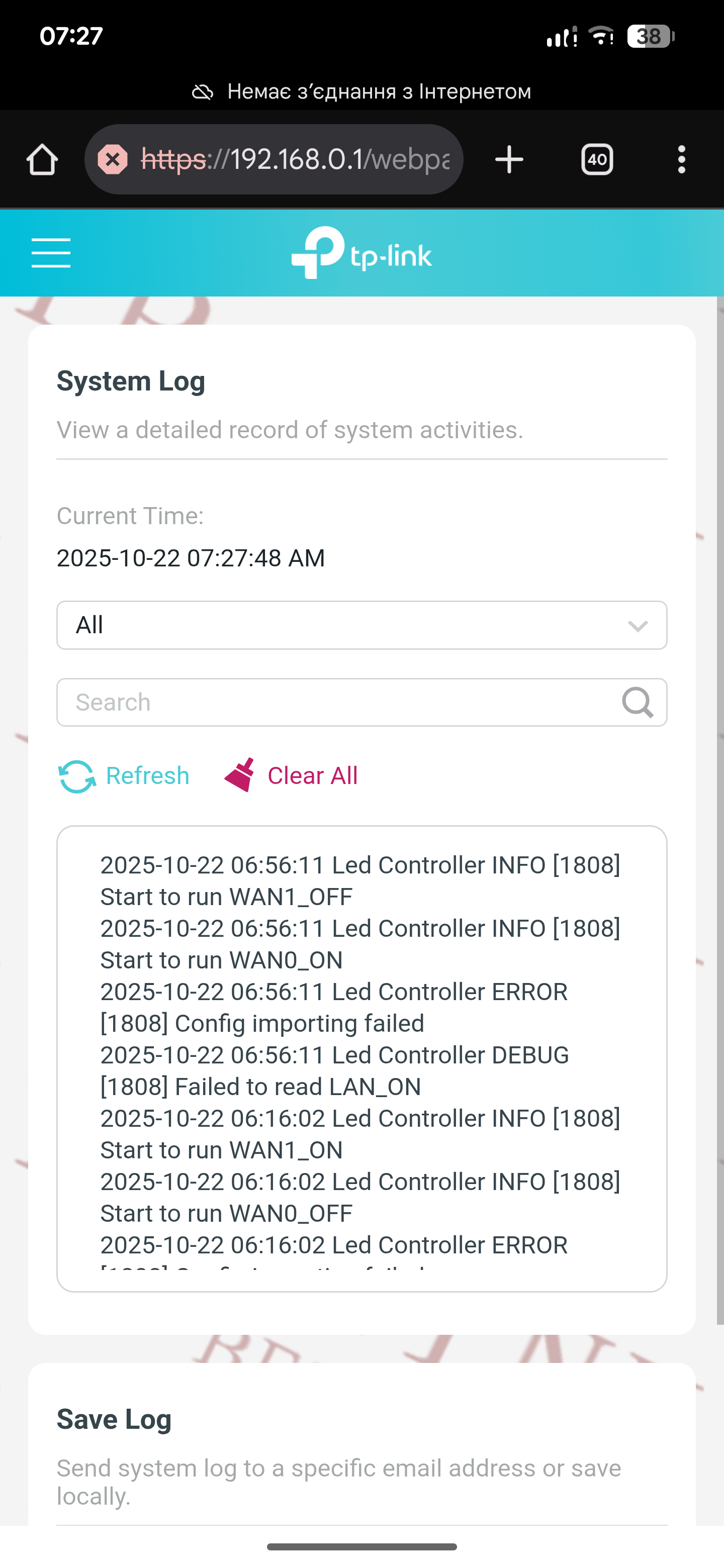
In my case, the problem remained, only now the internet disappears for 30 minutes.
Please return the ability to flash the previous firmware
AX12(EU)_V1_1.1.24 Build 20240823
Because the Internet never disappeared there.
Ps. Your actions with degraded to the previous version, and their consequences encourage people to switch to Internet equipment from another manufacturer, which is a real shame.
- Copy Link
- Report Inappropriate Content
Hello @Andrew_ua ,
Have you tried the beta firmware? Some users have tested this beta firmware, and feedback has been provided to fix unstable and unexpected behaviors.
I understand that the new firmware changes may cause some inconvenience. Generally speaking, if the latest firmware has a large gap, downgrading is not recommended to prevent errors during the downgrade process that may affect device performance.
Please believe that we are always committed to providing high-quality products and services. If you have any questions, please do not hesitate to contact us.
- Copy Link
- Report Inappropriate Content

@Joseph-TP why version 1.2.1 is not available in US version? Us version doesn't get any updates after 1.1.22 version.
- Copy Link
- Report Inappropriate Content

@Zeragon I just updated the beta fw: AX12V1-up-ver1-2-2-P1[20250904-rel63560]. Hopefully the problem is resolved. which previous firmware Ver = 1.2.1 Build 20250729 Rel. 73566, is very unstable in terms of download and upload connections.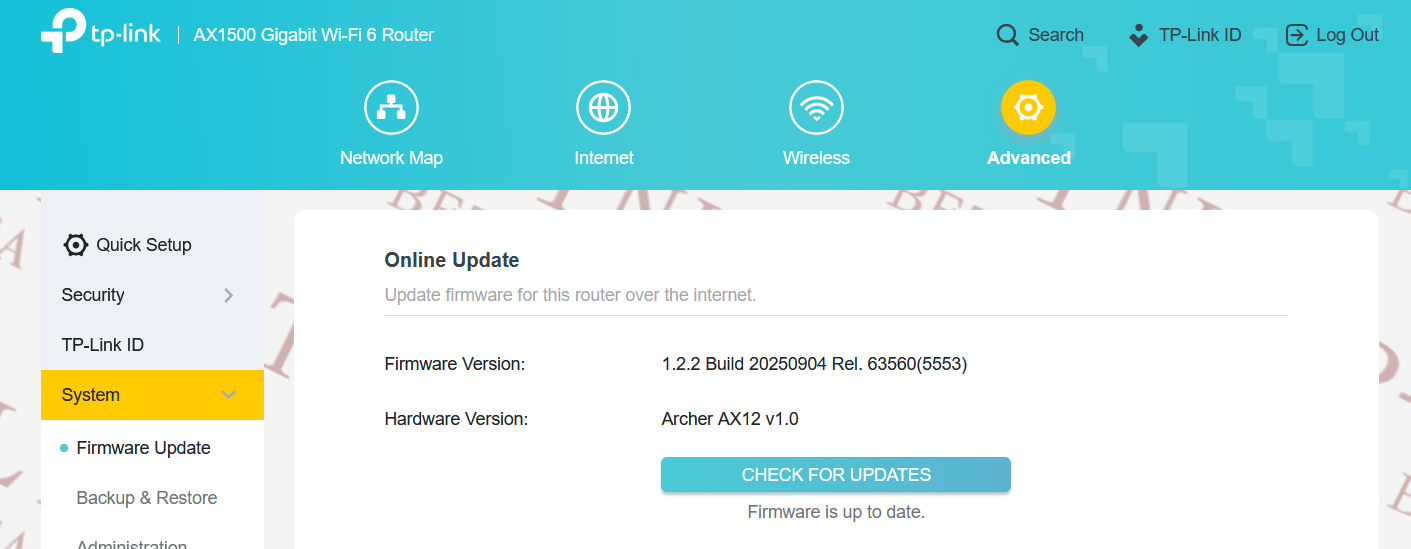
- Copy Link
- Report Inappropriate Content
@Joseph-TP Your brand's quality is getting worse and worse, please immediately release the latest firmware that can downgrade to previous versions. your beta firmware feels very heavy when changing in the admin menu.
- Copy Link
- Report Inappropriate Content
@Poly_andro01 AX12 is generally more laggy than AX10, because previous one has single core while the later has triple core processor! I regret buying AX12, but was forced to choose it because AX10 is online product and I bought my router offline due to urgent need (as my previous TpLink Archer C6 also had frequent disconnect issue and it was confirmed by many other users in our group)
- Copy Link
- Report Inappropriate Content

@ჯოზეფ-TP I tried the beta version but it's still the same. When I run a speed test, the internet goes down for 10 minutes. The technician checked everything and said it's the router's fault. I bought a brand new router a week ago and I'm very disappointed.
- Copy Link
- Report Inappropriate Content
Hello @georgex ,
Thanks for contacting our community.
Could you check if you have updated the firmware successfully? We received feedback from other users that this beta firmware can effectively fix network instability.
If the router Internet LED turns red/orange occasionally, please try the following troubleshooting steps:
1) Connect a PC directly to your modem to verify if your ISP's Internet is stable.
2) Ensure the Ethernet cable connecting your modem to the Router is properly connected, and replace old wires with new ones.
3) Please change the DNS Server of the Router, log in to the web management interface of the Router, go to Advanced > Network > Internet > Advanced Settings, and change the two DNS Servers to 8.8.8.8 and 8.8.4.4, How to Change the DNS servers on the wireless router and DSL modem router (New UI)?
- Copy Link
- Report Inappropriate Content
- Copy Link
- Report Inappropriate Content
Information
Helpful: 1
Views: 7378
Replies: 42
Voters 1
