Home Webserver (Port Forwarding)

Home Webserver (Port Forwarding)

Home Webserver (Port Forwarding)
2025-08-31 14:30:10
Model: Archer BE900  
Hardware Version: V2
Firmware Version: 1.1.7 Build 20250529 rel.12784(4155)

I recently upgraded my router from a TP-Link VX220 to a TP-Link BE900. I run a home webserver that was working fine with the VX220, but since switching to the BE900, port forwarding for port 80 no longer functions.


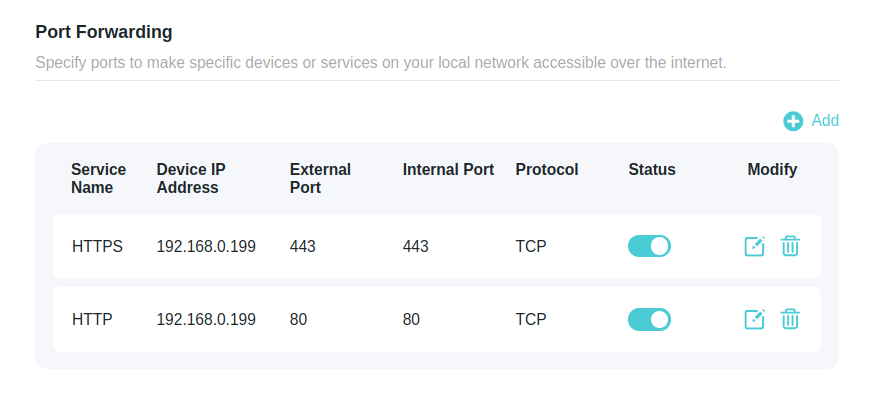
The configuration is correctly set in the router settings, and the server remains accessible within the local LAN. However, external access via port 80 is not working.


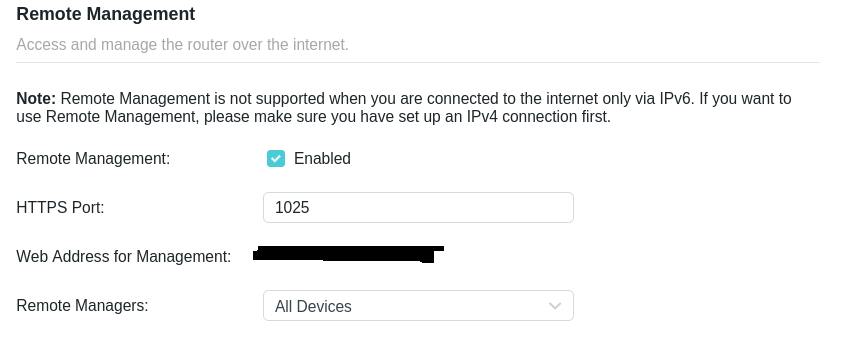
I tried diasbaling and changing the remote management port to something other than the default, but that only affects HTTPS and does not resolve the issue. From what I can tell, the BE900 seems to keep port 80 bound for its own internal management, which prevents it from being forwarded.


0
0
#1
4 Reply
Re:Home Webserver (Port Forwarding)
2025-08-31 18:05:09 - last edited 2025-09-01 14:45:47

  @Rubbah 


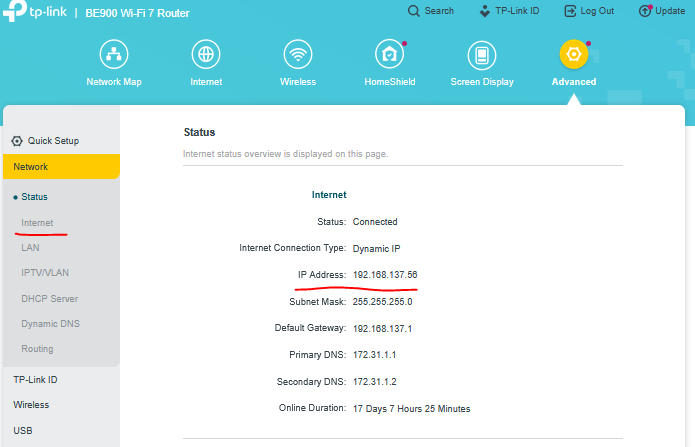
First make sure that you get your public IP address on the  BE900 Internet port (for example):


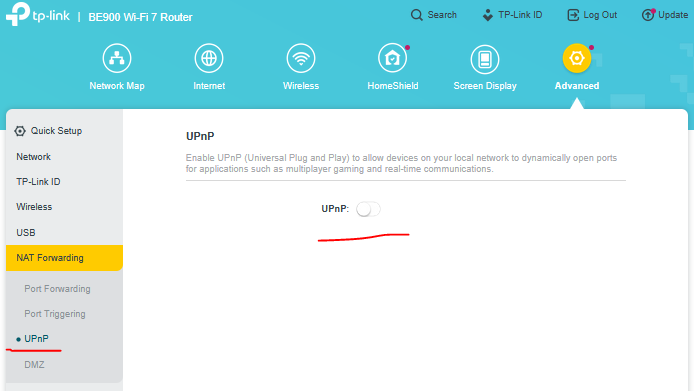
If you have UPnP feature enabled in BE900, disable it, reboot the router and test again:


If this was helpful click on the arrow pointing upward to make it blue. If this solves your issue, click the star to make it blue as a "Recommended Solution". BTC:149wubkkfoLmNDjDbiTxx4ZU8mpcMA5CJt
0
0
#2
Re:Home Webserver (Port Forwarding)
2025-08-31 19:29:23


Hi,


Just a bit of additional information.


In general, the logic on current models of TP-Link's Archer routers with up-to-date firmware is that when Remote Management is enabled, then port 80 is used by Remote Management and when Remote Management is disabled, then port 80 is available to be forwarded to a local IP address.

It works like this on my Archer BE550.


Previously TP-Link's routers allowed the user to modify the HTTP port for the Remote Management, but this option has been removed by TP-Link. 
 

0
0
#3
Re:Home Webserver (Port Forwarding)
2025-09-01 11:03:23

@woozle   @terziyski 


Thanks for the suggestions guys, though still not routing through. 


0
0
#4
Re:Home Webserver (Port Forwarding)
2026-01-21 01:37:38

Hello @Rubbah ,

We are delighted to announce the pre-release firmware for the Archer BE900 V2! This update has new advanced features. It is recommended that you try this firmware and take advantage of the new features.

New Firmware for Archer BE900 V2 to Support Multi-WAN, DoH/DoT, EasyMesh in AP Mode and More

Any feedback and suggestions are welcome~

Welcome to Our Community! Get the latest posts: △New Firmware for Archer GE550/GE650 V1 Introduces AI-QoS, EasyMesh IoT Expansion, and More! △New Firmware Releases for Archer BE805 V1/BE450 V1 to Support VPN Merge, New ECO Mode, and More! More posts, please see: △ Get the Ongoing Pre-release Firmware for Wi-Fi Routers Here— Subscribe for Updates! Urgent problems with your Wi-Fi Router, Range Extender, or DSL Modem? Please reach out via private Messages or @Joesph-TP in your new thread directly. Click Or ☆Recommended Solution if the post/answer helps.
0
0
#5