
Solution XX530v is capped at 50Mb download in a 500Mb plan

I installed this device in my house, put fiber directly on it, it registered without issues.
But I noticed a odd issue:
Any download is always capped at 50Mb/s (my plan is 500Mb/s for both downloads and uploads), but UPLOADS happen at full speed (500Mb/s).
I tried some troubleshooting but nothing seems to work!
If I return to the old ONU I was using, it downloads at full 500Mb/s (ONU in bridge mode and XX530v connecting via PPPoE).
As soon as I return the fiber cable to XX530v, the problem happens again.
I suspect it might have to do with firmware (I've updated it to latest firmware), but the problem is I can't find the original firmware that came with it (Firmware Version:0.4.0 3.0.0 v6096.0 Build 240426 Rel.38762n).
ISP told me this router is compatilble, and they advised me to contact TP LINK, which I'm doing, because it might be a software fault on device's side.
Local TP Link support couldn't help me. They just say the same old stuff like "this router is targeted to ISP, so ISP has to help you... etc etc etc".
It seems this is a secret device only ISPs have access.
I mean, come ou guys! This router is sold in many places, and we currently can buy it from stores and install it ourselves.
TP LINK has to support this device because it's sold to end users!
My network already directed me to contact Tp Link, so I demand a solution!
And my ISP is very open, you only need the right GPON SERIAL to connect. Pratically any device can be used in their network as long as the GPON SN is right.
I even tried another ONU (different from the original) and no problem with it as well.
There was even a similar topic in this forums with the EXACT SAME PROBLEM.
GPON XX530v V1 - Download speed limited to less than 50MB
Can anyone escalate it to engineers?
- Copy Link
- Subscribe
- Bookmark
- Report Inappropriate Content


Lekao wrote
O meu é a versao V2, serve para ele?
The provided pre-release firmware is only available for XX530v V1.0. It's not compatible with the hardware V2.
There will be new official firmware for other models and hardware. Please keep an eye on the regional official website for future updates.
- Copy Link
- Report Inappropriate Content
xMarcosx wrote
Kevin_Z wrote
Hello everyone,
@Rabatonfr @MaracaKan @Litiano @alb3530 @DennisTT @HoiWong @grad1e @shu006 @Yash_Kanawjia @Romain_L @LeticileTebogo @AnantJo @Uttaran @GabrielNunez @PatrickPPP @Miroslav01 @jrandis @Lekao @KURUMIN
We know some of you have been experiencing an unexpected behavior on the XX530v V1, where download speeds are capped at around 50 Mbps when using PPPoE with MAC Clone. We want to provide a pre-release firmware to address it.
Model & Hardware Download Link XX530v_V1 XX530v_V1_0.9.0_3.0.0_Build 251126 (Pre-release version)
Please download and install the beta firmware, then reply to this thread (or contact us) to let us know:
- Did your download speed improve to expected levels?
- Did you encounter any other issues?
@xigga The reported IPv6 RA Lifetime optimization has been implemented on this version. Please update to confirm.
Your feedback is essential to validate this fix and move towards a stable release.
Thank you all for your continued support and feedback.
Olá amigo, tudo bem?
Estou com dois equipamentos que precisam de atualização: XX530v V2 e XX230v. Gostaria de saber se já existe alguma previsão de nova atualização de firmware para correção do bug que esses aparelhos estão apresentando.
Poderia me informar se há alguma versão em desenvolvimento ou previsão de liberação?
Desde já, agradeço pelo suporte.
Thank you both for the comments and updates.
As I responded to Lekao, there will be new official firmware for other models and hardware. Please keep an eye on the regional official website for future updates.
- Copy Link
- Report Inappropriate Content

Will test & report tomorrow.
But as per reports it seems to be working now.
Thanks TP-Link engineers.
Looking forward to stable version at the earliest.
Regards,
- Copy Link
- Report Inappropriate Content

@Kevin_Z My XX530V firmware version 0.7.0 , got bsnl ftth new connection and using it for week, facing EPON Registering issue when modem resumes from powercut after power resume XX530V indefinetly in EPON Registering issue loop, even tp link GUI level reboot also not rectifying EPON Registering issue, only if i perform manual power OFF & ON via modem power button then modem automatically getting EPON Registration success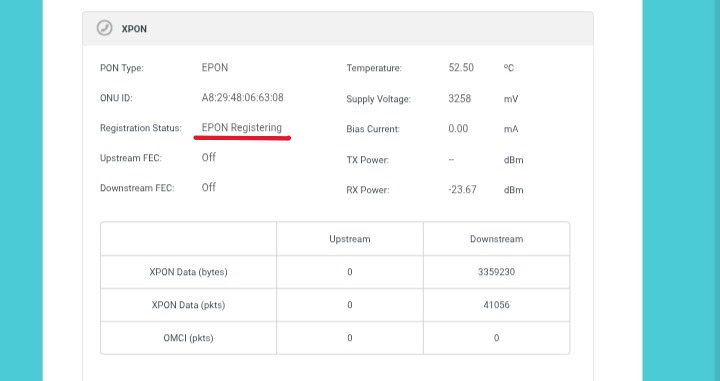
- Copy Link
- Report Inappropriate Content

Hello @Kevin_Z and team,
I have tested the pre-release firmware 0.9.0 3.0.0 Build 251126 on the XX530v V1 and compared it with 0.7.0 3.0.0 Build 250606, focusing on IPv6 Router Advertisement (RA) behavior and Lifetime configuration. Below is a comprehensive report with all observed behaviors, regressions, and critical issues.
Device and Test Environment
-
Hardware: XX530v v1.0
-
Test Client: Raspberry Pi Zero 2 W, DietPi (Debian-based)
-
Interface: wlan0
-
Tool Used:
rdisc6(from ndisc6 package) -
Command:
rdisc6 wlan0 -
IPv6 Configuration: Address Type: RADVD via RA
-
Settings Tested:
- Advanced > LAN Settings > IPv6 (Lifetime Value)
- Advanced > Security > Access Control (ON/OFF / Allowlist / Deny list)
1. Lifetime Handling
| Firmware | Lifetime Configured | Router Lifetime | Prefix Valid / Pref | Route Lifetime | DNS Lifetime | Notes |
| 0.7.0 | 1440 min (86400s) | 1800s | 86400 / 86400s | 30s | 10s | Prefix lifetime correct; router lifetime fixed |
| 0.7.0 | 30 min (1800s) | 1800s | 86400 / 86400s | 30s | 10s | Prefix lifetime remains correct |
| 0.9.0 | 86400s | ~20864s | 300 / 300s | 30s | 900s | Prefix lifetime ignored; high router lifetime misapplied |
| 0.9.0 | 1800s | 1800s | 300 / 300s | 30s | 900s | Low lifetime correct, prefix still fixed |
Key Observations:
-
0.9.0 regresses prefix lifetime handling: Configured prefix valid/preferred lifetimes are ignored (fixed at 300s).
-
Router lifetime miscalculation: Large values are applied incorrectly in 0.9.0 (~20864s vs 86400s).
-
Route lifetime remains statically 30s in all firmware versions.
-
DNS lifetime is unusually low (10s in 0.7.0; 900s in 0.9.0), which may affect Address Type: RADVD reliability.
-
Persistence: Configured lifetime in 0.9.0 does not persist after reboot (resets to 1800s).
2. RA Duplication and ACL Behavior
| Firmware | ACL Setting | RA Behavior | IPv6 Connectivity |
| 0.7.0 | OFF | Duplicate RA entries | Stable |
| 0.7.0 | ON (Allowlist) | Single RA | Client IPv6 fails |
| 0.9.0 | OFF | Duplicate RA entries | Stable |
| 0.9.0 | ON (Allowlist) | Single RA | Client IPv6 fails |
Observation:
-
When ACL Allowlist is ON in 0.9.0, RA messages are suppressed, causing Address Type: RADVD to fail and clients to lose IPv6 connectivity.
-
RA duplication (seen when ACL is OFF) appears to be keeping IPv6 connectivity alive, but this is non-standard and unreliable.
-
ACL OFF or ACL ON with Deny list allows normal IPv6 operation.
3. Comparative Analysis
| Parameter | 0.7.0 | 0.9.0 | Regression / Notes |
| Prefix Lifetime | Config-respected | Fixed 300s | Regression |
| Router Lifetime | Fixed 1800s | Low: OK / High: Fail | High values misapplied in 0.9.0 |
| Route Lifetime | 30s | 30s | Issue persists |
| DNS Lifetime | 10s | 900s | Still unusually low |
| RA Duplication | ACL-dependent | ACL-dependent | Critical: Allowlist suppresses RA |
| Persistence | Persists | Resets to 1800s | Regression in 0.9.0 |
4. Expected Behavior
-
Configured Lifetime Value should persist after a reboot.
-
Router lifetime should scale accurately with the configured value.
-
Prefix valid/preferred lifetimes should match configured values.
-
Route and DNS lifetimes should be reasonable relative to configured values.
-
RA messages should always be advertised to clients, independent of ACL allowlist/deny list settings.
-
RA duplication should be eliminated.
5. Impact & Recommendations
Impact:
-
Instability: Rapid IPv6 address expiration (300s prefix) leads to frequent Address Type: RADVD renewals.
-
Connectivity Failure: ACL allowlist prevents clients from maintaining a public IPv6 address.
-
Manual Overhead: Reconfiguration is required after every reboot due to the lifetime reset.
Recommendations:
-
Fix prefix lifetime regression in 0.9.0.
-
Apply router lifetime correctly for all configured values.
-
Ensure RA messages are advertised even when ACL Allowlist is enabled.
-
Make configured lifetime persistent across reboots.
6. Additional Feedback & Feature Requests
In addition to the bug reports detailed above, I would also like to direct the engineering team's attention to my previous comment, which contains several suggestions for feature additions that would greatly improve this firmware:
https://community.tp-link.com/en/home/forum/topic/839982?replyId=1642906
Conclusion
Firmware 0.7.0 partially corrects prefix lifetime behavior but still has short route/DNS lifetimes. Firmware 0.9.0 introduces significant regressions regarding prefix lifetimes, value persistence, and a critical bug where the ACL Allowlist suppresses RA messages entirely.
- Copy Link
- Report Inappropriate Content

@xigga
I recently bought the tp link xx530v for my jiofiber connection to replace the jio fiber router with it by using it as a Gpon router. I applied all the settings which i could by seeing from youtube and all and my internet is working fine as i did the steps mentioned there of mac cloning.
I am facing an issue and have not been able to solve it even after getting the router replaced by the company.
during the use of wifi on the 5 ghz band (i have separated the bands into 2.4 ghz and 5 ghz), the internet suddenly stops working at random times for about 2 to 5 minutes. this happens to all devices connected to the 5 ghz band only.
this issue does not occur on the 2.4 ghz band or on ethernet-connected devices. It only happens on devices connected to the 5 ghz network. when I run the troubleshooter, it shows “no internet,” and when i check further, it says “no DHCP server found.”
after waiting for about 2 to 5 minutes, it starts working again on its own. during this time, the wifi sometimes disconnects and fails to reconnect, getting stuck on “connecting.”
this issue occurs around 4 to 5 times a day approx.
what could be the reason for this? i have also upgraded the firmware of my tp-link xx530v router, but the issue is still not resolved.
- Copy Link
- Report Inappropriate Content
Hi. I suspect few possible causes.
1. Check your DHCP lease time.
2. Check your DNS settings.
3. Use a stable firmware (0.7.0 Indian Version, which is simply a copy of the Brazilian one, but regardless I find it better than rest).
4. Check if there are any other device in your LAN acting as a DHCP server.
5. If nothing works just take a backup and reset the router to its default settings and see if the issue resolves.
- Copy Link
- Report Inappropriate Content
@xigga @kevin_z
1. DHCP lease time. - its 120
2 Check your DNS settings. - can u share any pic what it should be or any specific settings u r trying to say?
3 Use a stable firmware (0.7.0 Indian Version) - using the same
4 Check if there are any other device in your LAN acting as a DHCP server. - NOPE
5 If nothing works just take a backup and reset the router to its default settings and see if the issue resolves. - I have already replaced new router with brand new router for this issue and still same issue, the 5gh band gets disconeected geenrally at 9 or 9 30 am and some random times in between day and also around 10 to 11 30 pm.
The internet gets disconnected and shows trying to connect but couldnt connect. Even if i try forcefully to connect only sometimes it connect to 5ghz that time by luck and show connected no internet and than i have to switch to 2.5ghz and 2.5ghz works no issue is in 2.5ghz, also no issue in ethernet connection ever.
issue is only in 5ghz, have read in some broadband forum that this happens with other persons also who is using it with jiofiber . u r using with airtel or jiofiber? i am also using with jiofiber.
can u share screenshots of your diff settings like xpon setitings and xpon wan and lan settings so that i can see if any change is required or any settings of wireless settings related to 5 ghz .
really fedup with the issue , any solution or do u know any person here who can help ?
- Copy Link
- Report Inappropriate Content
@Aman_1829
I'd suggest the following-
- Change DHCP lease time to 1440 (1 day) for both V4 and V6 in the LAN settings.
- Enable Reboot Schedule to reboot once everyday after midnight.
- DNS settings can be found at the LAN and WAN (XPON) settings under the Advanced options of the WAN Profile, change the XPON WAN to something reliable like Cloudflare or Google.
- In the Wireless>Advanced Settings try these values for both 2.4GHz and 5GHz- Beacon Interval: 100, RTS Threshold: 2000, DTIM Interval: 1, Group Key Update Period: 3600. And while the toggles below that shouldn't really matter, you can try disabling Short GI & AP Isolation and leave WMM and Airtime Fairness enabled.
- If the issue only pertains to a specific device then try forgetting the WIFI credentials and even that does not work reset the WIFI certificates on the client.
- Copy Link
- Report Inappropriate Content

- Copy Link
- Report Inappropriate Content
Information
Helpful: 0
Views: 15531
Replies: 118
Voters 0
No one has voted for it yet.